当前章节:首页

全程 AI 协作开发并上线一款微信小游戏 · 操作 SOP

我是程序员码歌(全网昵称唯一)。10+ 年大厂经验,在职场玩副业,目标副业年入百万,探索可复利、可复制的一人企业玩法。

这是一份用 AI 开发微信小游戏 的操作 SOP(样例来自「箭头快跑呀」)。按步骤粘贴 Prompt 即可跟做——不用会读代码,验收看画面与文件夹是否存在。

加我微信 · 进陪伴群

免费陪伴群:资料全部分享,一步步陪你用 AI 做出属于自己的游戏,知无不言。第一次做陪伴群,边帮大家边打磨自己。

  • 扫码加好友,备注「小游戏 SOP」
  • 我拉你进群,资料免费分享
  • 卡住随时问,一起把游戏做出来

扫码加程序员码歌微信扫码加微信

先玩一把(样例成品)

微信扫码打开小游戏 「箭头快跑呀」,先感受目标手感,再按下面章节跟做。

也可微信内搜索:箭头快跑呀

微信搜「箭头快跑呀」或扫码进入

作者公众号

公众号专注分享 AI 工具与 AI 编程实战。

核心 3 大价值

  1. AI 工具 — 用 AI 做小工具提效;免费使用码歌生产的 AI 小工具。
  2. 副业实战 — 亲自跑通一遍,少避坑、少付费甚至零付费;完整闭环图文教程 + 问答库。
  3. 随时提问 — 向码歌提问,知无不言。

扫码关注程序员码歌公众号扫码关注公众号

怎么读(小白按这个走)

  1. 先读 00 · 怎么用这本 SOP(5 分钟搞清顺序和两个文件夹)
  2. 严格按 M0 → M8,一章验收完再进下一章
  3. 卡住:先看本章「不对就」→ 附录 C 报错附录 E 可看禁抄
  4. 需要抄样例结构时再看 资料/(GDD、设计、出图提示词)
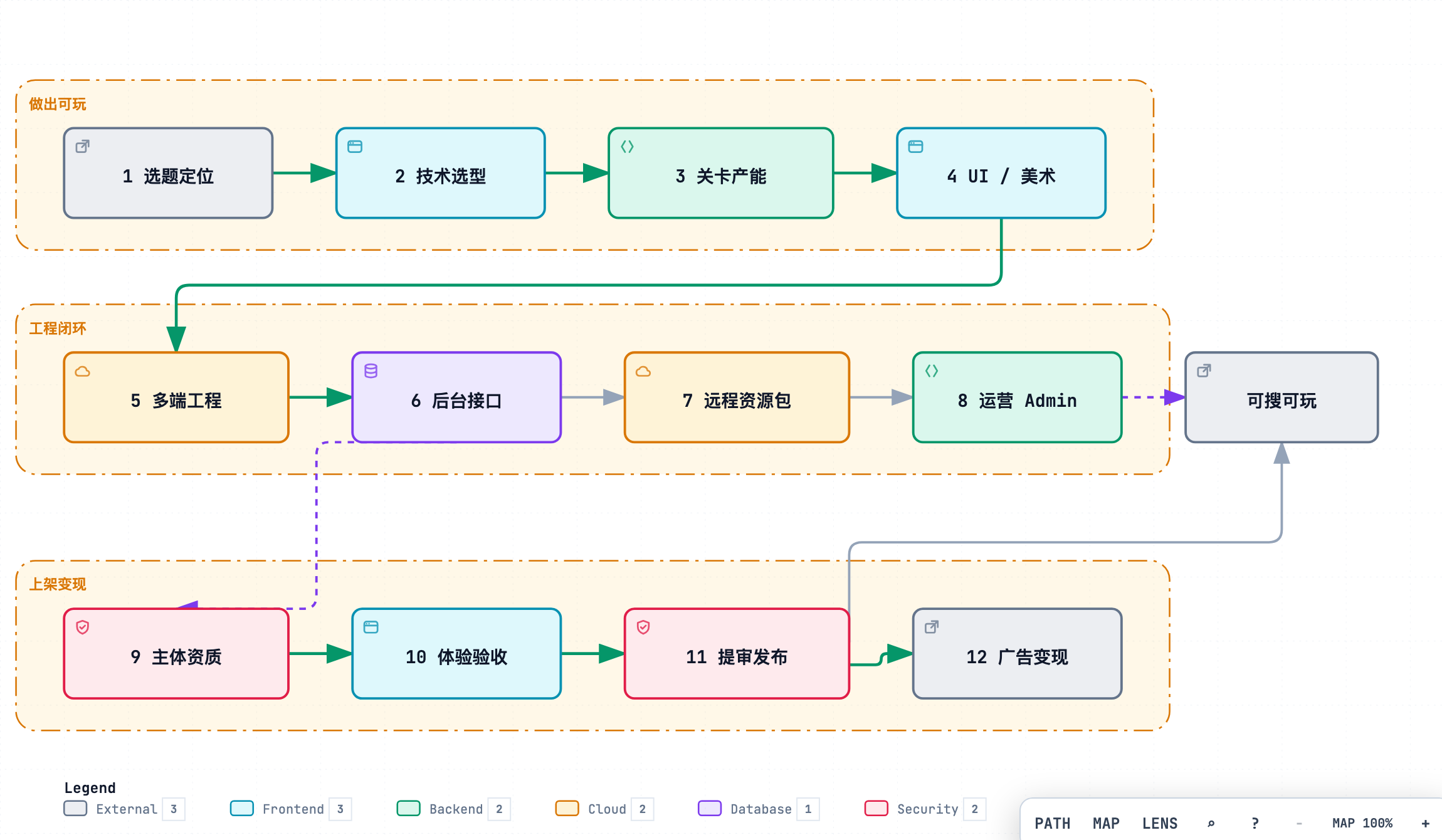
装环境(M0) → 写文档(M1) → 出图切图(M2) → 做出可玩(M3) → 打微信包(M4) → 上线变现(M5~M8)

目录

你在干什么
00 怎么用这本 SOP
M0 环境与账号 · 工具、微信号、空文件夹
M1 选题与选型 · 聊天定玩法 → GDD + 设计文档
M2 UI 出图切图 · 提示词 → AI 出图 → 切进 assets
M3 核心玩法与关卡 · 学关卡工具 → 自建工程可玩
M4 多端构建与正式包 · 打出微信包
M5 后台与 Admin · 本地后台(金牌);生产可选
M6 备案与提审 · 过审可搜(银牌关键)
M7 流量主与广告
M8 上线后第一周

附录(用到再点)

主线一句话

个人微信小游戏 · 只做广告不开内购 · 空目录 + AI 搭建。
默认先冲:银牌(可搜可玩);有余力再冲本地金牌(广告 + 本机 Admin)。

00 · 怎么用这本 SOP

你不用会写代码。按章节把 Prompt 贴给 Cursor,靠画面能不能点、文件夹在不在勾验收。
样例来自微信小游戏「箭头快跑呀」;你自己的工程从空文件夹搭起。

成品可先感受:打开 首页 扫小程序码,或微信搜 箭头快跑呀


一句话路线(先记住这个)

M0 装好工具和账号
 → M1 用聊天定玩法,写出 GDD + 设计文档
 → M2 按文档写出图提示词,AI 出图并切图
 → M3 对照关卡工具学算法 → OpenSpec propose/apply 自建可玩工程(含接切图)
 → M4 打出微信正式包
 → M5~M8 后台 / 提审上线 / 广告 / 上线后

一次只做一章,验收勾完再进下一章。


人和 AI 怎么分

你来 AI(Cursor)来
注册微信、人脸、备案、点提审 写代码、改报错
订 Cursor;配置出图 Key 按文内 Prompt 改项目、出图
真机点主路径,看能不能玩 整理目录、生成关卡数据
拍板玩法与范围

两个文件夹(别混)

打开哪里 路径 干嘛用
小游戏项目 ~/my-minigame Cursor 主窗口;几乎所有 Prompt 贴这里
关卡工具 Level Studio ~/game-arrows-level-studio 只在 M3 打开学习;不当游戏工程

地址见 附录 F。对照时只看不抄核心算法进公开说明:附录 E


主线范围(跟做就按这个)

  • 主体:个人微信小游戏
  • 赚钱:只做激励视频广告,不开内购
  • 技术:Canvas 2D + TypeScript + Vite(M1 会聊定)
  • 玩法建议:短局益智(箭头消除类最好跟);大改玩法时 M2/M3 提示词要自己改

做到什么算毕业(先别纠结细节)

你想达到 简单标准 主要章节
银牌(默认先冲这个) 微信里能搜到,主路径能玩 M0~M4 + M6 过审发布
金牌·本地 银牌 + 广告接上(真播或待开通)+ 本机后台能查到自己 再加 M5(本地) + M7
金牌·生产 真机正式环境也能登录、查到自己 M5 里选腾讯云或云函数上生产

跟做顺序建议:先银牌 → 再金牌本地。没买服务器时,不要卡在「生产金牌」。
流量主还没开通:广告勾「待激活」也算本地金牌达标(后台本地项要勾上)。

各章和毕业的对应:

你在干什么
M0~M1 环境 + 把产品想清楚(文档)
M2 把界面资源做出来(图)
M3 把游戏做出来(能玩)
M4 打微信包
M5 后台 / Admin(金牌用)
M6 备案提审上线(银牌关键)
M7 广告
M8 上线后一周检查

跟做规矩(5 条)

  1. 一次只做一个 Step,验收勾完再往下。
  2. Prompt 整段复制,不要自己加「顺便重构」。
  3. 每做完一大节用 Git 存一下(M0 有命令)。
  4. 报错:把全文贴回 Cursor 用修复 Prompt。
  5. 微信后台菜单名以你当时页面为准。

几个词(看到再查)

意思
IAA 靠广告赚钱(本主线);不是内购
GDD 游戏设计文档:玩法、页面、做什么/不做什么
H5 浏览器里先调试;最后要出微信包
合法域名 微信后台白名单:真机只许访问你填过的 HTTPS
必可解 关卡至少有一种点法能过关,不是开局死锁

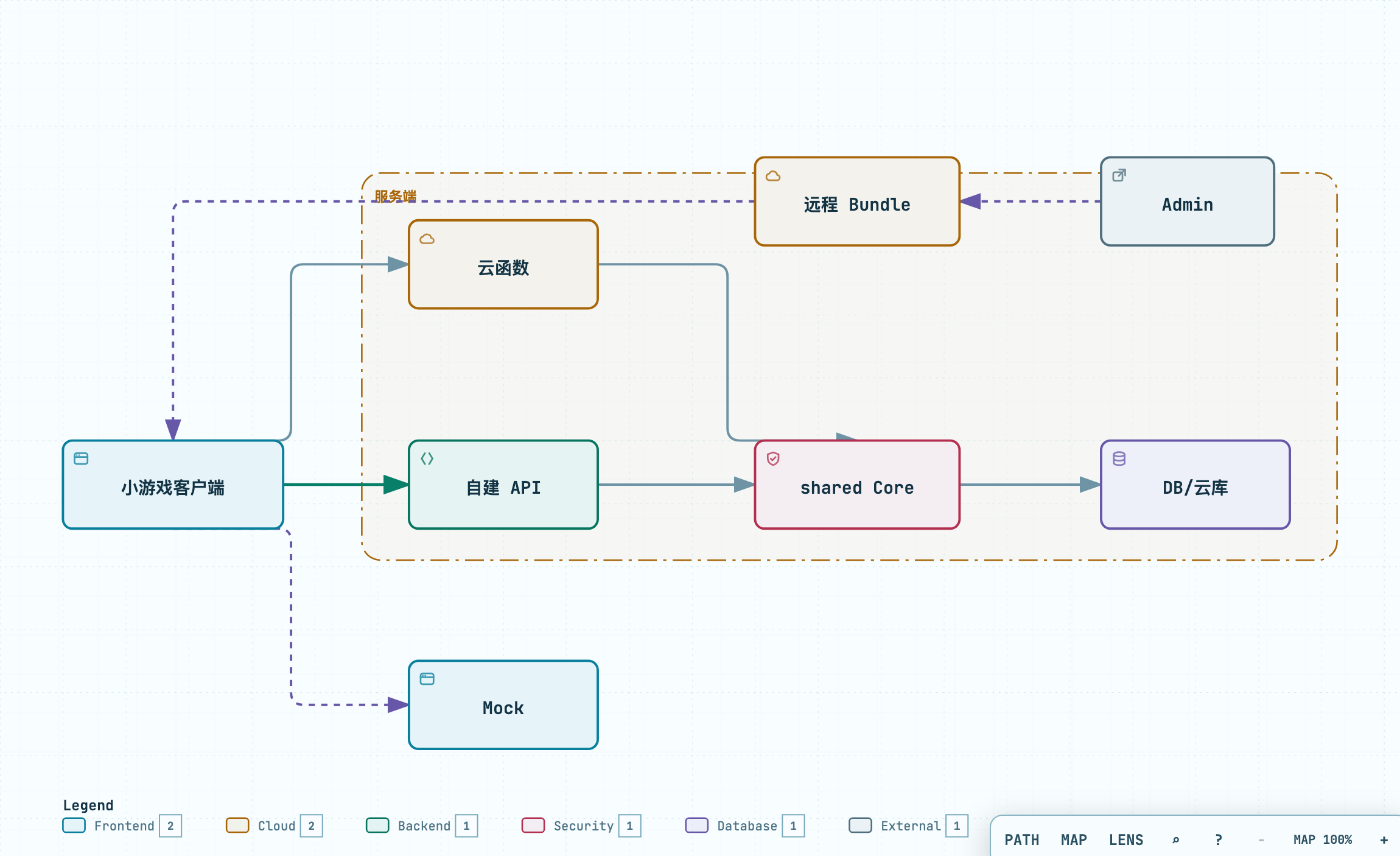
全链路示意

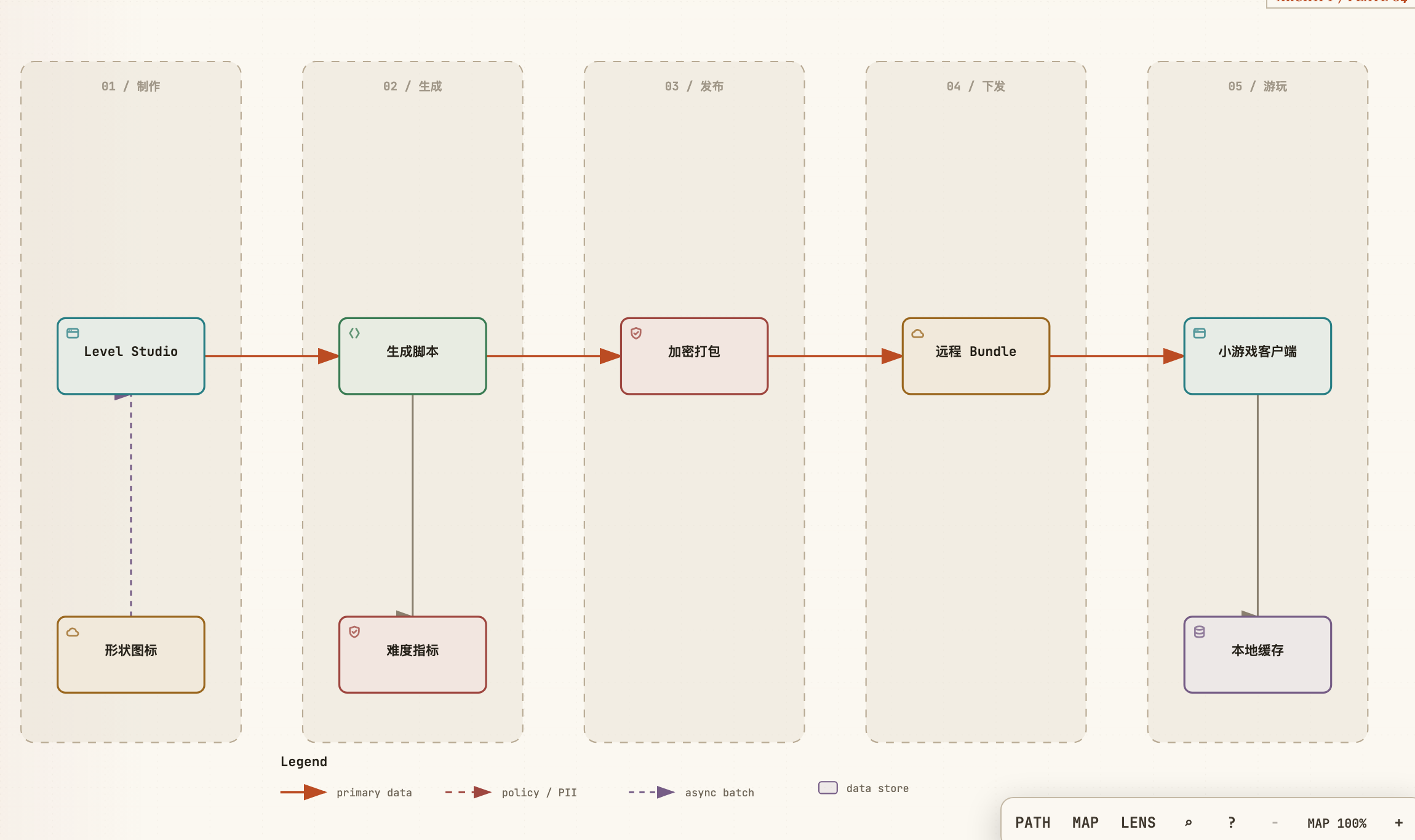
一款小游戏上线全链路

产品能力示意


工具(装齐在 M0)

工具 用途
Cursor(约 20 刀/月,国内可支付宝) 主线写代码
OpenSpec M1 用聊天选题(/opsx-explore
mage-images-gen M2 出图
微信开发者工具 预览、上传
Node.js + 浏览器 本地跑 H5

费用细项见 M0。Codex 可选,不是必装。


下一章

M0 · 环境与账号

M0 · 环境与账号

本章无代码:完成账号、订阅、本机环境,供后续章节使用。

范围:微信个人小游戏;抖音 / 支付宝小游戏账号本章不办(支付宝付 Cursor 订阅见 0.1)。

当前工作区

本章 浏览器 + 安装包;尚无游戏工程
末步创建 ~/my-minigame 空目录,用 Cursor 打开
截图 截图清单;后台菜单一时找不到时对照清单「怎么拍」

Step 0.1 订编码助手(Cursor 主线 / Codex 可选)

工具:浏览器

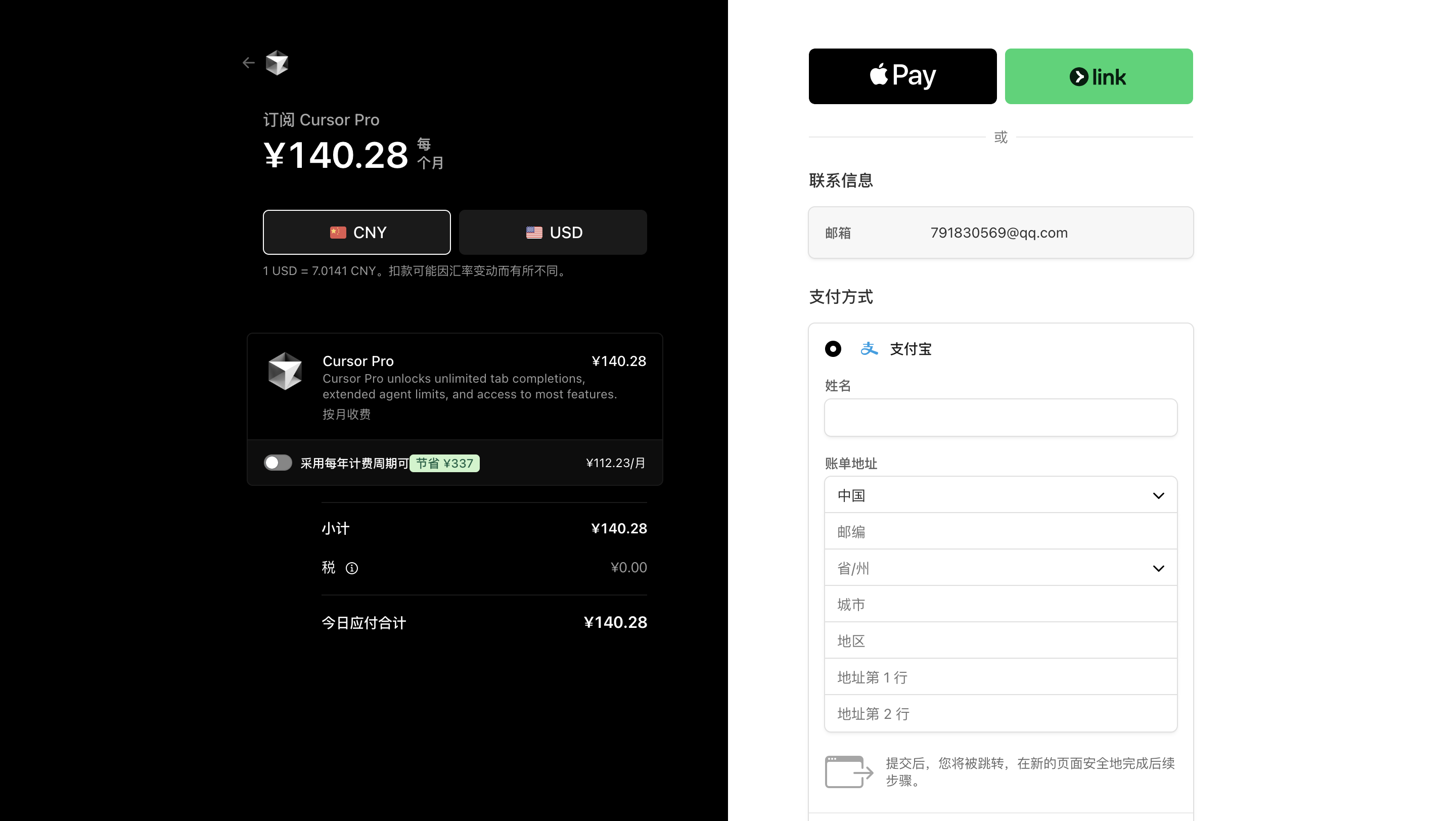
本 SOP 正文 Prompt 按 Cursor 写。国内付款可用支付宝;也可用 OpenAI Codex(含在 ChatGPT Plus 约 20 刀/月)作为备选或并行工具。价格、额度以各官网当期页面为准。

A. Cursor(主线)

常见入门付费档约 20 刀/月(Pro 等名称以页面为准)。

【你只做这些】

  1. 打开 https://cursor.com 注册/登录。
  2. 安装桌面版 Cursor,登录同一账号。
  3. 打开订阅 / Billing(或 Upgrade),选择约 20 刀/月 的付费档。
  4. 国内支付:结账页选 Alipay / 支付宝 → 手机扫码付款(人民币按当日汇率结算)。看不到支付宝时:账单国家/地区试填中国大陆或香港后再进支付页。
  5. 支付成功后回到 Cursor,确认 Agent / Chat 可用。

Cursor 订阅 / Alipay

【验收】

□ Cursor 能打开,能新建 Agent / Chat
□ 没有一直停在「登录失败 / 额度 0 却不让用 Agent」

【不对就】

  • 支付失败:换官方结账页重试;使用官方正版订阅,不走代充。
  • 公司邮箱登不上:换个人邮箱。

B. Codex(可选,约 20 刀/月)

OpenAI Codex 写代码代理,通常随 ChatGPT Plus(约 20 刀/月)提供额度;也可在 IDE / CLI / 网页里用(入口以 https://chatgpt.com / OpenAI 当期说明为准)。

和 Cursor 的关系:

Cursor Codex(ChatGPT Plus)
价位 约 20 刀/月 约 20 刀/月
本 SOP 主线:后面步骤默认贴进 Cursor 可选:同一类「改项目 / 修报错」任务可交给 Codex
怎么选 跟做优先订这个 已有 Plus、或想多一个编码代理时开通
国内付款 官方结账支持 支付宝 见下表(与 Cursor 不同)

Codex / ChatGPT Plus 支付方式(以结账页当期为准)

方式 说明
国际信用卡 / 借记卡 官网 Upgrade 常用路径(Visa、Mastercard 等);国内银联卡多数无法直付
App Store / Google Play 手机端订阅时走商店账单,能否订、价格以商店账号地区为准
支付宝 / 微信 OpenAI 官方结账页通常不支持(与 Cursor 不同)
虚拟卡 / 境外卡 部分人自备可用国际卡走官网;成功率、风控以当时环境为准
第三方代充 本 SOP 不推荐:账号与资金风险自负

支付对比(国内跟做):

  • Cursor:优先官方结账页 Alipay
  • Codex:优先 有可用国际卡 → 官网 Plus;没有国际卡、又只想跟做时,订 Cursor 即可,不必强开 Codex

【你只做这些】(选做)

  1. 打开 https://chatgpt.com 注册/登录。
  2. 升级 Plus(约 20 刀/月):结账页用官方支持的卡完成支付;手机端若走商店,在 App Store / Google Play 订阅。
  3. 支付成功后,在产品里找到 Codex 入口,用本机项目试一句:「列出当前目录结构」。
  4. 跟做时:SOP 里的 Prompt 同样可整段贴给 Codex;验收标准不变。

【验收 · 若开通 Codex】

□ Plus 已生效,Codex 能对本机或上传项目给出修改建议

【不对就】

  • 官网拒卡:换官方支持的国际卡,或放弃 Codex、只用 Cursor
  • 看不到升级入口:核对账号地区与登录环境,以 OpenAI 当期说明为准

【本节禁止】

✗ 把 API Key / 订阅截图发群
✗ 把 ChatGPT 账号密码交给不明代充渠道


Step 0.2 开通出图(mage-images-gen)

工具:Cursor + mage-images-gen Skill

本 SOP 出图统一走 mage-images-gen(可选 gpt-image-2 / Seedream / 通义 / Google)。
仓库:https://github.com/jaydenxiao2016/mage-skills-lab.git(见 附录 F)。

获取 Skill(三选一)

方式 怎么做
A. git clone git clone https://github.com/jaydenxiao2016/mage-skills-lab.git ~/mage-skills-lab,确认有 mage-skills/mage-images-gen/SKILL.md
B. 拷到 Agent Skills mage-images-gen 文件夹放到 ~/.claude/skills/mage-images-gen
C. 已随教程打包 按发放说明解压后,记下本机 SKILL_DIR
export SKILL_DIR="$HOME/mage-skills-lab/mage-skills/mage-images-gen"
test -f "$SKILL_DIR/SKILL.md" && echo "skill ok"

可选模型(provider)

--provider 典型模型 / 用途 需要的 Key(环境变量)
openai gpt-image-2 等(可用 OPENAI_IMAGE_MODEL 指定) OPENAI_API_KEY
seedream 火山方舟 Seedream SEEDREAM_API_KEYARK_API_KEY
dashscope 阿里通义万象 DASHSCOPE_API_KEY
google Gemini / Imagen 系 GOOGLE_API_KEY

国内可优先 seedream / dashscope;要 GPT Image 再备 openai。至少打通 一个 Key。

【你只做这些】

  1. 按上表拿到 Skill,SKILL.md 能打开。
  2. API Key 写入 ~/.mage-skills/.env(勿提交 git):
# ~/.mage-skills/.env(按你开通的填写,不必全有)
OPENAI_API_KEY=sk-...
SEEDREAM_API_KEY=...
DASHSCOPE_API_KEY=...
# OPENAI_IMAGE_MODEL=gpt-image-2
  1. 试跑 1 张(SKILL_DIR 用你的真实路径):
export SKILL_DIR="$HOME/mage-skills-lab/mage-skills/mage-images-gen"
mkdir -p ~/my-minigame/design

npx -y bun "$SKILL_DIR/scripts/main.ts" \
  --provider seedream \
  --prompt "竖屏手机游戏简单图标,扁平,主题箭头,无水印无乱码" \
  --image ~/my-minigame/design/m0-test-icon.png \
  --ar 1:1 --quality normal

或在 Cursor 说:「用 mage-images-gen,provider=seedream,出到 design/m0-test-icon.png」。

  1. 确认 design/m0-test-icon.png 存在。

【验收】

test -f "$SKILL_DIR/SKILL.md" 成功
□ 至少一个 provider Key 已配(未进公开仓)
□ 试跑图已生成
□ 默认 provider 已选定

【不对就】

现象 处理
clone / 路径不对 见附录 F;确认 ~/mage-skills-lab/mage-skills/mage-images-gen/SKILL.md
Missing API key 检查 ~/.mage-skills/.env
bun/npx 失败 Node 已装;用 Skill 要求的 npx -y bun
某模型不可用 换另一个 --provider

【本节禁止】

✗ API Key 进 README / 发群
✗ 后面章节改用另一套出图习惯导致画风乱跳


Step 0.2b(可选)克隆 Level Studio

银牌 / 本地金牌会在 M3 用到;也可提前克隆练手。

git clone https://github.com/jaydenxiao2016/game-arrows-level-studio.git ~/game-arrows-level-studio
cd ~/game-arrows-level-studio
npm install
npm run dev
# http://127.0.0.1:5198

地址见 附录 F。对照规则见 附录 E

【验收 · 若克隆】

□ 浏览器能打开 Studio(5198)
□ 未把任何密钥 / .env 拷进自己的游戏工程


Step 0.3 申请微信小游戏号(个人)

工具:浏览器 + 手机微信

【你只做这些】

  1. 打开微信公众平台:https://mp.weixin.qq.com
  2. 注册 → 选 小程序(小游戏走小程序账号体系)→ 主体选 个人
  3. 按页面完成管理员信息、身份证、手机验证。
  4. 登录后台,类目选 游戏(菜单名以后台为准)。
  5. 在「开发」相关页找到 AppID,复制保存到本地记事本,记为 YOUR_APPID
  6. 开发管理里把自己的微信号加成 体验成员(真机预览需要)。

【验收】

□ 能登录小游戏/小程序后台
□ 记事本里有 AppID(不发到公开群)
□ 体验成员里有你自己

【不对就】

  • 个人额度满了:换微信号或按微信提示处理;不使用来路不明的账号。
  • 类目找不到游戏:查帮助中心当期说明,或先建好号,M7 再核对类目。

【本节禁止】

✗ 把 AppSecret 转发到公开渠道
✗ 使用与本人无关的企业主体


Step 0.4 装微信开发者工具

【你只做这些】

  1. 下载「微信开发者工具」: https://developers.weixin.qq.com/miniprogram/dev/devtools/download.html
  2. 安装,微信扫码登录。
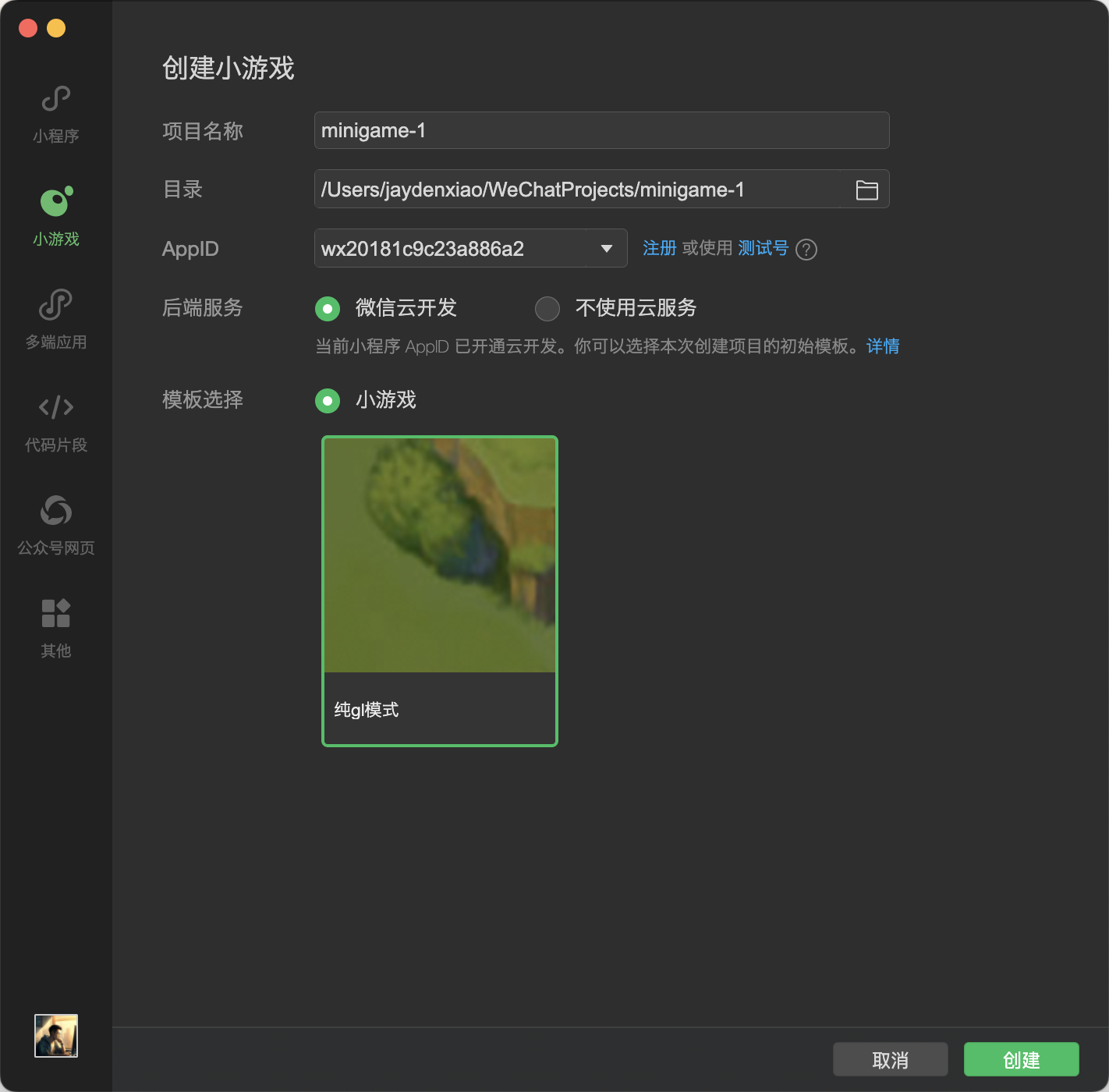
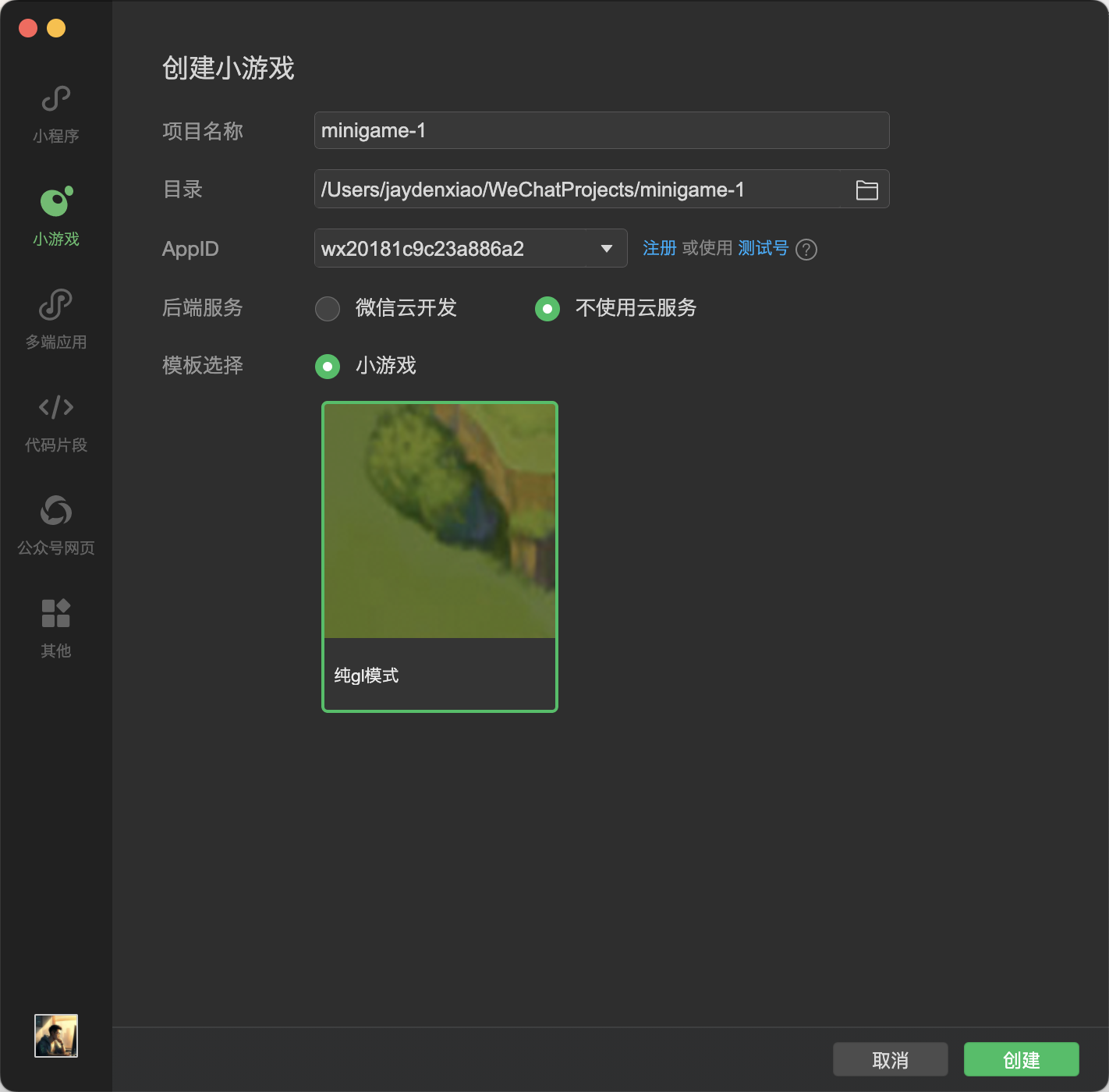
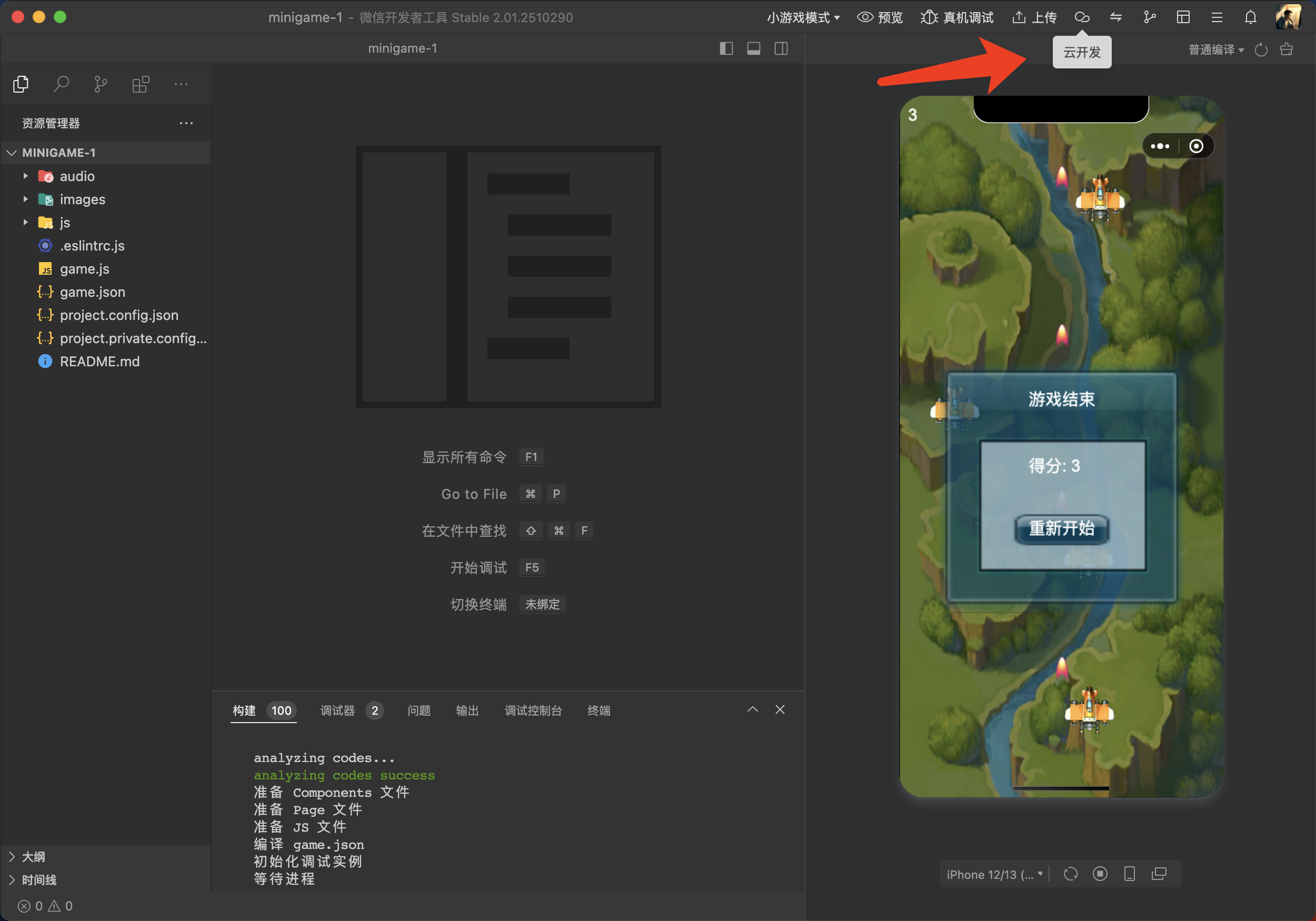
  3. 选小程序/小游戏,用你的 AppID 建一个空项目点预览(先证明号是活的)。

微信开发者工具空预览

【验收】

□ 工具能打开
□ 用你的 AppID 能进项目,模拟器不是登录死循环


Step 0.5 本机:Node、Git、空目录

【你只做这些】

  1. 安装 Node.js LTS(官网安装包即可):https://nodejs.org
  2. 打开终端,输入:
node -v
npm -v

应看到版本号,不是「command not found」。

  1. 安装 Git(Mac 有时已自带)。终端:
git --version
  1. 建空项目目录(路径可改,后面 Prompt 要一致):
mkdir -p ~/my-minigame
cd ~/my-minigame
git init
  1. 用 Cursor:File → Open Folder,打开 ~/my-minigame

【验收】

node -v / npm -v / git --version 都有输出
□ Cursor 左侧就是空目录(最多一个隐藏的 .git
□ 你知道项目路径是 ~/my-minigame(或你改过的路径)

【不对就】

  • node 找不到:重装 LTS,关掉终端再开。
  • Cursor 打开错目录:关掉重开,认准文件夹名。
  • OpenSpec 要求 Node ≥ 20.19node -v 过旧就升级 LTS。

Step 0.5b 安装并初始化 OpenSpec(M1 必用)

工具:终端 + Cursor
文档:OpenSpec · 包名 @fission-ai/openspec

OpenSpec 是干什么的(一句话)
给 AI 协作加一套「先想清楚再改代码」的规矩:用 Markdown 把需求 / 设计 / 任务写清楚,再让 Agent 按清单实现,避免一上来就乱改工程。

本手册里常用三条命令(装好后在 Cursor 里打):

命令 干什么
/opsx-explore 只讨论不写代码:选题、选型、权衡(M1 必用)
/opsx-propose 把已拍板的事写成 proposal / design / tasks
/opsx-apply 按 tasks 逐项改代码(M3 搭工程后才用得多)

本步先装 CLI,并在游戏工程里初始化;装完才能稳定用上面的命令。

【你只做这些】

  1. 全局安装 CLI(需网络):
npm install -g @fission-ai/openspec@latest
openspec --version

应看到版本号(如 1.x),不是 command not found

  1. 在游戏工程里初始化(生成 openspec/,并为 Cursor 写入指令 / 命令):
cd ~/my-minigame
openspec init --tools cursor

若交互询问 AI 工具,选 Cursor(或等价项)。
--tools cursor 可减少手工勾选。

  1. 确认目录与命令:
cd ~/my-minigame
ls openspec
openspec list
  1. 回到 Cursor:必要时 Reload Window,再试输入 /opsx-explore(或 /opsx:explore,以你 Cursor 里实际命令名为准)。

【验收】

openspec --version 有输出
~/my-minigame/openspec/ 已存在(常见含 config / changes 一类结构)
□ Cursor 能看到 /opsx-explore(或已出现 openspec 相关 Skill / 命令)
openspec list 能跑(空列表也算成功)

【不对就】

现象 处理
openspec: command not found 确认全局 npm bin 在 PATH;重开终端;或用 npx @fission-ai/openspec@latest --version 验证包能下
Node 版本太旧 升级 Node LTS ≥ 20.19 后再装
init 后 Cursor 没有 /opsx-* cd ~/my-minigame && openspec update --tools cursor,然后 Reload Window
装到了别的目录 必须在 ~/my-minigame(你的游戏工程根)执行 openspec init

【本节禁止】

✗ 跳过 init 直接进 M1 却抱怨没有 explore
✗ 把 OpenSpec 只装在手册仓库、游戏工程却是空的(两个目录不是同一个)


Step 0.6 后端怎么上生产(先选型,可先不买)

本地金牌(M5A)不需要云。冲 金牌(生产) 时,主线给两条路,二选一即可(M6 再部署):

路线 是什么 适合 M0 本章要做的
A. 腾讯云轻量 + 自建 HTTP 一台小主机跑 Node API +(可选)Admin 要自己控服务器、方便挂 Admin/远程包 注册腾讯云;可先不付款,或先买最低档轻量
B. 微信云开发 · 云函数 公众平台 / 开发者工具里开通云开发,用云函数 + 云数据库 少运维、和微信登录绑定紧 在小游戏后台开通云开发(或记清入口,M6 再开)

对照仓(箭头)两种形态都支持思路上的「适配器切换」:业务只调 getBackendService(),下面可接云函数或 HTTP。

路线 A:腾讯云账号(推荐跟做生产档)

【你只做这些】

1.之前腾讯推广workbuddy下单腾讯云有优惠,可以看下【零门槛白嫖腾讯云服务器】(https://mp.weixin.qq.com/s/A5IdiGPP5H_sCKnPmArsuw?scene=1&click_id=170&mode=light)。
2. 控制台找到 轻量应用服务器(或当期等价「轻量 / 简单应用服务器」入口)。
3. 看清楚最低档年付大概多少钱、是否含流量;可以先加购收藏,等 M6 再买
4. 若已买:记下 公网 IP、登录方式(密钥或密码),存本地记事本,变量名用 YOUR_SERVER_IP(不要发群)。
5. 域名:有备案域名更好;没有可先用 IP + 后续再配域名/HTTPS(真机合法域名一般要备案域名,见 M6)。

【验收 · 路线 A】

□ 能登录腾讯云控制台
□ 知道「轻量应用服务器」在哪买
□(若已购)本地记事本有 IP,未写入将公开的 README

路线 B:微信云开发(云函数)

【你只做这些】

  1. 登录 微信公众平台 → 你的小游戏。
  2. 找到 云开发 入口(菜单名以后台为准;开发者工具里也可开通)。
  3. 按指引开通云开发环境(个人主体可用性、免费额度 以当期页面为准)。
  4. 开通后记下 环境 ID(形如 cloud1-xxxx),本地记为 YOUR_CLOUD_ENV_ID
  5. 开发者工具:确认已登录同一 AppID,能打开云开发面板(云函数 / 数据库标签看得到即可)。

云开发环境 ID

云开发环境面板

【验收 · 路线 B】

□ 云开发已开通,或已确认开通入口(延后到 M5 开通也行,须在本步记下)
□ 环境 ID 只存在本地,不进公开仓

【怎么选 · 一句话】

  • 想少碰 Linux、先让真机登录跑通 → 优先 B 云函数
  • 想要独立 Admin 网站、远程包挂自己的域名 → 优先 A 腾讯云
  • 都还不急 → 本步只注册账号,M5A 本地金牌照做

【本节禁止】

✗ 把腾讯云 AccessKey、云开发密钥、环境密钥截图发群
✗ 在客户端代码里写死 Secret


Step 0.7 费用参考

量级 备注
Cursor ~20 刀/月 国内可用支付宝;以官网为准
Codex(可选) ChatGPT Plus ~20 刀/月 官方结账多为国际卡;通常无支付宝;以官网为准
出图(mage-images-gen) 按所选 API 计费 通 1 张;模型可选 gpt-image-2 / seedream 等
腾讯云轻量(路线 A) 约 60~100 元/年档起(示例) 以购买页为准;可 M5 再买
微信云开发(路线 B) 常有免费额度 / 超量计费 以云开发控制台为准
域名 + 备案(路线 A 真机域名) 另计 个人备案要求看当期
微信个人 以公众平台为准 认证/类目费用看当期
时间 主要成本

主线不含抖音/支付宝小游戏账号费用。生产自建 HTTP 主线以 腾讯云轻量 为例(M5)。


Step 0.8 存一个「M0 完成」进度

在项目目录终端:

cd ~/my-minigame
git init

【Prompt】

在仓库根目录生成标准 .gitignore(Node/Vite):忽略 node_modules、dist、.env、.env.*(保留 .env.example)、.DS_Store、IDE 目录。
不要写任何真实密钥。

然后:

echo "M0 done: AppID saved offline, Cursor ok" > M0-DONE.txt
git add .gitignore M0-DONE.txt
git commit -m "M0: env ready"

【验收】

□ 有一次 commit 成功(含 .gitignore
□ AppID 只在本地记事本或未跟踪配置里,未写进将要公开的 README


M0 总验收

□ Cursor 付费能用(Codex / Plus 为可选)
□ 出图:mage-images-gen 已通 1 张(并记下默认 provider)
□ 微信小游戏号 + AppID + 体验成员
□ 开发者工具能开
~/my-minigame(或你的路径)在 Cursor 里已打开
□ OpenSpec:CLI 已装 + 工程内已 openspec init(能 /opsx-explore
□ 生产后端已选型:腾讯云轻量 微信云开发(可只注册/记下入口,未部署也算过)
□ 附录 F:出图 Skill 已按地址 clone(Studio 可选)
□ 抖音/支付宝小游戏账号本章未办理(符合主线)


下一章

M1-选题与选型

M1 · 选题与选型(写出两份文档)

用 Cursor 聊天(OpenSpec explore)想清楚:做什么玩法、用什么技术
本章结束时,文件夹里应有:

文件 是什么
design/GDD.md 产品文档:玩法、页面、做什么/不做什么
design/DESIGN.md 设计文档:每屏长什么样、要出哪些图

本章不写游戏代码、不搭工程。 文档齐了再进 M2 出图。

当前工作区

Cursor 小游戏项目 ~/my-minigame(可先只有空目录)
命令 /opsx-explore(M0 已装 OpenSpec)
可对照样例 GDD · 设计

技术栈

聊天定玩法/技术 → 拍板表 → 写出 GDD.md → 写出 DESIGN.md → 去 M2

Step 1.1 确认 OpenSpec 已就绪

工具:Cursor · 小游戏项目 ~/my-minigame

【开始前检查】(未勾完先回 M0 Step 0.5b

□ 已 npm install -g @fission-ai/openspec@latest
□ 已在 ~/my-minigame 执行 openspec init --tools cursor
□ Cursor 打开的就是该目录
□ 能输入 /opsx-explore

【Prompt · 可直接复制】

/opsx-explore

先不要写代码、不要创建业务文件。
只用一句话确认:你现在处于 OpenSpec explore(只讨论)模式。
然后列出接下来帮我做选题时,你会按哪几步问我。

【验收】

□ OpenSpec CLI + 工程 init 都过了
□ 明白:explore 只讨论、不写代码


Step 1.2 用 explore 聊定玩法与技术栈(必做)

【Prompt · Task 整段复制】

/opsx-explore

我是个人开发者,想用 AI 从零做一款能上架的微信小游戏。

硬约束:
- 主体:个人
- 平台主战场:微信小游戏(先不做抖音/支付宝上架主线)
- 变现:只做广告(激励视频 IAA),不开内购 / 虚拟支付
- 人力:一个人 + AI,目标几个月内「可搜 + 主路径可玩」
- 调试:希望先 H5,再出微信包

备选玩法(可改):箭头消除类短局益智;或我另有点子:【在这里写一句话】

请先进入 explore,不要写代码、不要创建项目文件。帮我一起想清楚并给出对比表:

1) 品类 / 玩法:给 2~3 个候选,评估「一个人能否做完」「关卡能否批量产」「要不要版号/内购」
2) 平台:为什么先微信,而不是先做独立 App / 纯 H5
3) 技术栈:对比 Unity / Cocos·Laya / Pixi / 小程序组件 / Canvas 2D+TypeScript+Vite
   按这些维度打 1~5 分并说明:微信包体与链路、H5 同构调试、自绘棋盘+弹窗、团队/AI 熟悉度、动画开箱即用、长期多端扩展
4) 第一版范围:哪些进 MVP,哪些明确不做
5) 风险:选错引擎或选错品类时,三个月后会还什么债

最后只输出一张「拍板表」:
| 项 | 结论 |
| 玩法一句话 | |
| 暂定名建议 | |
| 平台 / 主体 / 变现 | |
| 技术栈 | |
| MVP 做 | |
| 明确不做 | |
| 结论 | 做 / 缩小范围 / 不做 |

【你只做这些】

  1. 多轮把表讨论到你认可。
  2. 主线技术栈应对齐:Canvas 2D + TypeScript + Vite(否则后续章节要大改)。
  3. 探索结束前,保存最终「拍板表」原文。

【验收】

□ 已有拍板表
□ 个人微信 + 仅 IAA + 短局逻辑益智(或已自觉缩小范围)
□ 技术栈与主线一致
没有开始写游戏代码

【不对就】

现象 处理
没有 /opsx-explore 见 M0 Step 0.5b;或说明「按 OpenSpec explore:只讨论不写代码」再贴 Task
AI 直接写代码 打断:「回到 explore,只给拍板表」
结论倾向 Unity/3D 换更轻玩法重跑,或暂停本 SOP 主线

Step 1.3 锁定主线表

【Prompt】

根据刚才的拍板表,用下面固定答案帮我对齐一版「主线勾选表」。
若有冲突,先指出冲突再给修改建议;不要写代码。

| 决策 | 主线答案 |
| 平台 | 微信小游戏 |
| 主体 | 个人 |
| 赚钱方式 | 广告(激励视频),不开内购 |
| 玩法体量 | 一局几分钟的益智/消除类 |
| 技术 | Canvas 2D + TypeScript + Vite |
| 调试 | 先 H5,再微信包 |

【验收】

□ 已按上表勾定(重度 3D / 联机对战不在本 SOP 范围内)


Step 1.4 产出 GDD 产品文档(必做)

写之前可对照样例 GDD · 箭头快跑呀 的章节结构(抄结构不抄数值也行)。

【Prompt · 可直接复制】

/opsx-explore

根据已拍板的玩法与技术栈,帮我生成一份中文 GDD 产品文档草稿。
不要写代码,不要创建工程目录以外的实现文件;只输出 Markdown 正文,我保存为 GDD.md。

请按下列大纲写(没有的信息用「待定」并列出要我补充的问题):

# 【游戏暂定名】GDD

## 1. 一句话定位
## 2. 目标用户与使用场景
## 3. 核心玩法规则(玩家看得见的规则,分条)
## 4. 一局流程(从进入到结算)
## 5. 进度与成长(关卡/体力/收集等,MVP 范围)
## 6. 变现(仅激励视频 IAA;写清触发点,如复活/加体力)
## 7. 信息架构:页面清单(首页/局内/设置/通关/失败…)
## 8. 弹窗清单(设置、失败复活、通关…)
## 9. MVP 做 / 明确不做
## 10. 验收标准(人话:怎样算做得成)

约束:个人微信小游戏;Canvas 2D + TS + Vite;不开内购。

【你只做这些】

  1. 把输出存为 ~/my-minigame/design/GDD.md(可先 mkdir -p design)。
  2. 缺内容就继续追问 AI 补全,直到「页面清单 + 弹窗清单」齐全。

【验收】

□ 有 design/GDD.md
□ 含玩法规则 + 页面清单 + 弹窗清单 + MVP 边界
□ 仍未写游戏业务代码


Step 1.5 产出设计文档(必做)

结构语义优先(分区、层级、每屏要什么控件);画风细节留给 M2 主参考图。
可对照样例 设计 · UI 结构 的 ASCII 分区写法。

【Prompt · 可直接复制】

/opsx-explore

已有 design/GDD.md(或我贴在下面的 GDD 正文)。
请生成一份「设计文档」Markdown,我保存为 design/DESIGN.md。
不要写代码、不要出像素标注表到小数;只要结构。

大纲:

# 设计文档 · 【游戏名】

## 1. 设计基准
- 逻辑稿宽度 375 竖屏;导出常用 @2x
- 说明:精确视觉以 M4 主参考图为准

## 2. 页面 ASCII 布局
对 GDD 里每个主页面给一张 ASCII 草图(首页、局内、必要则设置页)
标注区域名:如顶栏 / Logo / 主 CTA / Dock / 棋盘区

## 3. 弹窗母版
列出每个弹窗:标题区、正文区、主按钮、次按钮;说明互斥(同时只开一个)

## 4. 出图业务清单(给 M2 用)
表格列:业务ID | 中文名 | 类型(整页/弹窗/控件) | 要出的图 | 优先级(P0/P1)

P0 至少覆盖:首页、局内 HUD、开始按钮、通关或失败其一、设置入口。

## 5. Logo 一句话创意
用玩法符号化描述(例:各色箭头拼成「箭」字 + 速度线 + 蓝天)

不要写具体 hex 色值;不要开始生成图片。

【你只做这些】

  1. 存为 ~/my-minigame/design/DESIGN.md
  2. 确认「出图业务清单」表格里 P0 行你都看得懂。

【验收】

□ 有 design/DESIGN.md
□ 有 ASCII 分区 + 弹窗母版 + 出图业务清单
□ Logo 一句话创意已写


Step 1.6 短笔记 PRODUCT.md(可选但推荐)

【Prompt】

把拍板表压成一页 PRODUCT.md(中文),字段只要:
一句话 / 暂定名 / 变现 / 技术栈 / MVP / 明确不做。
不要写代码。

~/my-minigame/PRODUCT.md,便于以后章节引用。

cd ~/my-minigame
git init   # 若还没有
git add design/GDD.md design/DESIGN.md PRODUCT.md 2>/dev/null
git commit -m "M1: GDD + design from openspec explore"

【验收】

□ 文档已进 git(或你有自己的备份方式)


Step 1.7(可选)OpenSpec propose 固化

/opsx-propose

根据 explore 拍板与 design/GDD.md、design/DESIGN.md,
创建 change:minigame-gdd-design
生成 proposal / design / tasks 初稿。
范围只到「产品 + 界面结构 + 出图清单」,不要实现代码、不要生成图片。

换皮清单

  • Step 1.2 改「备选玩法」,重跑 explore
  • 重写 GDD.md / DESIGN.md
  • 不要在 M1 改成「开内购」
  • 仍保持短局逻辑关,后续出图与关卡章才好复用

下一章

M2 · UI 出图切图:按设计文档的业务清单写提示词 → 调 Skill 生图 → 黑/绿底等比例切图。

M2 · UI 出图与切图

目标:M1 的文档齐了之后——先写出每张图的提示词 → 用 AI 出图 → 绿底或黑底切出按钮/图标,放进 assets/
本章只准备资源;接进游戏画面在 M3(用 OpenSpec 建工程并执行 tasks)里一起做。

当前工作区

Cursor 小游戏项目 ~/my-minigame
你已有 design/GDD.md · design/DESIGN.md(M1)
出图工具 mage-images-gen(M0 已试通);地址见 附录 F
可对照 出图提示词样例 · 设计样例

本章你要完成的事

1. 从设计文档列出要出哪些图(PROMPT-SHEET)
2. 定一张主参考图(画风锚)
3. 给每个业务写可复制的出图 Prompt
4. 调用 Skill 一张张生成
5. 控件用绿/黑底 → 等比例切进 assets/ui、assets/icons

小白提醒:M2 结束时文件夹里有图就行;不必先有能玩的工程。

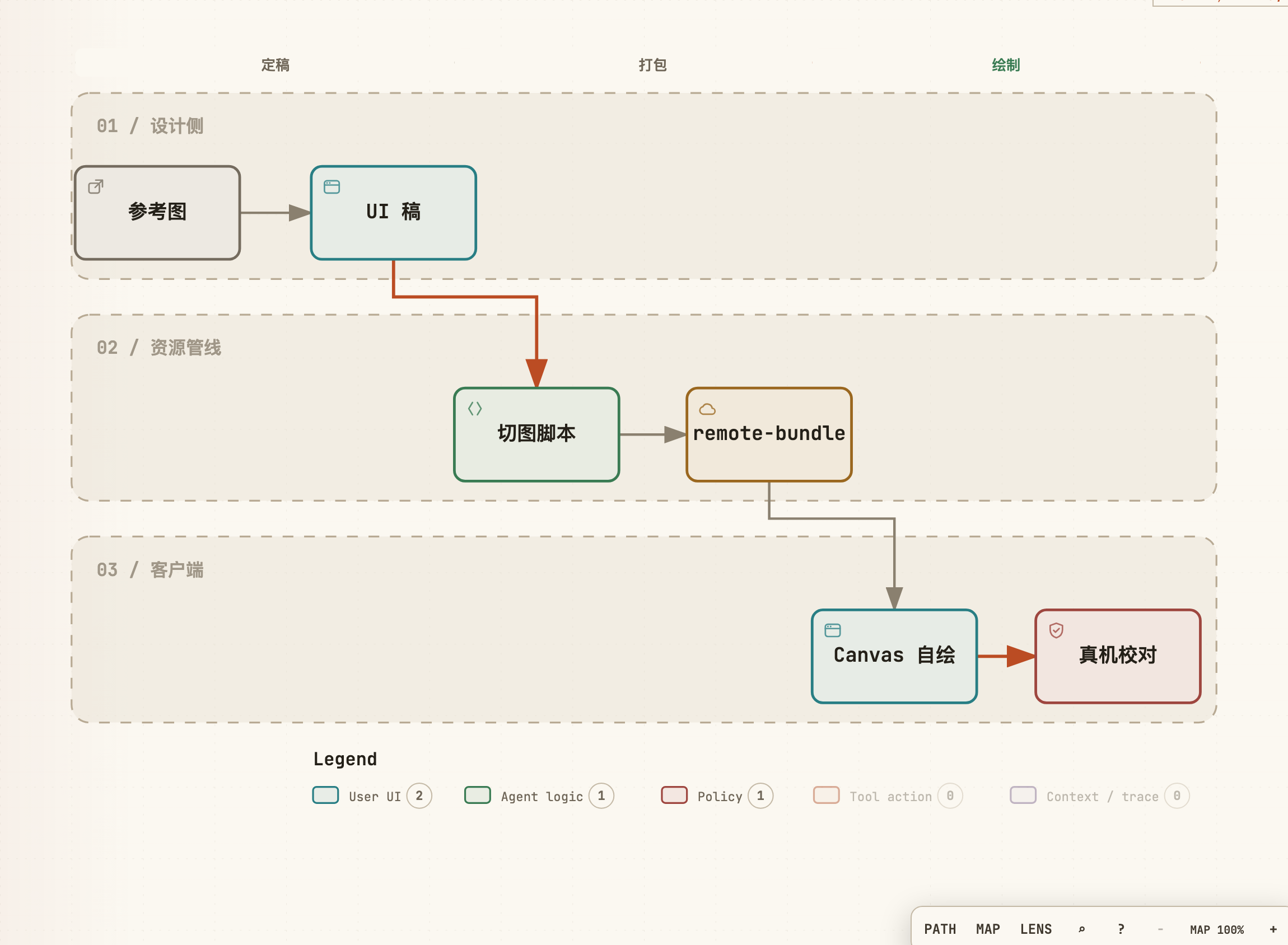
管线示意:

UI 从稿到 Canvas

设计基准:逻辑稿 375 宽竖屏;导出常用 @2x。游戏里「等比 fit」,禁止把非方形图硬拉成方形

特别注意 · 分辨率 vs 比例
AI 生图模型吐出来的图 像素往往很大(上千边长很常见),这很正常。
你要盯的不是「模型是不是刚好输出 128×128 / 375 宽」,而是:
1)画布比例对不对(方图标 1:1、竖屏整页约 9:16、横条按钮宽>高等);
2)主体按比例铺在画布里,四周别留奇怪大片空区或被裁切。
切进 assets/ 时再 等比例缩到游戏用的目标边长(见 2.5);不要为了「凑小尺寸」去拉伸、也不要指望模型一次吐出最终像素稿。


2.0 开始前检查

M1 已完成:design/GDD.md + design/DESIGN.md(含出图业务清单)
□ M0:mage-images-gen 已通 1 张;默认 provider/model 已选定
□ Cursor 开着小游戏项目
□ 已建目录:design/design/raw/design/prompts/assets/ui/assets/icons/

【Prompt · 建目录】

我在 ~/my-minigame。请只创建这些空目录(不要写游戏代码):
design/raw  design/prompts  design/cuts  assets/ui  assets/icons
若已存在则跳过。列出最终路径。

2.1 从设计文档拉出「出图业务表」

没有清单就批量出图,会风格漂移、漏弹窗。

Step 2.1.1 生成 PROMPT-SHEET(必做)

【Prompt · 可直接复制】

读取 design/DESIGN.md 与 design/GDD.md(若上下文没有,我稍后粘贴)。
不要写代码、不要生成图片。

请输出一张「出图业务提示词表」,我保存为 design/prompts/PROMPT-SHEET.md。

表格列:
| 业务ID | 中文名 | 类型(整页/弹窗/控件/Logo) | 优先级 | 画布建议 | 主体外背景 | 一句话画面目标 | 提示词要点(关键词,逗号分隔) | 输出文件名 |

规则:
1) P0 至少包含:Logo、首页整页、局内整页、开始按钮、失败或通关弹窗其一、设置弹窗或设置按钮
2) 整页/弹窗:先出「合成参考图」;控件:单独出,便于切图
3) 凡要切图的控件/图标/按钮:主体外背景统一写「纯绿幕 #00FF00」或「纯黑 #000000」(二选一,全表同一色)
4) 整页效果图可用正常游戏背景;从整页再拆控件时,改为绿/黑底单件重出
5) 「画布建议」写 **比例/构图**(如 1:1、9:16、横条按钮),不要逼模型输出游戏最终像素(AI 图通常很大,切图再缩)
6) 文件名小写连字符,如 logo.png、page-home.png、modal-fail.png、btn-start.png

【你只做这些】

  1. 把表格存为 design/prompts/PROMPT-SHEET.md
  2. 选定全表切图底色:绿幕 #00FF00(推荐)或 纯黑 #000000,写在文件开头一行。

【验收】

□ 有 PROMPT-SHEET.md,P0 行齐全
□ 切图底色已统一(绿或黑)
□ 每个业务有「提示词要点」


2.2 锁一张主视觉参考

Step 2.2 存主参考 + STYLE

【Prompt · 出主参考】

用 mage-images-gen(或你环境里的等价命令)生成 1 张「风格主参考」:
手机竖屏休闲益智小游戏,扁平干净,圆角统一,清新卡通。
不要水印、不要真实照片、不要小程序码。
保存为 design/ref-main.png。

命令形态示例(按你 M0 的 provider 改):

# 示例:按 Skill 文档改 provider/model
# 输出到 design/ref-main.png,并加 --ref 仅在后续出图使用

【Prompt · 写 STYLE.md】

根据 design/ref-main.png(或我描述的画风),写 design/STYLE.md,只要 6 行:
主色、辅色、圆角大约、描边有无、扁平还是轻微立体、禁止出现的元素。
不要写代码。

【验收】

□ 有且只有一张 design/ref-main.png
□ 有 STYLE.md
□ 之后每张出图尽量带参考图(provider 支持时加 --ref design/ref-main.png

【禁止】

✗ 同一批出图混用 3 张不同画风的参考


2.3 为每个业务写成「可粘贴生图 Prompt」

对照 PROMPT-SHEET.md,给 每一行 P0 写成完整 Prompt 文件(一文一业务)。

Step 2.3.1 通用前缀(所有生图都带上)

参考风格图(已通过 --ref 传入)。手机竖屏休闲益智小游戏 UI。
扁平干净,圆角统一,线宽一致。与 STYLE.md 一致。
不要水印,不要真实照片,不要英文乱码,不要复杂透视场景。
主体居中,四周留白均匀。

Step 2.3.2 Logo Prompt 示例

样例创意(箭头快跑呀,可改成你的):

主体是用各色箭头笔画拼成「箭」字,搭配速度流线、星星感叹号;清新卡通蓝天白云背景,直观体现箭头消除的解压闯关玩法。

【Prompt · logo】

【通用前缀】
画一张游戏 Logo,正方形画布 1024×1024。
主体用各色箭头笔画拼成「箭」字,搭配速度流线、星星感叹号;
清新卡通蓝天白云背景,直观体现箭头消除的解压闯关玩法。
风格与参考图一致。不要小程序码、不要水印。
输出文件:design/raw/logo.png

若后续要抠 Logo:再出一版「纯黑或纯绿背景 + 同一主体」。

Step 2.3.3 整页 Prompt 示例(首页)

【Prompt · page-home】

【通用前缀】
画一张手机竖屏小游戏「首页」完整界面效果图(9:16)。
按设计文档分区:顶栏设置与体力、中上 Logo、中部主题/进度区、下方大「开始」按钮、底部入口 Dock。
中文按钮字清晰。不要真实照片、不要状态栏系统 UI 乱码。
这是合成参考图,用于定布局;不是最终切图像素稿。
输出:design/raw/page-home.png

Step 2.3.4 弹窗 Prompt 示例(失败/复活)

【Prompt · modal-fail】

【通用前缀】
画一张竖屏小游戏「挑战失败」弹窗(居中卡片),背后可有轻微变暗的游戏桌面虚化。
结构:标题「挑战失败」+ 短说明 + 主按钮「看广告复活」+ 次按钮「重新开始」。
中文清晰,圆角面板,与参考图同一套 UI。
输出:design/raw/modal-fail.png

Step 2.3.5 控件 Prompt 示例(绿/黑底,便于切图)

推荐绿幕(键控干净):

【Prompt · btn-start · 绿底】

【通用前缀】
只画一个「开始游戏」主按钮,横向胶囊或圆角矩形,中文「开始游戏」清晰居中。
画布内除按钮外全部填充纯绿幕背景 #00FF00,不要渐变、不要阴影铺满画布、不要桌面场景。
按钮本身可有轻微立体;四周留白方便裁切。
输出:design/raw/btn-start.png

或纯黑底

【Prompt · icon-heart · 黑底】

【通用前缀】
只画一个红色心形生命图标,正方形构图。
画布内除图标外全部纯黑 #000000。不要文字、不要做成按钮条。
输出:design/raw/icon-heart.png

Step 2.3.6 批量写完 P0 的 Prompt 文件

【Prompt · 让 AI 按表落盘】

读取 design/prompts/PROMPT-SHEET.md。
不要生成图片、不要写游戏代码。
为每一行优先级=P0 各写一个完整的 mage-images-gen 用中文 Prompt,
保存为 design/prompts/<业务ID>.md(一个文件一个业务)。
控件类必须使用全表统一的绿幕或黑底(与 PROMPT-SHEET 开头一致)。
整页/弹窗类用正常游戏背景即可。
每份文件结构:
# 业务ID
## 输出路径
## 完整 Prompt
(整段可复制)

【验收】

design/prompts/ 下 P0 每项一份 .md
□ 控件类 Prompt 含 #00FF00#000000
□ Logo / 首页 / 至少一弹窗 / 开始按钮 都有


2.4 调用 Skill 生图

Step 2.4.1 一次只出一张

design/prompts/*.md 逐个调用 mage-images-gen(或 Cursor Agent 按 Skill 执行)。
不要一张图塞满整套 UI 再指望自动切准。

生图时记住:

  • Prompt / 参数优先保证 宽高比与画布构图(Skill 若支持 size / aspect,按业务比例选,而不是死磕最终 @2x 像素)。
  • 出来几千边的大图 → 正常;下一步切图再缩。
  • 比例错了(该方却扁、该竖却方)→ 重出,不要硬拉去「救」。

【Prompt · 让 Agent 按 Skill 出一张】

使用 mage-images-gen Skill(路径见附录 F / M0)。
读取 design/prompts/btn-start.md 里的完整 Prompt,
生成图片到该文件写明的输出路径。
若支持参考图:--ref design/ref-main.png。
若支持尺寸/比例参数:按该业务「画布建议」选对应比例(如 1:1 / 9:16 / 横向),
不要为了凑小分辨率去拉伸;大分辨率可以,比例必须对。
provider/model 用我在 M0 已选定的默认。
不要改游戏代码。出图后用一句话汇报:路径、是否成功、实际宽高与比例是否匹配。

btn-start 换成下一张业务 ID,重复直到 P0 出完。

Step 2.4.2 生图验收

【Prompt · 质检】

我刚出了这些图:【列出 design/raw 下文件名】。
按清单检查:
1) 画风是否像同一套(对照 ref-main)
2) 控件图是否真是纯绿或纯黑底(没有杂色桌面)
3) 中文是否可读
4) 宽高比是否符合业务(方/竖/横);像素很大可以接受
5) 哪几张建议重出(给重出短 Prompt)
不要写代码。

【验收】

□ P0 的 design/raw/*.png 都在
□ 控件图底色干净(绿或黑)
□ 整页/弹窗能看懂分区
□ 比例对(大分辨率可接受)

【不对就】

现象 处理
风格漂移 强制 --ref,旧图作废
绿/黑底不纯 Prompt 加重「除主体外全部 #00FF00/#000000,不要渐变」
中文乱码 无字底图 + 程序字;或换模型短中文
比例错了 按画布建议重出;禁止拉伸救图
图特别大 正常;切图阶段再等比例缩小

2.5 等比例切图(黑 / 绿底)

原则:按内容比例缩放,不拉伸;方图标保持 1:1;按钮保持原宽高比。
AI 原图再大,也只做「色键抠透明 → 等比缩到目标尺寸」;不要先强行改成小画布再拉扁。

Step 2.5.1 绿幕 / 黑底键控裁切

【Prompt · 让 Cursor 写切图脚本】

在 ~/my-minigame 写一个小脚本(Node 或 Python 均可):
输入:design/raw 下带纯绿 #00FF00 或纯黑 #000000 背景的 PNG
处理:
1) 按背景色做色键,得到透明底
2) 按非透明像素算 bbox,四周留 4~8px padding
3) 等比例缩放到目标尺寸(不要拉伸):
   - 方图标 → 256×256 画布居中
   - 按钮 → 最长边不超过 800,保持宽高比
4) 输出到 design/cuts/ 与 assets/ui 或 assets/icons(按文件名:btn-*→ui,icon-*→icons)
不要改游戏业务代码。给我运行命令示例。

【你只做这些】

  1. 跑通脚本,先切 btn-start、一个 icon-*
  2. 用看图软件确认:透明棋盘格、未拉扁

也可手工:预览 / Photopea / Photoshop 色键 → 导出 PNG → 用「约束比例」缩放。

Step 2.5.2 建议导出尺寸(@2x)

类型 建议像素 备注
游戏 Logo 512 或 1024 边 正方形
小图标 128 或 256 边 正方形画布
主按钮 宽 600~800,高按比例 正方形
弹窗面板 宽约 600~700 竖板
开关 成对同尺寸 on/off 对齐

Step 2.5.3 目录与命名

design/
  GDD.md
  DESIGN.md
  ref-main.png
  STYLE.md
  prompts/          # PROMPT-SHEET + 各业务 Prompt
  raw/              # AI 原图
  cuts/             # 切完透明图备份
assets/
  ui/               # btn-*.png、面板、标题、logo
  icons/            # icon-*.png

【验收】

assets/ui + assets/icons 有 P0 控件
□ 方图是正方形且未拉伸;按钮未变形
□ 透明底(整页背景图除外)


2.6 常见问题

# 情况 处理
1 三张图三种画风 固定 ref-main.png,旧图作废
2 绿/黑底有杂色 重出;键控容差略加大
3 按钮被拉成方块 切图时等比例,不要拉扁
4 AI 文字乱码 无字底图 + 程序字
5 AI 图几千像素很大 正常;盯比例,切图再缩到 @2x
6 想对照整页再拆 可先出 page-*,控件仍建议绿/黑底单件重出再切

换皮清单

  • ref-main.png + STYLE.md,按 PROMPT-SHEET 重出
  • 绿/黑底策略保持全表一致
  • 本章不接广告位、不接支付

M2 总验收

□ 有 PROMPT-SHEET.md + P0 各业务 Prompt
□ P0 图已用 Skill 生成
□ 控件已绿/黑底切进 assets/uiassets/icons
□ 至少具备:Logo(或可后补)、开始按钮、3 个 HUD 图标、1 个弹窗相关图

齐了就进 M3:学关卡工具 → OpenSpec 建工程并执行 tasks(含接这些图)。


下一章

M3 · 核心玩法与关卡

M3 · 核心玩法与关卡

本章三步,别颠倒:

  1. 打开关卡工具练手(只学习)
  2. 弄懂「怎么生成关」和「为什么必须能过关」
  3. OpenSpec:explore → propose → apply,在 ~/my-minigame 自建可玩工程(参考算法 + 接上 M2 切图)

Level Studio = 生成关卡的对照工具,不是小游戏模板。
游戏必须在 ~/my-minigame 另建;不要改 Studio、不要从 Studio「生成项目」。

当前工作区

对照工具(只读) ~/game-arrows-level-studio(见 附录 F
游戏项目(主工程) 小游戏项目 ~/my-minigame(与 Studio 两个目录
输入 design/GDD.md · M2 切好的 assets/

管线:

关卡内容管线

下载 Studio,试玩生成(只学习)
→ 弄清生成算法与必可解(写成文档)
→ OpenSpec explore → propose → apply
→ 自建工程:玩法 + 关卡 + 接上 M2 切图 → H5/微信可玩

3.0 开始前检查

□ 已有 design/GDD.mdM1
□ 建议已有 M2 切图(assets/uiassets/icons);没有也可先搭工程后补
□ Cursor 主窗口开着 ~/my-minigame不是 Studio 仓)
□ Studio 用第二终端 / 第二个文件夹打开,只读对照


3.1 下载 Level Studio(只学习,不当工程)

仓库:https://github.com/jaydenxiao2016/game-arrows-level-studio.git

用途:调参、生成、试玩、看 JSON 长什么样、读算法思路。
不用来:当微信小游戏主工程、当 Vite 业务模板、合并进 my-minigame

Step 3.1.1 克隆并启动

git clone https://github.com/jaydenxiao2016/game-arrows-level-studio.git ~/game-arrows-level-studio
cd ~/game-arrows-level-studio
npm install
npm run dev
地址 干什么
http://127.0.0.1:5198 网页 UI(主要用这个)
http://127.0.0.1:5199 本地 API(写盘;Vite 代理 /api

【验收】

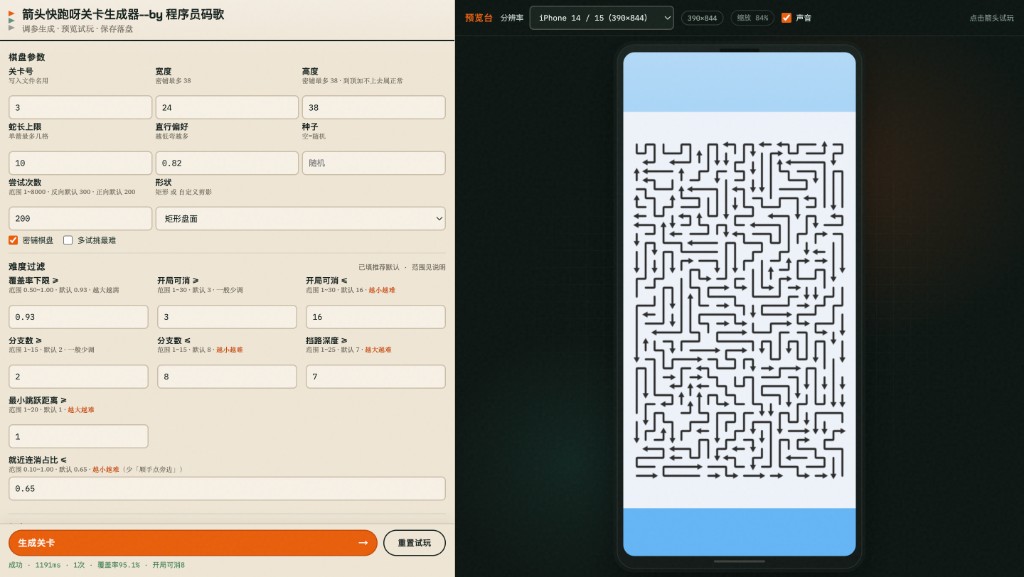
□ 5198 能打开,看到调参区、预览试玩区、生成关卡按钮
□ 你清楚:这是工具页,不是将要上架的小游戏包

Level Studio 调参区与预览试玩区

【不对就】

现象 处理
端口占用 再跑一次 npm run dev;或查 5198/5199 占用
npm run dev 找不到 确认 cwd 是 Studio 仓根(有 package.json

Step 3.1.2 界面怎么用(人话)

你要会的事
棋盘参数 宽、高、seed、attempts;先改小盘面练手
形状 矩形乱线关 / 自定义剪影(内置库或上传图)
生成 点「生成关卡」,看指标与成败原因
预览 直接点箭头试玩;乱了就「重置试玩」
保存 下载 JSON 看数据结构(样本即可)

【Prompt · 让 AI 对着仓讲解(只读)】

我已克隆 Level Studio 到 ~/game-arrows-level-studio。
请只读打开该仓库,用中文给我一张「界面操作说明书」(不要改代码、不要据此生成微信小游戏工程):
1) 左侧每个主要参数是干什么的
2) 生成成功/失败时我该看哪里
3) 下载的 JSON 大概有哪些字段(列字段名 + 一句话含义)
4) 我怎样用 seed 复现同一关
强调:Studio 仅作算法与数据对照,游戏工程将在 ~/my-minigame 另建。

Step 3.1.3 完整练手:生成并试玩 1 关

【你只做这些】

  1. 形状选矩形,宽高先偏小
  2. 生成关卡,等到完成或失败
  3. 在预览台点箭头试玩
  4. 下载 JSON 放到 ~/my-minigame/design/studio-samples/(只当样本,不要求整仓拷进游戏)

【验收】

□ 至少成功生成 1 关并能在预览里点
□ 有一份 JSON 样本用于后面「对照字段」


3.2 生成算法与「必可解」思路(从工具学到文档)

跟做不必手写论文级算法,但必须懂:关卡不是随机乱扔,而是「能清完」才算合格。
学完后,这些思路要落到你自己的游戏工程里,而不是继续依赖 Studio 页面。

Step 3.2.1 人话版算法

【Prompt · 可直接复制】

结合 ~/game-arrows-level-studio 源码(只读)与我的 design/GDD.md,
用中文讲解「关卡是怎么生成的」,面向不会读代码的人:

1) 输入:棋盘大小、seed、attempts、形状蒙版等
2) 过程:大致分几步(例如:铺可玩格 → 放置折线箭头 → 模拟点击顺序)
3) 输出:JSON 里和「一条箭头 / 一关」相关的关键字段
4) 失败常见原因:格子太少、attempts 用尽、剪影过瘦
5) 哪些思路适合搬进「我自己的微信小游戏工程」(原则即可,不要直接抄目录结构)

写成 design/LEVEL-PIPELINE.md。
不要改 Studio 代码;不要在 Studio 里搭小游戏工程。

【验收】

□ 有 design/LEVEL-PIPELINE.md
□ 你能讲清:Studio 教你什么、游戏工程里要自己实现什么

Step 3.2.2 必可解

必可解 = 至少存在一种操作顺序,能达成胜利条件,而不是开局死锁。

思路 人话
边生成边验证 候选关用同一套规则在内存里「试玩」;过不了就丢弃重试
已知解构造 先定可点顺序,再摆元素,天然有解
结构校验 字段缺失、越界、空盘直接拒绝
attempts 同一 seed 多试;失败换参

【Prompt · 钉死验收标准】

根据 GDD 与 LEVEL-PIPELINE.md,写 design/SOLVABILITY.md:
1) 什么叫「本游戏一关必可解」(玩家能听懂的话)
2) 关卡入库前检查清单(结构 + 可解/试玩模拟)
3) 检查失败时游戏里如何提示(禁止静默卡死)
4) 建议在「游戏工程」里的脚本名,例如 npm run level:check

明确:这些检查将实现在 ~/my-minigame,不是改 Studio。
不要写代码;只要文档。

【验收】

□ 有 design/SOLVABILITY.md
□ 写清「实现位置 = 游戏工程」

Step 3.2.3(可选)Studio 里验证逻辑在哪

在 ~/game-arrows-level-studio 里(只读),找出与「生成后校验 / 可解 / 模拟消除」最相关的文件路径,
各用一句话说明职责,并注明:游戏工程应「参考思路自写」,不要 import Studio 包。
不要贴大段源码,不要修改文件。

3.3 用 OpenSpec 自建工程并执行 tasks(主工程)

学完 Studio、文档写好后:~/my-minigame用 OpenSpec 把「可玩小游戏」拆成 change → 直接 /opsx-apply 做完。
接 M2 切图、实现玩法与关卡,都放进同一套 tasks,不必再回 M2。

Step 3.3.1 explore:把实现范围聊清楚(仍不写代码)

【Prompt · 可直接复制】

/opsx-explore

我在 ~/my-minigame,已有:
- design/GDD.md、design/DESIGN.md
- design/LEVEL-PIPELINE.md、design/SOLVABILITY.md
- assets/ui、assets/icons(M2 切图)
- design/studio-samples/ 里 Studio 导出的 JSON 样本(若有)
- Level Studio 仓在 ~/game-arrows-level-studio(只读对照,不当模板)

请只讨论、先不写代码。帮我列出「自建微信小游戏工程」要实现的任务边界:
1) Canvas 2D + TypeScript + Vite;H5 调试 + 可打微信产物
2) 玩法与关卡:参考 LEVEL-PIPELINE / Studio 算法思路在本工程自写;禁止复制 Studio 当主包
3) ≥3 关明文 JSON + level:check(按 SOLVABILITY)
4) 把 assets 接到首页/局内/至少一个弹窗;等比、缺图占位
5) platform 抽象;AppID 占位 YOUR_APPID
6) 不做内购、不做广告、不依赖 Studio 5198/5199 运行时

最后输出一张「实现拍板表」:必做 / 明确不做 / 验收标准(人话)。

【验收】

□ 有实现拍板表,且写明「工程 = my-minigame,Studio 只对照」

Step 3.3.2 propose:生成可执行 tasks

【Prompt · 可直接复制】

/opsx-propose

根据刚才的实现拍板表与 design/ 下文档,创建 change:playable-minigame-from-gdd
生成 proposal / design / tasks。

tasks 必须覆盖(可拆多步):
A. 脚手架:Vite + TS + Canvas;npm run dev;微信构建产物说明
B. 按 GDD 实现主路径玩法(进局、操作、胜负/重来)
C. 关卡数据目录 + 加载 ≥3 关;字段参考 studio-samples,以本项目 README-LEVELS 为准
D. level:check(结构 + 尽量可解校验)
E. 接入 assets/ui、assets/icons(Logo/开始/HUD/一弹窗);弹窗单层;预留胶囊安全区
F. 验收说明:H5 怎么点、微信开发者工具导入哪一层

硬性禁止:
- 以 Level Studio 仓库为模板生成/改造项目
- 运行时请求 Studio API

不要开始写业务代码;等我确认 tasks 后再 apply。

【验收】

openspec/changes/... 下有 proposal / tasks
□ tasks 里能看到脚手架、玩法关卡、接图、check

Step 3.3.3 apply:按 tasks 直接做完

【你只做这些】

  1. Cursor 执行 /opsx-apply(或按 OpenSpec 提示对该 change 逐项 apply)。
  2. 每一项 Accept 后,按 tasks 里的验收自己点一遍。
  3. 全部做完后跑:
cd ~/my-minigame
npm run dev
# 另开:按 README 打微信产物,用开发者工具导入预览
npm run level:check   # 若 tasks 里定了别的脚本名,用文档里的

若某步失败,把报错贴回 Cursor:

change playable-minigame-from-gdd 当前 task 失败。
报错:【粘贴】
请最小修复后继续同一 task,不要新开无关重构,不要改成依赖 Studio。

【验收】

□ H5:首页 → 开局 → 过关或失败重来 → 能换关(≥3 关)
□ 能看到 M2 切图(开始钮 / HUD 等)
level:check 能拦住故意破坏的坏关
□ 微信开发者工具预览的是 my-minigame 产物
□ 工程未把 Studio 当运行时依赖

Step 3.3.4(可选)补强提示词

若 apply 中途 AI 漏接图或漏关卡,可对当前 change 追加一句再 apply:

补做未完成项:确保 assets 已接到主路径;关卡 JSON ≥3;弹窗一次只开一层;主按钮避开微信胶囊。
仍禁止基于 Studio 脚手架。

3.4 换皮与进阶(可选)

  • 大改玩法:改 GDD + 重跑 3.2 文档 + 新开/更新 OpenSpec change
  • 需要更多关卡素材:Studio 再导出 JSON → 拷进本工程 → 再跑 level:check
  • 有余力:在本工程做迷你关卡编辑器(与 Studio 分离)

M3 总验收

□ Studio 已用来学习:能生成、试玩、看懂 JSON
□ 有 LEVEL-PIPELINE / SOLVABILITY
□ 已用 OpenSpec propose + apply 在 my-minigame 做出可玩工程(非改 Studio)
□ ≥3 关 + 玩法 + level:check + M2 切图已在主路径
□ H5 / 微信预览主路径可玩


下一章

M4 · 多端构建与正式包

M4 · 多端构建与正式包纪律

主线发布微信包;H5 用于调试。抖音 / 支付宝:本 SOP 主线不要求发包。

当前工作区

Cursor / 终端 小游戏项目 ~/my-minigame
导入微信工具 build:wechat 产物目录(不是源码根)
禁抄 附录 E

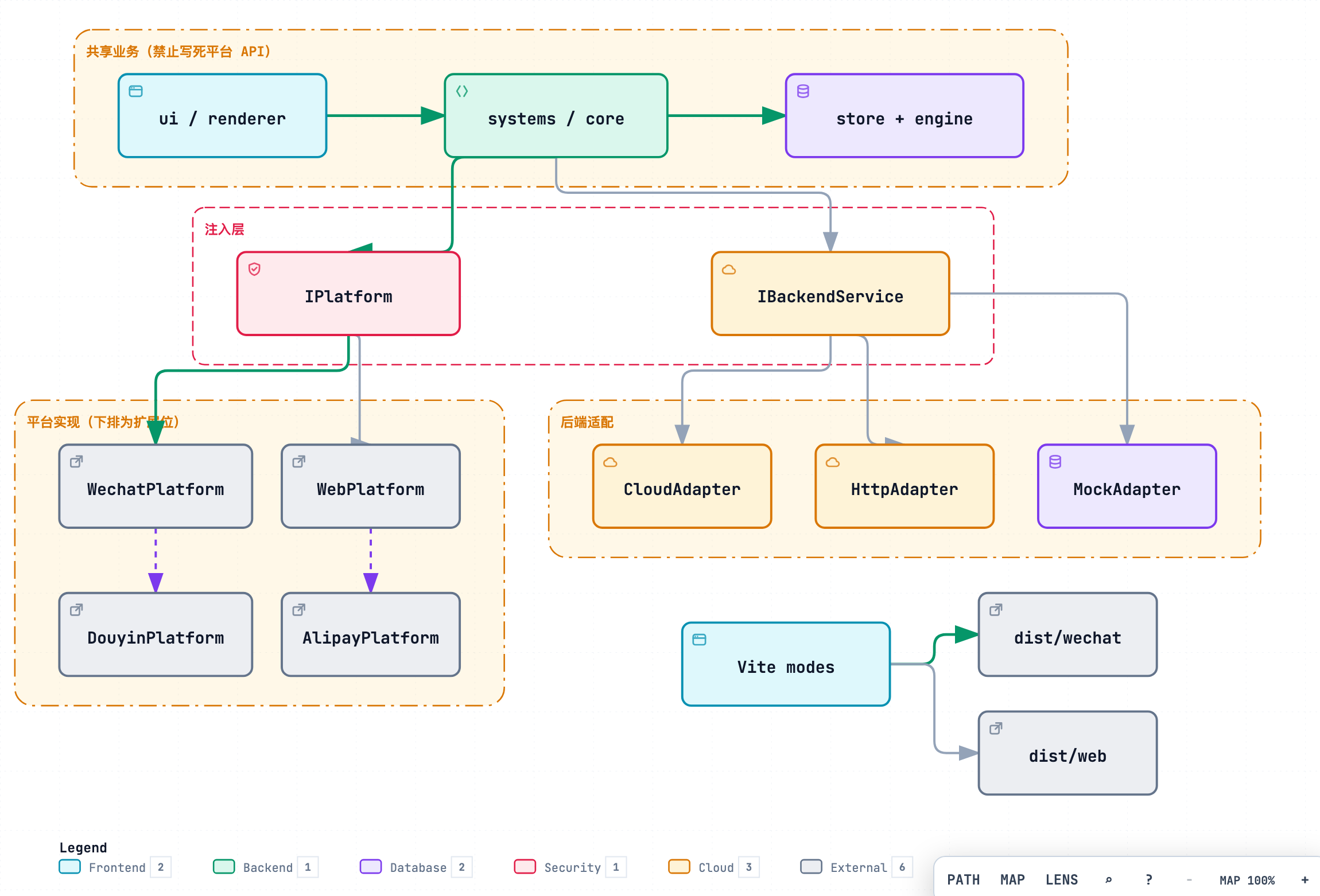
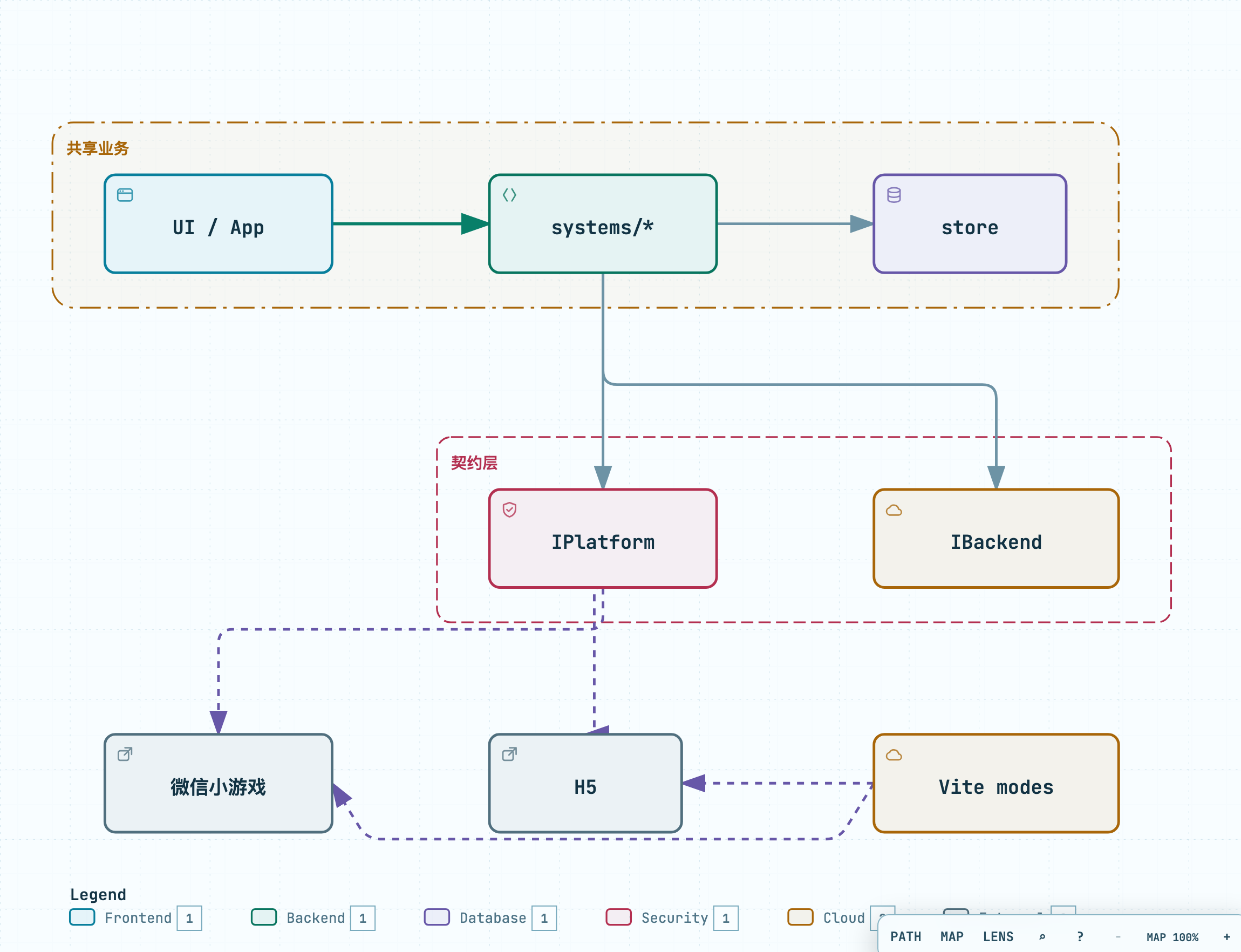
多端架构

客户端分层

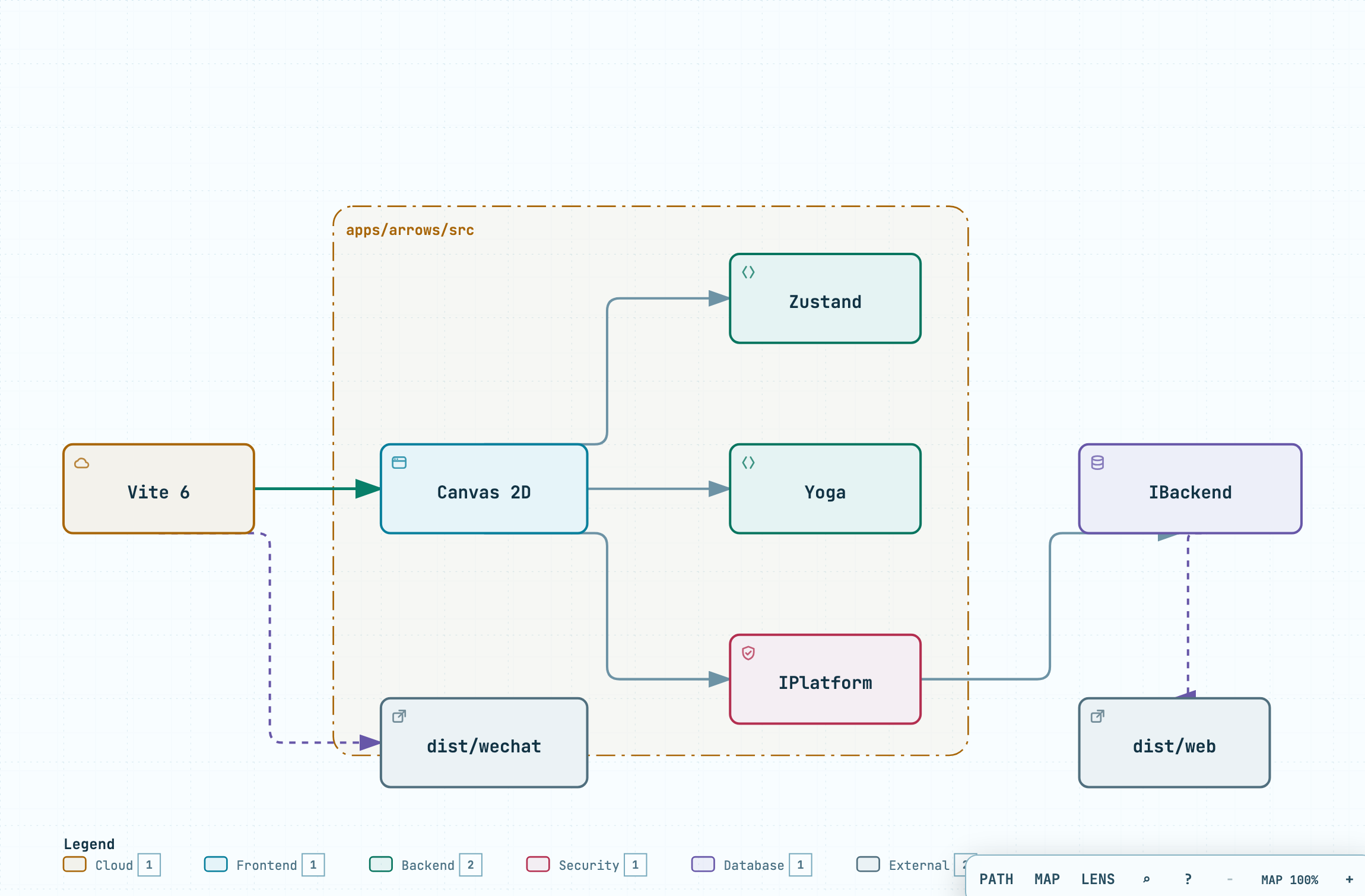
展开说明:博客 05

三条命令(名字以你 package.json 为准,须写进 README-DEV):

命令 用途
npm run dev H5 调试
npm run build:wechat 打出可导入开发者工具的目录 → 体验版 / 真机预览用这个
(正式)同上或 build:wechat 且关闭作弊 提审上传前再确认检查表

Step 5.1 固定命令与 README-DEV

【Prompt】

整理 package.json 脚本,保证至少有:
- dev:H5 调试
- build:wechat(或等价):产出可导入微信开发者工具的目录
在 README-DEV.md 用中文写死:
1) 改 AppID 改哪个文件
2) 跑哪条命令出包
3) 开发者工具「导入」应选哪个文件夹(产物路径)
4) 如何预览到真机
不要加自动上传密钥。

【验收】

□ 只看 README-DEV.md 能打出微信包并导入工具
□ H5 dev 仍可用


Step 5.2 正式包关掉调试礼物

【Prompt】

增加「正式构建」与「调试」区分:
- 调试开关默认仅在 dev/H5 可用
- wechat 正式构建必须关闭作弊类开关;若可能被打进包,构建期直接失败或替换成安全默认值
把检查表写入 README-DEV.md 一节「上传体验版前检查」,列出开关文件路径。

【验收】

README-DEV.md 里有可打印的检查表
□ 正式包里点不到「跳关」之类入口


Step 5.3 体验版主路径手点

【你只做这些】

  1. npm run build:wechat(或 README 写明的命令)。
  2. 开发者工具导入产物目录 → 上传体验版。
  3. 真机按序点:冷启动 → 进一局 → 过关或失败重来 → 设置(若有)。
  4. 弱网:开飞行模式再进游戏一次。

【验收】

□ 全程无白屏、无卡死
□ 弱网时:有可读错误提示,能进内置兜底关;不是一直转圈无反馈


换皮清单

  • 换 AppID / 游戏名配置
  • 构建命令别改乱
  • 仍不要在业务里直写 wx.

下一章

M5-后台远程包与Admin

M5 · 后台、远程包与 Admin

本章分两档,对应毕业标准(见 00):

目标 是否需要云
本地金牌(必做) Mock/本机 HTTP + 本机 Admin,能查到你刚玩的记录
生产金牌(可选) 真机真登录 + 生产数据里 Admin 能查到自己 要:腾讯云 微信云函数

展开说明:博客 06

后台 · 资源 · 部署

规则只写一份;Mock / 云函数 / HTTP 可切换。顺序:Mock → 本机最小 HTTP →(可选)上云

生产两条路(与 M0 Step 0.6 选型一致),做通一条即可

路线 形态 合法域名
A. 腾讯云轻量 自建 Node HTTP +(可选)同机 Admin 要配 request 合法域名(HTTPS)
B. 微信云开发云函数 wx.cloud.callFunction(经 Platform/Backend 封装)+ 云数据库 云开发调用通常走微信通道;自建 Admin/HTTP 仍要域名

当前工作区

Cursor / 终端 小游戏项目 ~/my-minigame
对照(可选) 本仓 admin/deploy/cloudfunctions/ 目录划分;附录 E
禁止 生产密钥写入前端;把 AccessKey / 云开发密钥贴进聊天

5A · 本地金牌(必做)

数据流(先看懂再动手):

游戏(HttpAdapter)--submit--> 本机 API :8787 --写入--> 同一份存储
Admin 浏览器 ----------getPlayer/list--> 本机 API :8787 --读出--> 你刚玩的记录

H5 开发仍可用 Mock 离线点;要勾本地金牌时,游戏改为走本机 API(与 Admin 同一端口)。

Step 6.0 新建 GRADUATION.md(没有就建)

在游戏工程根目录创建 GRADUATION.md

# 毕业记录
银牌:未
Admin:未
广告:未
状态:进行中

后面每通一项改一行。


Step 6.1 登录契约 + Mock(先能离线玩)

【Prompt】

为项目加最小后端抽象 IBackendService(或等价):
- login(mock 固定玩家 id:mock-player-001,刷新不变)
- submitProgress 或 submitScore
- getPlayer(id)、listPlayers(给 Admin)
提供 MockAdapter,npm run dev 默认可离线玩。
预留 HttpAdapter / CloudAdapter 接口,先不必实现。
业务只调 getBackendService(),不要满项目 fetch 或 wx.cloud 裸写。
不要接支付。

【验收】

□ H5 能「登录」;刷新后仍是 mock-player-001


Step 6.2 本机最小 HTTP API(本地金牌关键 · 勿跳)

没有这一步,Admin 连 8787 会空转。

【Prompt】

在游戏工程增加本机最小 API(建议 Node + Express,端口默认 8787):
- 进程独立于 Vite,npm 脚本例如:dev:api
- 内存或本地 JSON 文件存储玩家进度(路径写进 README)
- 路由至少:POST /login、POST /progress(或 /score)、GET /players、GET /players/:id
- 开启 CORS,允许本地 Admin 与游戏 H5 源访问
- 实现 HttpAdapter:游戏通过 http://127.0.0.1:8787 调用上述接口;用环境变量切换 Mock / Http(如 VITE_BACKEND=http)
- README-API.md:如何同时启动 npm run dev 与 npm run dev:api
玩家 id 开发期可继续用 mock-player-001(login 固定返回),但 progress 必须写入 API 存储,供 Admin 读取。
不要接支付;不要写真实 AppSecret。

【你只做这些】

  1. 按 README 起 dev:api,浏览器打开 http://127.0.0.1:8787/health(若有)或按文档测一条 GET。
  2. 游戏切换到 HttpAdapter(或 VITE_BACKEND=http)。
  3. 游戏里登录并打一局触发 submit。

【验收】

dev:api 能常驻听 8787(或文档写明的端口)
□ 游戏走 HTTP 提交后,用 curl/浏览器能在 API 侧读到该玩家进度(不一定先开 Admin)

【不对就】

现象 处理
端口占用 换端口并同步改游戏与 Admin 配置
游戏仍 Mock 检查环境变量是否生效、是否重启了 npm run dev

Step 6.3 本机 Admin:能看见自己

【你要的最小 Admin】

  • 登录墙(管理员账号密码,与玩家 id 分开)
  • 玩家列表 + 详情
  • API 基址默认 http://127.0.0.1:8787

【Prompt】

做一个最小 Admin(目录建议 admin/,可用 Vite+React+表格):
- 环境变量配置 API 基址,默认 http://127.0.0.1:8787
- 管理员登录墙(密码放 API 或 Admin 服务端环境变量,不要写死进前端仓库明文文档)
- 玩家列表 + 详情,数据全部来自 Step 6.2 的 API
- README-ADMIN.md:三条命令如何同时开 游戏 dev、dev:api、Admin
不要做给公网裸奔的无鉴权后台。

【你只做这些】

  1. 按 README 同时开:游戏 + API + Admin。
  2. 游戏再打一局(HTTP)。
  3. Admin 登录 → 找到 mock-player-001(或你的固定 id)。

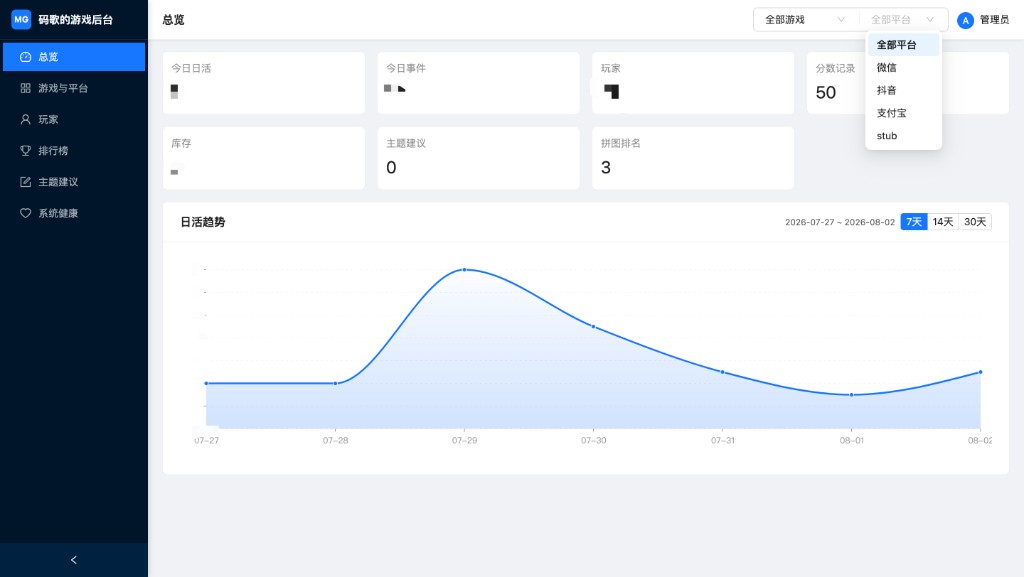
成品参考(管理后台 · 总览;跟做时页面可更简,但要有登录墙 + 能看见玩家):

管理后台总览

【验收 · 本地金牌】

□ Admin 能看到刚玩的记录(分数或进度任一)
□ Admin 有登录墙
GRADUATION.md 写明:Admin:本地已通(金牌本地)

【不对就】

现象 处理
Admin 空列表 是否跳过了 6.2;游戏是否仍在纯 Mock、未打到 API
跨域失败 API CORS;或 Admin 开发代理到 8787
连错地址 Admin 的 API 基址是否为本机

Step 6.4 远程资源(可选 · 不挡本地金牌)

关卡多了再做。本地金牌总验收 不要求 本步。

【Prompt】

支持从远程或本地加载资源清单(图或关卡 JSON):版本号、失败重试、没网用内置 1~3 关兜底。
说明如何用 npx serve 起本地 static。本阶段明文即可。

【验收 · 可选】

□ 断网有兜底关;有网能拉到清单

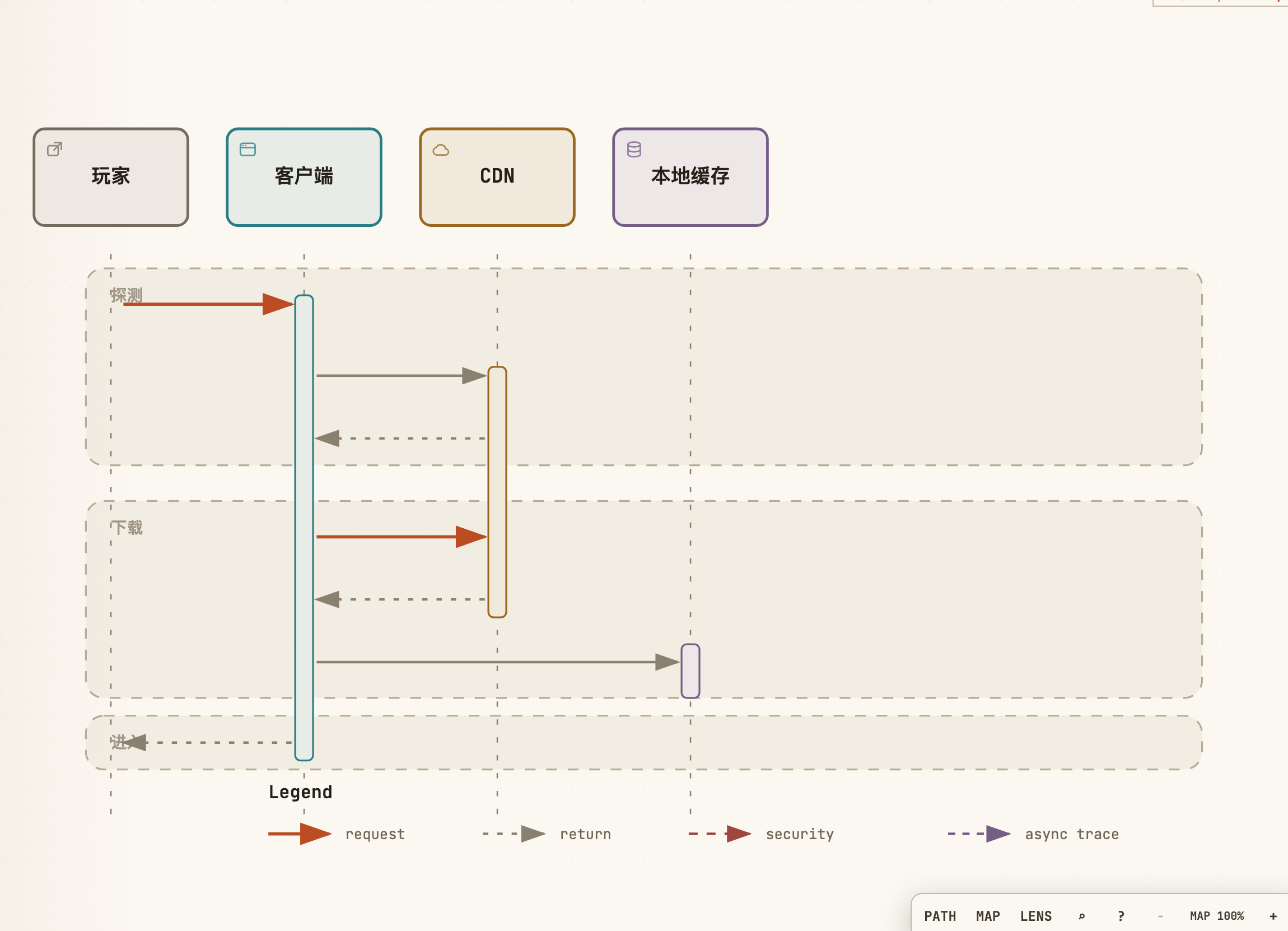
成品参考:

远程下载


5B · 生产金牌 · 路线 A:腾讯云轻量 + 自建 HTTP

没买主机时跳过 6B/6C,本地金牌仍算达标。

前置: 已完成 6.2 本机 HTTP + 6.3 Admin(同一套 API 契约)。本路线是把这套 API 搬到腾讯云并配 HTTPS,不是从零另写一套。

Step 6.10A 购买与登录轻量

【你只做这些】

  1. 腾讯云控制台 → 轻量应用服务器 → 选最低够用档(系统选 Ubuntu 或厂商「应用镜像 · Node」若有)。
  2. 防火墙/防火墙放行:22(SSH)、80443(有的面板叫「防火墙规则」)。
  3. 用 SSH 登录(密钥或密码,以购买页为准):
ssh root@YOUR_SERVER_IP
# 或 ssh ubuntu@YOUR_SERVER_IP
  1. 安装 Node LTS(以 Node 官网或 nvm 文档为准),确认:
node -v
npm -v

【验收】

□ SSH 能进机器
node -v 有输出
□ 80/443 已放行

Step 6.11A 部署 API + HTTPS

【Prompt】

根据我在 Step 6.2 已跑通的本机 HTTP API,写一份 DEPLOY-ALIYUN.md:
- 环境变量清单(无真值,只有名字:PORT、ADMIN_USER、ADMIN_PASS、WX_APPID、WX_SECRET 等)
- 本机如何 build;如何用 scp/rsync 或 git pull 同步到服务器
- 服务器上用 PM2 启动 API(进程名 game-api)
- Nginx 或 Caddy 反代到本地 PORT,并申请 HTTPS(域名用 YOUR_DOMAIN;Let's Encrypt)
- 健康检查路径 /health
- 微信登录:服务端用 code2session(AppSecret 只放服务器环境变量)
- Admin 可同机反代到另一路径或端口,必须有登录墙
不要写任何真实密钥。

【你只做这些】

  1. 按文档把代码放到服务器,配置 .env(勿提交 git)。
  2. pm2 start(或文档等价命令)保证重启后还在。
  3. 配好 https://YOUR_DOMAIN → 反代 API。
  4. 浏览器打开 https://YOUR_DOMAIN/health

【验收】

/health 在公网 HTTPS 下成功
□ 服务器上 echo $WX_SECRET 类命令不要写进脚本仓库;Secret 仅在环境变量

Step 6.12A 微信合法域名 + 真机验收

体验版/正式版真机请求你的 HTTPS 时,在公众平台配置(「开发 → 开发管理 → 开发设置」,菜单名以后台为准):

配置项 填什么
request 合法域名 https://YOUR_DOMAIN(不含路径)
downloadFile 合法域名 若远程包也在同域或 COS 域名,一并填写
不校验合法域名 仅开发者工具;真机不要长期勾着当正式方案

【你只做这些】

  1. 域名按微信当期要求可配(个人主体常见需备案,以页面为准)。
  2. 保存合法域名,等生效。
  3. 游戏切到 HttpAdapter / 生产 API 基址。
  4. 真机体验版:登录一局 → Admin(生产库)能看到该玩家。

【验收 · 生产金牌 · 腾讯云】

□ 真机登录成功(非仅 H5 mock)
□ Admin 连生产数据能看到该次记录
GRADUATION.mdAdmin:生产已通(腾讯云 HTTP)

【不对就】

现象 处理
request:fail HTTPS、合法域名、证书链
工具行真机不行 工具勾了「不校验合法域名」
502 PM2 是否挂了;Nginx 反代端口是否对

Step 6.13A(可选)远程包挂腾讯云 COS

关卡/美术包体积大时:

  1. 开通 对象存储 COS,建 Bucket(读权限按你的策略,常见「公共读」仅用于无敏感资源)。
  2. 上传 manifest + 资源;游戏 downloadFile 域名填 COS 域名。
  3. 密钥只放上传脚本环境变量,不进前端。

对照本仓思路:pack:remote 一类打包后再上传(自己项目用 AI 写最小上传脚本即可)。


5C · 生产金牌 · 路线 B:微信云开发云函数

Step 6.10B 开通环境与初始化

【你只做这些】

  1. 确认 M0 已有云开发环境;没有则在公众平台 / 开发者工具开通。
  2. 开发者工具打开游戏工程产物或可上传的小游戏项目,打开 云开发 面板。
  3. 记下环境 ID,写入本地 .env.example 占位:CLOUD_ENV=YOUR_CLOUD_ENV_ID(真值放未跟踪配置)。

【Prompt】

在现有 IBackendService 上实现 CloudAdapter(微信小游戏):
- 初始化云开发:wx.cloud.init({ env: 配置里的环境 ID })
- login:走云函数(例如 auth-login),用微信 code 换玩家 id;Secret 只在云函数环境,禁止进客户端
- submitProgress / getPlayer:各对应一个云函数名,名字放配置 cloud.functions.*,禁止业务里硬编码字符串散落
- H5 仍用 MockAdapter;仅微信构建走 CloudAdapter
- 云函数目录建议 cloudfunctions/ 或 functions/,每个函数一个文件夹,含 package.json 与入口 index
- 规则逻辑尽量抽到 shared 模块,云函数只做:取 openid → 调 core → 读写数据库
- README-CLOUD.md:如何在开发者工具上传/部署云函数、如何开云数据库集合
不要接支付;不要把 AppSecret 写进前端。

【验收】

□ 开发者工具能部署至少一个云函数(如 auth-login
□ 模拟器或真机调用云函数返回成功(不是 env not found

Step 6.11B 云数据库与「看见自己」

云函数路线的「看见自己」二选一即可(都算生产金牌):

方案 做什么 GRADUATION.md 写法
控制台 云开发数据库集合里能看到你的记录 Admin:生产已通(云函数·控制台查库)
管理端 有登录墙的 Admin/只读接口能列出该玩家 Admin:生产已通(云函数·管理端)

【你只做这些】

  1. 云开发控制台 → 数据库 → 建集合(如 players),权限勿选「所有用户可读写」长期裸奔。
  2. 游戏真机登录并提交一局进度。
  3. 用上表任一方案确认「看见自己」。

【Prompt · 若做管理端】

给 Admin 增加受登录墙保护的只读玩家列表(可云函数 HTTP 触发或小主机),数据来自云开发库。
不要把云开发高权限密钥暴露到浏览器。
游戏玩家路径继续走云函数。

【验收 · 生产金牌 · 云函数】

□ 真机走云函数登录成功,玩家 id 稳定
□ 控制台 管理端能看到该次进度/分数
GRADUATION.md 按上表写明方案
□ 客户端仓无 AppSecret、无云开发高权限密钥

【不对就】

现象 处理
env not found 环境 ID 是否与工具选中环境一致
云函数 timeout / 找不到模块 依赖是否安装在函数目录;shared 是否打进函数包
数据库权限拒绝 集合权限;是否用了云函数服务端 SDK 写库
H5 误调 wx.cloud 保证 H5 仍走 Mock

Step 6.12B 云函数纪律(对照仓同款)

不做
业务只调 getBackendService() UI 里直接 wx.cloud.callFunction
云函数名进配置表 字符串散落各文件
规则一份(core),函数薄封装 每个函数复制一套排行榜逻辑
上传前在函数目录装好依赖 依赖上级目录 ../../shared 却不打包

本仓可对照目录名:deploy/cloudfunctions/(只看结构,不抄密钥)。见 附录 E


6D · 生产共用纪律

【你只做这些】

  • 本地 / 预发 / 生产配置分开
  • 密钥只放:腾讯云环境变量、或云函数环境变量 / 云开发「环境设置」
  • README 写清:禁止用生产库当日常沙箱

【验收】

□ README 写了「禁止用生产库点着玩」
□ 前端仓无可提交的 AppSecret / AccessKey


换皮清单

  • 换游戏 id / 表名 / 云函数名配置
  • Admin 菜单可加减,但「能看见自己」勿删
  • 腾讯云与云函数可并存开发期,正式构建只启用一种 Adapter
  • 仍不做内购

M6 总验收

本地金牌(跟做默认)

□ 6.2 本机 API 已跑通;游戏 submit 打到 API
□ 本机 Admin 能查到刚玩的记录
□ Admin 有登录墙
□ (6.4 远程包可选,不要求)

生产金牌(二选一)

A 腾讯云:HTTPS + 合法域名 + 真机登录 + Admin/库能看见自己
或 B 云函数:真机云函数登录 + 控制台查库或管理端能看见自己


下一章

M6-主体资质备案与提审

M6 · 主体资质、备案与提审

本章以本人在后台操作为主;AI 仅起草文案。过审结果由主体方负责。

以各平台当期后台为准。 下文为个人 · 微信 · 仅 IAA 主线的操作口径,非法律意见。

当前工作区

操作 微信公众平台 / 备案站点(浏览器)
提审包 游戏工程正式构建产物
软著样例 ../软著申请/ 仅对照填法;禁止把样例证件/签章当自己的材料提交或进公开仓

展开说明:博客 07
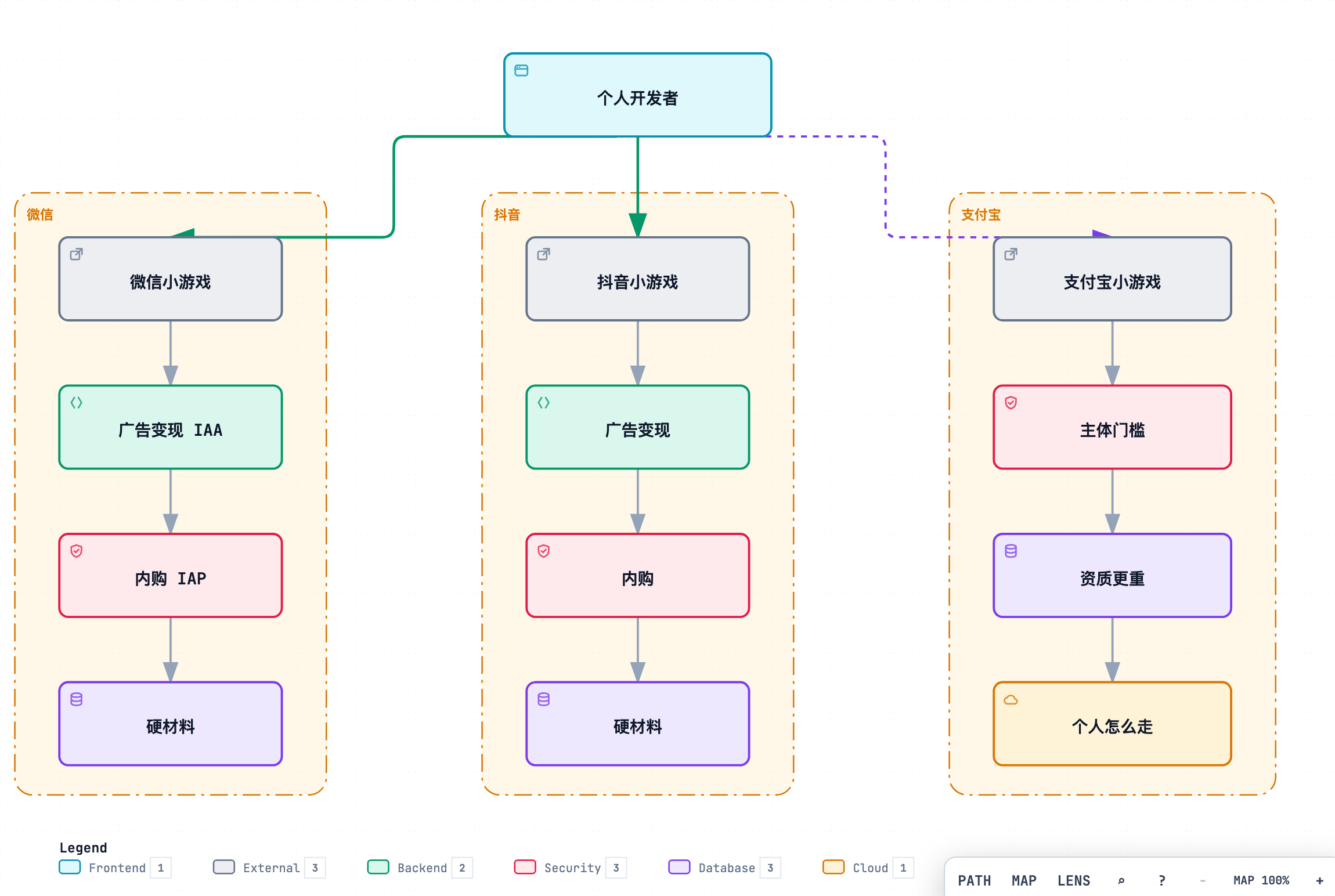
个人门槛图:三端门槛

提审发布


7.1 是否需要软著(主线可整节跳过申请)

你的情况 软著
微信 · 个人 · 不开虚拟支付 · 只靠广告(主线) 可以不申请跳到 7.4
抖音 小游戏 要软著(非主线步骤;见附录 A)
微信内购 / 企业主体 / 支付宝 一般要软著,超出主线
提审时微信要求补版权证明 再按 7.2 补交

主线读者: 不要为了样例目录去办软著耽误过审。
需要软著(抖音或提审要求):做完 7.2、7.3 再进 7.4。


7.2 软著申请流程(需要的人再走)

材料准备与审查周期以中国版权保护中心当期为准。微信个人仅 IAA 主线不依赖软著下证后再提审。

办理入口(个人免费常见路径):中国版权保护中心

Step 7.2.1 注册并实名

【你只做这些】

  1. 注册个人账号
  2. 实名:身份证正反面、手持身份证等(按页面)
  3. 等认证过(常见 1~2 天)

【验收】

□ 能进入计算机软件著作权登记相关入口


Step 7.2.2 填报

【你只做这些】

重点字段:

字段 填写要求
软件全称 「软件」或「系统」 结尾,如「某某某软件」
简称 与微信游戏名尽量一致(上抖音时更关键)
版本 如 V1.0;后续材料全部统一
分类 应用软件(按官网选项)
发表状态 按真实情况;常见选 未发表(通常少交发表证明)
源程序量 与程序鉴别材料行数一致

开发环境可写:TypeScript、Vite、微信小游戏等——和真实技术栈一致。

【验收】

□ 全称/版本/简称你抄在纸上,后面做材料不改口


Step 7.2.3 程序鉴别材料

规则大意(细节以官网为准):

  • 源码文档:前 30 页 + 后 30 页
  • 每页足够行数的有效代码;常见要求无空行凑页、页眉带软件全称+版本
  • 别加乱七八糟封面

【AI 可帮忙】

根据我的项目源码,按软著「前30页+后30页」习惯帮我整理成可粘贴进 Word 的正文,
页眉用:【软件全称】【版本】。不要包含 .env、密钥、身份证。
说明总行数让我好填「源程序量」。

【人必须做】

□ 自己打开 Word 看是不是你的项目
□ 没有密钥、没有别人隐私


Step 7.2.4 文档鉴别材料

说明 + 界面截图。材料需覆盖:启动(含健康忠告/适龄若有)、主界面(能看见名字)、核心玩法、关键弹窗。

【AI 可帮忙】起草说明书目录和段落;截图从真机或开发者工具导出。


Step 7.2.5 提交、签章、等证

  1. 上传材料
  2. 确认信息
  3. 下载签章页 → 打印 → 本人签字 → 拍照上传
  4. 等受理/审查邮件或站内信

【验收】

□ 状态不是「材料格式错误」卡死
□ 签章是你自己的字


7.3 软著注意事项(退回高发)

  1. 全称不以「软件/系统」结尾
  2. 申请表、页眉、说明书封面 三处名称/版本不一致
  3. 源程序量和材料对不上
  4. 未发表却乱交发表证明
  5. 说明书没目录、没关键界面、看不清游戏名
  6. 签章潦草或信息与系统不一致
  7. (抖音向)证书名和线上游戏名对不上

对照本仓:../软著申请/软著申请注意事项.md03-材料清单与提交步骤.md


提审被要求补软著怎么办?

别慌。把拒审原文贴给 Cursor 帮你列材料清单,然后走 7.2。
只补审核要的,别借机改版重做半个游戏。


7.4 主线必做:备案 · 隐私 · 体验版 · 提审

(个人微信仅 IAA、跳过软著的人从这里继续)

Step 7.4.1 备案(银牌关键 · 可勾选)

菜单名以后台为准;常见在公众平台首页或「设置 → 小程序备案 / 小游戏备案」。

【你只做这些】

  1. 登录 mp.weixin.qq.com → 进入你的小游戏账号。
  2. 找到 备案 入口,点开始/继续。
  3. 按页填写:主体信息(个人)、管理员人脸核验、紧急联系人等。
  4. 填写游戏名称、简介等;与将要上架的名字保持一致
  5. 按提示上传证件 / 截图材料(以后台清单为准)。
  6. 提交后盯进度:待核验 / 管局审核 / 已完成(文案因地区而异)。
  7. 未到「可提审 / 备案完成」一类状态前,不要做 7.4.4 正式提审。

【验收】

□ 后台备案进度已走完,或明确显示可以提审
□ 备案中的游戏名与你准备上架的名字一致

【不对就】

现象 处理
找不到备案入口 帮助中心搜「小游戏备案」;或账号类型/主体未满足当期条件
人脸失败 换网络/按提示重试;证件信息与微信实名一致
名称冲突 按提示改名后再提,并同步改游戏内显示名
卡在管局很久 以短信/站内信为准;勿重复提交冲突材料

Step 7.4.2 隐私与权限三处一致

【你只做这些】

  1. 列出你真实用到的:登录、存储、广告…
  2. 隐私政策、弹窗说明、后台权限申请 三处同一套说法
  3. AI 可起草,你对照真实 SDK 勾选

【Prompt】

根据我列出的真实能力清单【粘贴】,起草微信小游戏隐私政策要点和首次弹窗文案。
不要编造我没用到的通讯录/定位。

【验收】

□ 没申请「用不着」的权限
□ 用户能点到政策链接


Step 7.4.3 体验版再点透

冷启动 → 开局 → 结算 → 失败/复活(若有)→ 榜/任务(若有)→ 弱网。
正式包检查表(M5)再勾一遍。


Step 7.4.4 提审与拒审

  1. 上传 → 提交审核
  2. 过了就发布
  3. 挂了:只改他提的点,更新说明写清楚改了哪条

【验收】

□ 微信里能搜到你的游戏名(银牌达成)


自检表(提审前)

□ 类目是游戏且和内容相符
□ 隐私/弹窗/后台权限一致
□ 未开通广告就不要假按钮骗点
□ 调试开关没进正式包
□ 适龄/健康忠告(按类目要求)看得到
□ 软著:主线可跳过 / 或已按 7.2 搞定 / 或已准备补交


换皮清单

  • 游戏名、简称、备案名一起改
  • 上抖音:先软著再谈那边后台
  • 仍不开个人微信内购

下一章

M7-流量主游戏圈与激励视频

M7 · 流量主、游戏圈与激励视频

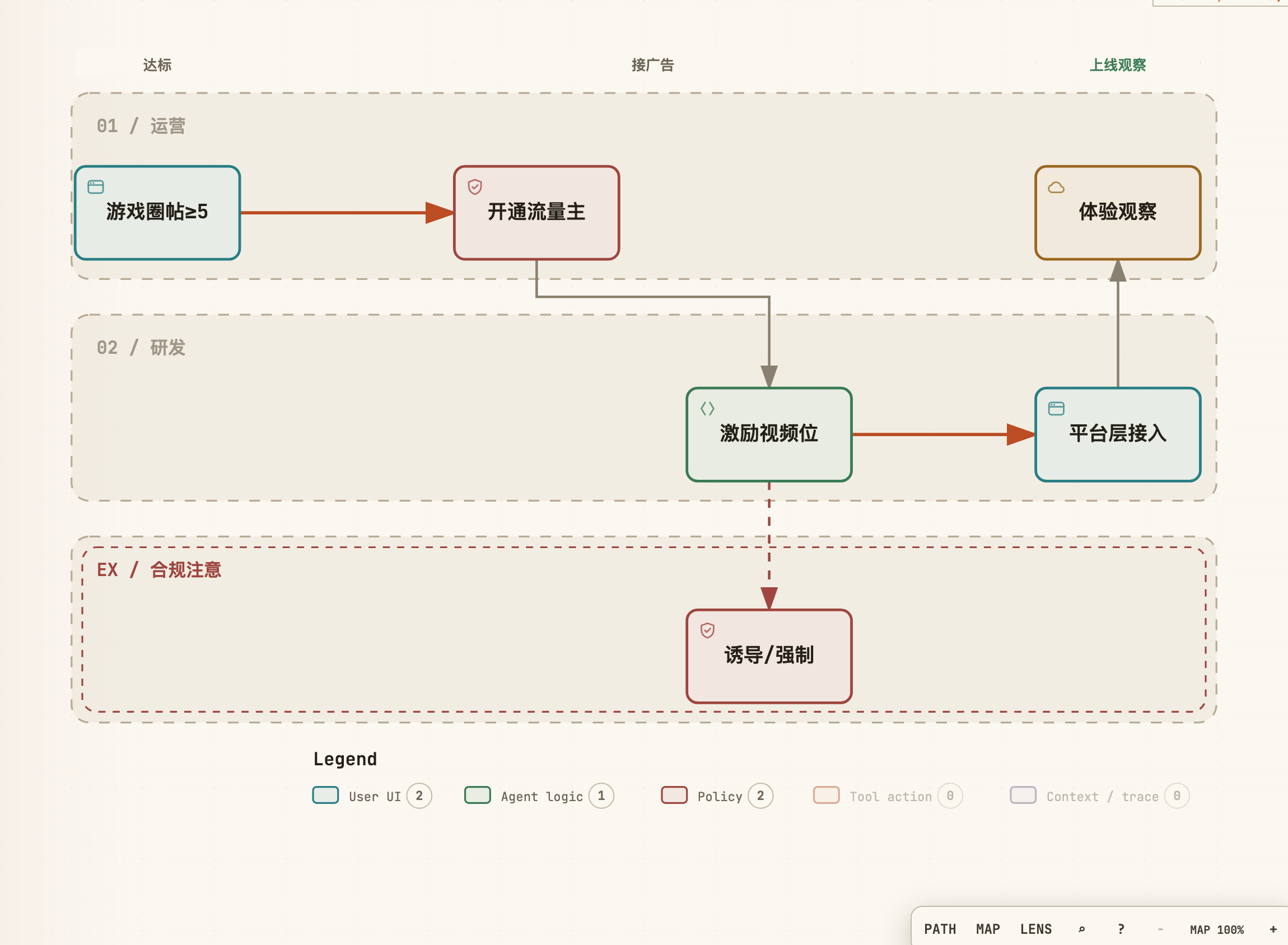
开通流量主并接入激励视频;玩法与留存优先于广告密度。

当前工作区

代码 小游戏项目 ~/my-minigame
后台 微信公众平台 · 流量主 / 游戏圈
毕业 未开通流量主 → 勾 金牌待激活,仍算跟做达标(须完成 G2)

展开说明:博客 08

样例资料(可选):GDD · 激励广告复活 F012(失败看广告复活流程)· 资料总览

广告接入

开通门槛(UV 等)以微信后台当期为准

怎么判断有没有开通(文字示意):

  • 后台能进入流量主/广告组件、能创建激励视频广告位 → 已开通 → G1
  • 入口灰色、提示未达门槛、或没有广告位创建 → 未开通 → G2

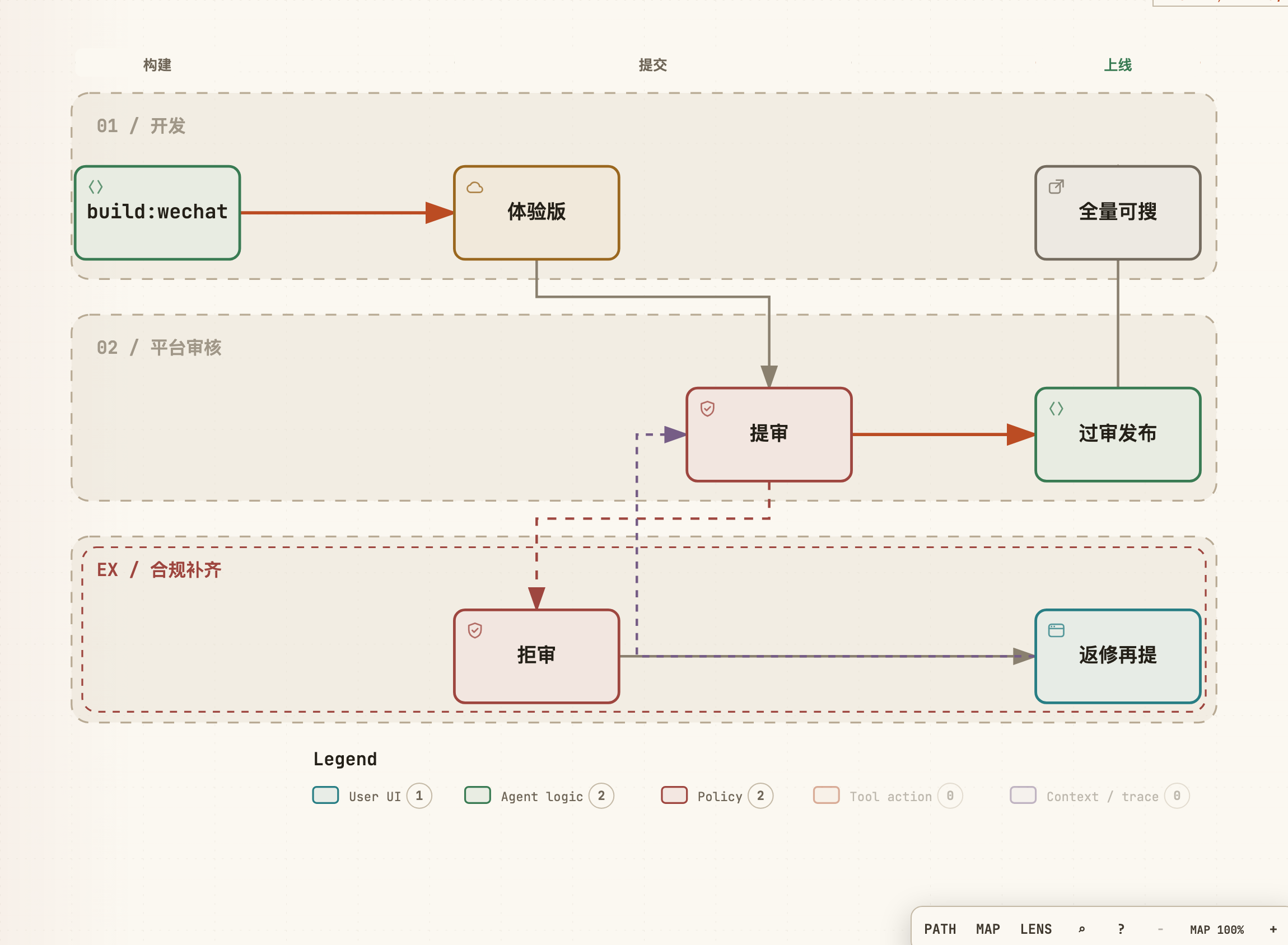
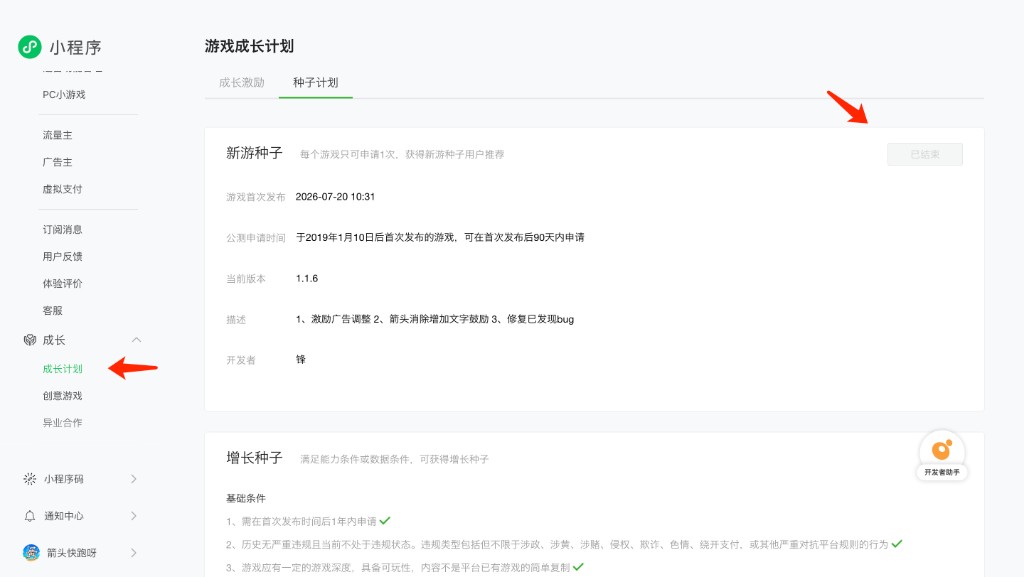
Step 8.0 新游推广(种子计划)· 先读再点

微信对新上架小游戏有 成长计划 / 种子计划(新游种子) 一类推荐入口(菜单名以后台为准,常见在「成长 → 成长计划 → 种子计划」)。

微信后台 · 游戏成长计划 / 新游种子

硬规矩(跟做必记):

  1. 每个游戏通常只能申请 1 次(后台常写「每个游戏只可申请 1 次」)——点申请前当作「一次性门票」。
  2. 申请前务必保证:主路径无明显 bug、能玩、能过关、广告/体力等关键功能已完善;半成品上推荐,等于浪费这次机会。
  3. 常见还有首发后若干天内可申请等时限(如 90 天一类),以你后台当期文案为准;过了窗口或状态变成「已结束」就没了。
  4. 没准备好:先别点申请。先把体验版 / 正式版主路径打通,再开推荐。

【验收 · 读懂即可】

□ 你知道入口在「成长计划 / 种子计划」附近
□ 你清楚:新游种子 只有一次,bug 多或功能残缺时不要开


Step 8.1 游戏圈(可选 · 不挡毕业)

与流量主开通是否挂钩 以微信后台当期为准。有入口就做;没有或暂时不做,在 GRADUATION.md 写一句「游戏圈:跳过」即可,不影响 G1/G2 毕业勾选

【你只做这些】(选做)

  1. 按微信指引开通/关联游戏圈(菜单名以后台为准)。
  2. 官方帖内容完整;发布节奏:隔天 1 篇
  3. 每日任务若有「逛游戏圈」,接入真实场景,不做虚假完成。

【验收 · 若做了】

□ 玩家能从游戏进到圈子或完成任务闭环
□ 已发至少 1 篇介绍帖


Step 8.2 看你有没有流量主(毕业相关)

【你只做这些】

进公众平台看流量主/广告相关能力是否已开通。

  • 已开通 → G1
  • 没有 → G2(金牌待激活)

Step 8.3 G1:激励视频真跑通

【Prompt】

通过 IPlatform 接微信激励视频:
- 业务只关心「看完 / 失败 / 取消」
- 用于复活或体力等,必须可跳过或有非广告出路,禁止不看广告就不能玩
- 加载失败要降级提示
- 广告位 ID 放配置/环境变量,不要写进仓库明文文档

【验收】

□ 真机看完视频,奖励到账
□ 关掉广告或失败时,游戏仍可继续(降级)


Step 8.4 G2:金牌待激活(没开通流量主)

【你只做这些】

  1. 代码和弹窗按 G1 接好,用模拟成功/失败打通逻辑。
  2. 按钮文案别写「必看广告才能玩」。
  3. GRADUATION.md 写明:
银牌:已可搜
广告:已预埋,待流量主开通后换真广告位
Admin:见 M6
状态:金牌待激活

【验收】

□ 体验版里模拟看广告流程能走完
□ 你清楚开通后只差填广告位和打开真组件


换皮清单

  • 奖励改成你的体力/提示
  • 仍禁止强制广告墙
  • 广告位 ID 不进公开文章

下一章

M8-上线后第一周

M8 · 上线后第一周

发布后第一周操作如下。

当前工作区

Admin 本地或生产(与你在 M6 勾的档一致)
后台 微信公众平台数据 / 游戏圈

Step 9.1 每天看一眼 Admin

【你只做这些】

□ 登录有没有异常涨
□ 有没有明显刷榜
□ 主题建议/反馈(若有)扫一眼

崩了把日志打码丢给 Cursor:

线上报错如下(已打码):
【粘贴】
请给最小修复,不要重构。

Step 9.2 游戏圈节奏

隔天一篇:玩法介绍 / 小技巧 / 更新说明轮流发布。频率:隔天 1 篇。

若首发后仍在「新游种子」可申请窗口内、且主路径已稳定:去后台「成长计划」申请(见 M7 Step 8.0)——每游戏通常仅一次,半成品勿开


Step 9.3 毕业总表

状态
微信可搜可玩(银牌)
激励视频真跑通,或已按 M8 勾「金牌待激活」
Admin:本地能查到自己(金牌本地)
Admin:真机+生产能查到自己(金牌生产:腾讯云或云函数,可选) □ / 跳过
正式包无调试作弊入口
隐私 / 权限弹窗与政策一致

银牌 + 广告项 + Admin 本地 勾完 → 本 SOP 默认毕业(金牌本地)。
生产 Admin 为加分项。后续加关与日常运营不在本章范围。


换皮清单

  • 按你的系统增减监控项
  • 不使用诱导分享或虚假广告数据

相关

样例资料(箭头快跑呀)

跟做时可选对照:用来定玩法、列界面、写出图 Prompt。不必整份抄进你的工程;你的主线仍以各章步骤与验收为准。

资料 主要用在 怎么用
GDD · 游戏设计 M1 写自家 GDD 时对照 / M3 规则与关卡 / M7 激励复活 抄结构:一句话、规则、页面清单、广告复活
设计 · UI 结构 M1 写 DESIGN.md / M2 出图清单 对照 ASCII 分区与弹窗母版
出图提示词 · 中文 M2 Skill 生图 按屏复制;控件建议绿/黑底便于切图
出图提示词 · 英文规范 M2(可选) 与中文版同一套屏;要英文 prompt 时用

和主线的关系

  • 银牌:GDD 只看到「核心玩法 + 最少页面」即可;拼图墙 / 全主题可后补。
  • 本地金牌:M6 Admin、M8 广告以各章步骤为准;GDD 里的云开发 / 广告节作对照。
  • 大改玩法时:GDD/设计仅作结构参考,Prompt 与验收按你的新玩法改写。

箭头快跑呀 游戏设计文档(GDD)

阶段: Game Design Document
日期: 2026-06-20
输入模式: 代码库 + OpenSpec + 设计文档反推
业务 SSOT: README.mdopenspec/changes/arrow-puzzle-game/doc/GAME-DESIGN-PLAN.md、当前实现代码
范围外清单(不进入后续实现): Capacitor 原生壳(OpenSpec 提及,非当前主线);拼图云同步(当前未实现)


一、产品定位

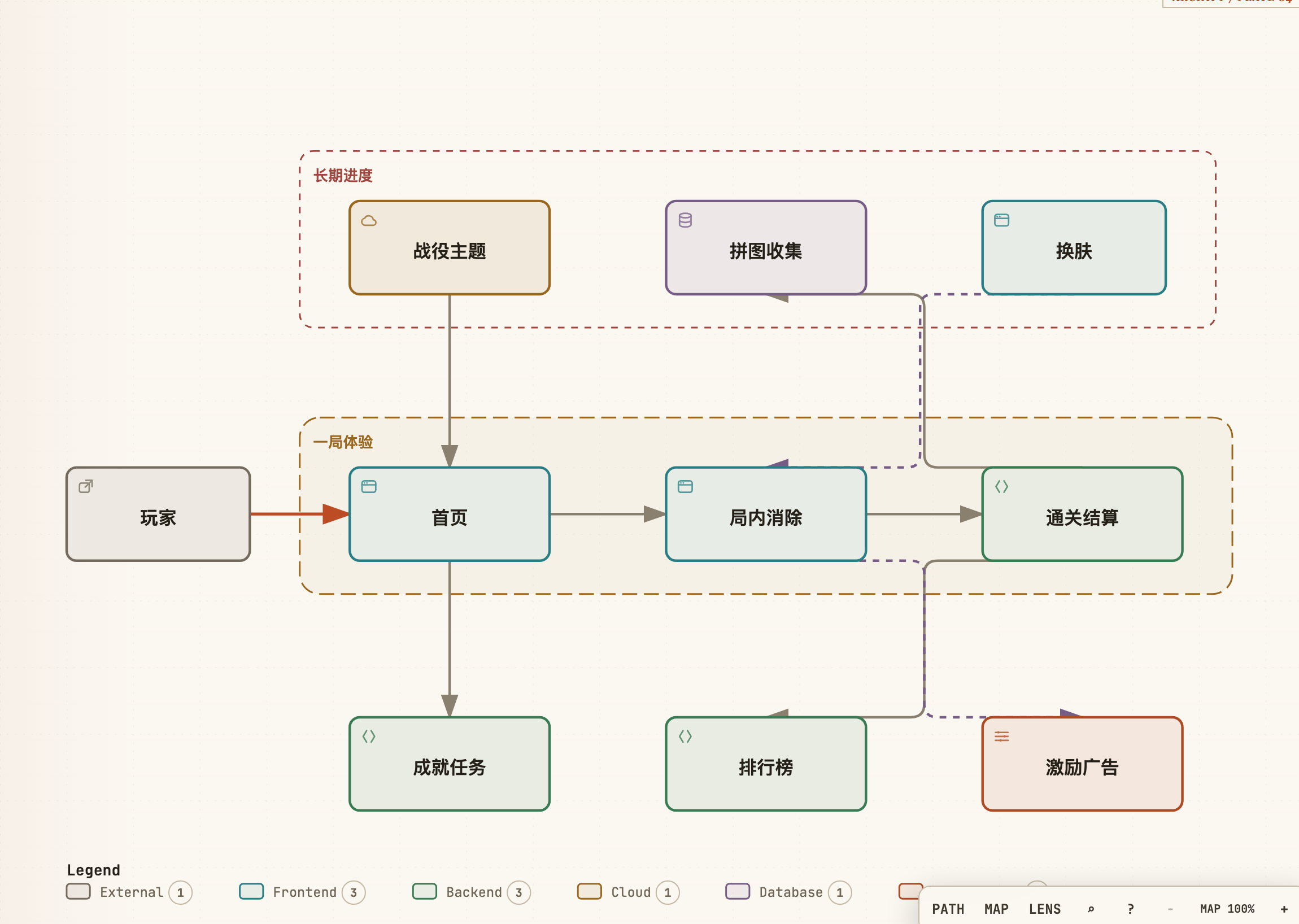
  • 一句话定位: 一款竖屏箭头消除逻辑益智微信小游戏,玩家按正确顺序点击多格折线箭头使其沿路径飞出棋盘;通关推进战役关卡,收集主题拼图,解锁新主题与局内换肤。
  • 目标用户: 休闲益智、微信小游戏泛用户;推断以碎片化时间、轻逻辑解谜偏好者为主(来源=设计默认;独立 PRD 未明确画像)。
  • 平台:H5 Web;竖屏;开放数据域好友榜;远程 bundle 加密关卡分发。
  • 屏幕: 设计基准 375×667 竖屏,随屏宽等比缩放。
  • 页面范围: 首页(主菜单)、游戏中页面、关卡完成/失败/复活弹窗、拼图奖励与点亮弹窗、主题介绍弹窗,及设置/排行榜/成就/换肤/每日任务/体力不足等模态层。

二、系统设计

2.1 核心玩法 - 箭头消除(F001)

  • 系统概述: 多格折线箭头逻辑解谜。每条箭头占据有序格子路径,玩家点击后若前方畅通则沿折线飞出消除;被挡则扣命并给出错误反馈。
  • 核心流程:
    1. 消耗体力进入关卡,棋盘播放入场动画。
    2. 玩家点击一条箭头。
    3. 可移除:箭头沿路径蛇形飞出,占用格释放,连击计数更新。
    4. 不可移除:扣 1 生命,播放错误反馈动画。
    5. 可使用提示(消耗提示道具)或辅助线(若配置开启)。
    6. 清空所有箭头 → 关卡完成;生命归零或倒计时归零 → 失败。
  • 规则定义:
  • 箭头模型: 有序格子路径 + 头部射出方向(U/D/L/R);最后一格为头。
  • 可射出判定: 从头部沿方向逐格检查至边界,路径上无其他剩余箭头占据 → 可移除。
  • 射出动作: 沿路径飞出动画,格子释放。
  • 错误点击: 被挡箭头点击 → 扣生命(关卡 JSON 可配 maxLives,默认 3)。
  • 计时: 单局默认 6 分钟sessionSeconds: 360);归零且未清盘 → 失败。
  • 输入锁定: 动画/入场期间不可点击;playing 态支持双指缩放棋盘。
  • HUD 布局(375 设计稿):
  • 顶栏(约 100px):设置、关卡标题、生命(心形)、倒计时
  • 中部:棋盘(几何/动物/水果轮廓蒙版)
  • 底栏(约 80px):提示、辅助线等工具按钮
  • 资源关联: 触发 F002 星级与分数;触发 F003 拼图流程;F014 Combo 奖励;加密关卡 JSON(远程 bundle)。
  • 边界与异常:
  • 关卡加载失败需 fallback 至本地 bundled levels。
  • 快速连点:动画中忽略重复有效输入(来源=工程默认)。

2.2 关卡完成与星级评分(F002)

  • 系统概述: 清盘后展示通关结果、星级、分数累计与下一关入口;与拼图弹窗互斥。
  • UI 母版: modal_result(★代表屏);标题槽「关卡完成!」
  • 核心流程:
    1. 清盘且庆祝动画就绪。
    2. 若无拼图/主题弹窗排队 → 显示「关卡完成!」弹窗(奖杯、1–3 星、「挑战下一关」、左上 Home)。
    3. 若有拼图奖励 → 抑制本弹窗,改走 F003 拼图流程。
    4. 通关奖励:+1 体力、记录星级、提交排行榜分数、检测成就。
  • 规则定义:
  • 星级: 0 失误 → 3 星;1 失误 → 2 星;≥2 失误 → 1 星。
  • 分数: 一关一分累计 totalScore;日榜用当日通关数 dailyScore
  • 资源关联: F006 体力 +1;F008 排行榜提交;F009 成就检测。
  • 边界与异常:
  • shouldSuppressLevelCompleteOverlay() 为 true 时不渲染本弹窗。
  • 重复点击下一关需防连点。

2.3 拼图奖励与点亮流程(F003)

  • 系统概述: 战役主题下的长期收集玩法;过关获得拼图块,玩家在首页 3×4 墙手动点亮拼入。
  • UI 母版(有新增碎片时的弹窗链):
  • 主题介绍 → 复用 modal_content标题槽为战役名(如「动物世界」)
  • 恭喜获得碎片 → ★ modal_reward 代表屏;标题槽「恭喜获得碎片」
  • 点亮碎片 → 复用 modal_content标题槽「点亮碎片」/「拼接成功」
  • 核心流程(有新增碎片时):
    1. 通关 → (可选)主题介绍弹窗(解锁新主题时,如第 30/60 关)
    2. 「恭喜获得碎片」弹窗:大图预览 +「立即点亮拼接」+「继续挑战下一关」
    3. 点「立即点亮」→ 「点亮碎片」弹窗:同款拼图墙 + 绿光待拼槽 +「挑战下一关」
    4. 点击绿槽 → 碎片飞入动画;可连续拼多块
    5. 全部待拼块拼完 →「拼接成功」态
    6. 「挑战下一关」/「继续挑战下一关」→ 进入下一战役关
  • 规则定义:
  • 每主题 12 块(3×4),在主题 30 关内渐进获得(puzzleEarnedCount:L1 得 1 块,L30 得满 12 块)。
  • 新过关可能产生 0 或 1+ 待拼槽;存于 themePuzzles[themeId].pendingSlots
  • 已拼槽存于 placedSlots;未获得/未拼为浅灰块 + 白线(#DADADA / #FFFFFF)。
  • 主题内 30 关全通时,未拼块 回填全亮backfillThemePuzzleIfComplete)。
  • 资源关联: F004 战役主题;各主题 puzzleAsset 整图(如 classic-arrow/full)。
  • 边界与异常:
  • 动画进行中底部按钮仍显示,不闪烁隐藏。
  • 本地持久化 themePuzzles云同步快照暂不包含,跨设备拼图进度可能丢失。

2.4 战役主题系统(F004)

  • 系统概述: 将 90 关分为三个叙事/视觉主题包,驱动首页展示与解锁节奏。
主题 ID 名称 关卡范围 解锁条件
classic-arrow 经典箭头 1–30 默认解锁
animal-world 动物世界 31–60 完成第 30 关
fruit-rainbow 缤纷水果 61–90 完成第 60 关
  • 展示模式: 三主题统一 puzzle 拼图墙(非旧版横向擦除/分角色切图)。
  • 首页定位: 默认展示主题随最高解锁关自动定位(1–30 → 经典;31–60 → 动物;61+ → 水果);未解锁主题显示锁定横幅 + 灰色占位图。
  • 与换肤区别: 战役主题管关卡段与首页拼图;换肤(F010)管局内配色/箭头色,二者独立。
  • 边界与异常: 主题切换仅展示已解锁主题;锁定主题不可开始对应段关卡。

2.5 首页(主菜单)(F005)

  • 系统概述: 游戏入口与战役进度展示中心,承载主题切换、拼图收集预览、开始游戏及外围功能入口。
  • 核心流程:
    1. 加载远程资源包后进入首页。
    2. 浏览当前战役主题,左右箭头切换。
    3. 查看 3×4 拼图墙进度、当前关卡文案「第 N 关」。
    4. 点击「开始游戏」→ 校验体力(F006)→ 进入游戏中页面。
    5. 可选:底部 Dock 打开设置、排行榜、成就、换肤、每日任务、游戏圈。
    6. 可选:拼图墙点击待拼绿槽 → 碎片飞入点亮动画。
  • 布局元素(375 设计稿):
  • 顶栏:左上设置(40×40)、右上体力胶囊(闪电 + 数字 + 恢复倒计时)
  • 居中 Logo(约 160×160)
  • 主题区:装饰横幅(主题名 + 进度 N/12)+ 拼图墙(352×235)+ 左右主题切换箭头 + 「待拼 N」角标
  • 「第 N 关」文案
  • 主 CTA「开始游戏」(约 200×58)
  • 底部 Dock:左列(游戏圈、每日任务),右列(成就、主题换肤、排行榜)
  • 规则定义: 三战役主题各 30 关,拼图各 12 块;主题解锁见 F004。
  • 资源关联: bg-menu.jpg、战役主题插画、themePuzzles 本地存档。
  • 边界与异常:
  • 任意模态打开时,首页底层不可点。
  • 体力不足时开始游戏需拦截(分享/广告补体力,见 F006)。
  • 拼图动画进行中禁止重复点击槽位。

2.6 体力系统(F006)

  • 系统概述: 控制开局频次的核心资源门控。
  • 核心流程:
    1. 用户点击「开始游戏」→ 检查体力。
    2. 体力 ≥ 1 → 扣除 1 点 → 进入游戏。
    3. 体力 = 0 → 弹出体力不足/分享弹窗(staminaModalView)。
    4. 分享成功 → 奖励 +1 体力。
  • UI 母版: 复用 modal_confirm(代表屏见 F012 失败弹窗);标题槽「体力不足」
  • 规则定义:
  • 上限 8 点;每 5 分钟 恢复 1 点。
  • 开始游戏消耗 1 点;通关奖励 +1 点(STAMINA_LEVEL_COMPLETE_REWARD)。
  • 分享成功奖励 +1 点(STAMINA_SHARE_REWARD)。
  • 首页胶囊展示当前值;未满显示倒计时,满额显示「已满」。
  • 资源关联: F005 开局拦截;F007 每日任务补充;F013 激励广告(细则未完全成文)。
  • 边界与异常:
  • 关卡加载失败、未成功进入游戏:是否扣体力需与实现一致(建议不扣,来源=工程默认)。
  • 提示/额外体力看广告范围:产品细则未完全成文。

2.7 每日任务(F007)

  • 系统概述: 提升留存与微信生态渗透的日常目标。
  • UI 母版: 复用 modal_content(代表屏见 F011 设置);标题槽「每日任务」
任务 ID 名称 奖励
checkIn 每日签到 +1 体力
share 每日分享 随机池:体力/提示/辅助线(权重 50/30/20)
gameClub 游戏圈 +1 体力(加圈/每日浏览)
desktop 桌面入口 +1 体力
myMiniProgram 我的小程序入口 +1 体力
  • 资源关联: F006 体力;F014 提示/辅助线;F005 首页入口。
  • 边界与异常:
  • 游戏圈需隐私授权。
  • 分享需离开小程序再返回校验。

2.8 排行榜(F008)

  • 系统概述: 总榜、日榜(云数据库);好友榜(微信开放数据域独立 context build)。
  • UI 母版: 复用 modal_content(代表屏见 F011 设置);标题槽「排行榜」
  • 核心流程:
    1. 用户从首页或结算相关入口进入排行榜。
    2. 切换总榜 / 日榜 / 好友榜。
    3. 通关后自动提交分数。
  • 规则定义:
  • 总榜:totalScore 累计通关分。
  • 日榜:当日通关数 dailyScore
  • 好友榜:依赖微信开放数据域。
  • 资源关联: F002 通关分数提交。
  • 边界与异常:
  • H5 环境好友榜/云能力降级或隐藏。
  • 榜单加载失败:展示空态 + 重试(来源=工程默认)。

2.9 成就系统(F009)

  • 系统概述: 基于进度指标解锁徽章,弹窗队列展示。
  • UI 母版:
  • 成就列表 → 复用 modal_content标题槽「成就」
  • 解锁 toast → ★ modal_banner 代表屏;标题槽「成就解锁!」+ 成就名
  • 规则定义(示例,见 ACHIEVEMENT_DEFS):
  • 完成 10/50/100 关
  • 累计游玩 10 小时
  • 累计 30 星等
  • 资源关联: F002 通关进度;F005 首页成就入口。
  • 边界与异常: 多成就同时解锁时队列展示,避免弹窗互斥冲突。

2.10 换肤系统(F010)

  • 系统概述: 局内棋盘/箭头配色主题,与战役主题(F004)无关。
  • UI 母版: 复用 modal_content(代表屏见 F011 设置);标题槽「主题」
  • 规则定义:
  • 内容:默认、海洋、森林、星空、糖果、霓虹等(SKIN_THEMES)。
  • 弹窗分「主题」「箭头」两 Tab。
  • 选择后持久化本地存档,下一局生效。
  • 边界与异常: 与 F004 战役插画/拼图资源独立,互不影响。

2.11 设置中心(F011)

  • 系统概述: 背景音乐、音效、振动独立开关。
  • UI 母版: ★ **modal_content 母版代表屏标题槽**「设置」
  • 规则定义: 三项开关独立控制;持久化本地存档。
  • 边界与异常: 设置变更即时生效,不影响进行中关卡计时(来源=工程默认)。

2.12 激励广告 - 失败复活(F012)

  • 系统概述: 关卡失败时可看激励视频复活(恢复生命 + 重置倒计时)。
  • UI 母版: ★ **modal_confirm 母版代表屏标题槽**「挑战失败」
  • 核心流程:
    1. 生命归零或倒计时归零 → 失败弹窗。
    2. 用户选择看广告 → 广告完整播放 → 复活成功。
    3. 广告不可用 → 降级为重试/回首页。
  • 规则定义: 复活恢复生命并重置倒计时;具体次数上限与广告 ID 产品层未完全成文。
  • 边界与异常:
  • 广告播放失败/中途关闭:不复活,可重试(来源=工程默认)。
  • 除复活外,提示/体力看广告是否全面开放:待产品确认。

2.13 关卡生成与内容管线(F013)

  • 系统概述: 离线脚本生成战役关卡,加密打包进 remote-bundle。
  • 规则定义(level-generation OpenSpec):
  • 反向构造法保证 100% 可解;落盘前 validatePuzzle().ok
  • 覆盖率目标 ≥ 99%;难度随战役序号 L1→L90 单调递增
  • 形状:几何 + 动物/水果图标蒙版;棋盘尺寸与蛇长随难度变化。
  • 当前内容量:
  • 规划 90 关(3 主题 × 30 关)。
  • 远程 bundle 已含 level-01 ~ level-60;61–90 待补全。
  • 边界与异常: 远程 bundle 加载失败降级本地关卡;manifest 版本与客户端兼容需同步。

2.14 Combo 连击与局内道具(F014)

  • 系统概述: 连续成功移除的爽感反馈与道具奖励;提示/辅助线为跨关持久消耗品。
  • 规则定义:
  • Combo 激活: 6 秒内连续成功移除 3 次。
  • Combo 维持窗口: 5 秒。
  • 里程碑: 8 连击 → 辅助线 ×1;16 连击 → 提示 ×1。
  • 提示: 消耗 1 提示道具,高亮一条当前可移除箭头。
  • 辅助线: 若配置开启,展示引导线(具体表现依关卡/皮肤)。
  • 初始库存: 提示 1、辅助线 1(CONSUMABLES_CONFIG);上限 99。
  • 资源关联: F001 局内玩法;F007 每日分享随机奖励。
  • 边界与异常: Combo 英文 callout(Good/Excellent/Perfect);道具不足时按钮置灰。

2.15 微信登录与云开发(F015)

  • 系统概述: 微信登录、云数据库排行榜;游客降级。
  • 边界与异常: H5 无微信能力时隐藏相关入口;云同步不含 themePuzzles(见 F003)。

三、数值平衡

3.1 关键数值表

参数 来源 设计意图
游戏名称 箭头快跑呀 baseConfig.productName 对外品牌名(是否终稿待确认)
设计分辨率 375×667 竖屏 GAME_DESIGN.refW 移动端等比缩放基准
战役总关数(规划) 90 campaignThemes.ts 3 主题 × 30 关长期目标
已打包关卡(当前) 60 remote-bundle/manifest.json 水果主题 61–90 扩展中
每主题拼图块数 12 DEFAULT_PUZZLE_GRID 3×4 首页收集墙粒度
体力上限 8 STAMINA_MAX 控制日开局频次
体力恢复 1 点 / 5 分钟 STAMINA_RECOVER_MS 自然回流
开局消耗 1 体力 StaminaManager.consumeForGame 每局门控
通关体力奖励 +1 STAMINA_LEVEL_COMPLETE_REWARD 通关正反馈(是否导致无限刷关待 A/B)
分享体力奖励 +1 STAMINA_SHARE_REWARD 裂变激励
默认生命 3 GAME_DESIGN.maxLives 关卡 JSON 可覆盖
单局计时 6 分钟 GAME_DESIGN.sessionSeconds 全局倒计时压力
提示初始 1 CONSUMABLES_CONFIG.hintBalance 上限 99
辅助线初始 1 CONSUMABLES_CONFIG.guideBalance 上限 99
Combo 激活 6 秒内 3 次成功移除 COMBO_CONFIG 技巧奖励窗口
Combo 维持 5 秒 COMBO_CONFIG 维持连击
Combo 奖励 8 连→辅助线×1;16 连→提示×1 COMBO_CONFIG.milestones 局内道具补充
星级 0 误→3★;1 误→2★;≥2 误→1★ PuzzleSession 技巧评价
拼图获得曲线 L1→1 块 … L30→12 块 puzzleEarnedCount 主题内线性渐进
每日分享随机 体力 50% / 提示 30% / 辅助线 20% DAILY_SHARE_REWARD_POOL 权重随机
关卡生成 确定性(种子/战役序号) 生成管线 非 gacha
激励广告填充率 缺失 依赖微信广告 SDK

3.2 资源流转

体力流转:

自然恢复(8 上限,5 分钟/点)
  → 开局 -1
  → 通关 +1
  → 每日任务/分享 +1
  → 体力不足 → 分享/广告路径(细则待成文)

局内流转:

点击箭头
  → 成功移除 → Combo 计数 → 里程碑奖提示/辅助线
  → 失败点击 → 扣生命
  → 生命=0 或 时间=0 → 失败 → F012 复活?
  → 清盘 → 星级/分数/成就 → F003 拼图? → F002 完成弹窗

宏观循环:

首页(F005) → 消耗体力(F006) → 游戏中(F001) → 清盘
  → 体力+1、拼图块入 pending(F003)
  → 弹窗分支:主题介绍(F004) → 获得碎片 → 点亮拼图 → 下一关
  → 首页拼图墙进度更新

3.3 概率公示

事件 概率 来源 说明
每日分享随机奖励 体力 50% / 提示 30% / 辅助线 20% DAILY_SHARE_REWARD_POOL 权重随机
关卡布局 非随机(战役序号确定性) 生成管线 可解性保证
激励广告填充 未公示 依赖 SDK

四、核心状态机

4.1 状态枚举

状态 含义 进入条件 退出条件
menu 首页 启动完成 / 从游戏中返回 开始游戏且体力足够
playing 游戏中 加载关卡成功 complete / gameover / 回首页

4.2 局内阶段(PuzzleSession.phase)

阶段 含义 进入条件 退出条件
playing 进行中 关卡开始 清盘或失败条件满足
complete 已清盘 所有箭头移除 弹窗分支结束
gameover 失败 生命或时间耗尽 复活/重试/回首页

4.3 通关弹窗优先级(互斥)

优先级 弹窗 条件
1 主题介绍 themeIntro 解锁新主题(如 L30/L60)
2 恭喜获得碎片 puzzleReward 有新拼图块
3 点亮碎片 puzzlePlace 用户选择立即点亮
4 关卡完成 levelComplete 无拼图流程排队

抑制规则:themeIntro / puzzleReward / puzzlePlace 任一激活时,不显示 levelComplete

4.4 状态流转图

                    ┌─────────────┐
                    │    menu     │
                    └──────┬──────┘
                           │ start(-1 体力)
                           ▼
                    ┌─────────────┐
          ┌────────│   playing   │────────┐
          │        └──────┬──────┘        │
     gameover             │ complete      │ 模态 overlay
          │                ▼               │(不改变 screen)
          │    ┌───────────────────┐      │
          │    │ themeIntro?       │      │
          │    │ puzzleReward?     │      │
          │    │ puzzlePlace?      │      │
          │    │ levelComplete?    │      │
          │    └─────────┬─────────┘      │
          │              │ next / home    │
          └──────────────┴─────────────────┘
                           │
                           ▼
                    menu 或 playing(下一关)

五、信息架构

5.1 页面层级结构

箭头快跑呀
├── 首页(menu)
│   ├── 战役主题舞台(拼图墙 ×3 主题轮播)
│   ├── 开始游戏 / 第 N 关
│   └── 底部 Dock(游戏圈、每日任务、成就、换肤、排行榜)
├── 游戏中(playing)
│   ├── 顶栏 HUD(设置、关卡、生命、计时)
│   ├── 棋盘区
│   └── 底栏工具(提示、辅助线)
└── 模态层(任意 screen 上叠加)
    ├── 关卡完成          [★ modal_result · 「关卡完成!」]
    ├── 关卡失败 / 复活广告  [★ modal_confirm · 「挑战失败」]
    ├── 主题介绍           [modal_content · 战役名]
    ├── 恭喜获得碎片        [★ modal_reward · 「恭喜获得碎片」]
    ├── 点亮碎片 / 拼接成功   [modal_content · 「点亮碎片」]
    ├── 设置              [★ modal_content · 「设置」]
    ├── 排行榜(总/日/好友)   [modal_content · 「排行榜」]
    ├── 成就              [modal_content · 「成就」]
    ├── 换肤(主题 / 箭头)   [modal_content · 「主题」]
    ├── 每日任务            [modal_content · 「每日任务」]
    ├── 体力不足 / 分享      [modal_confirm · 「体力不足」]
    └── 成就解锁横幅         [★ modal_banner · 「成就解锁!」]

= 母版代表屏,出图/切图优先;其余同母版仅换标题与内容区。详见 §5.3。

5.2 页面流程图

进入游戏 → 加载资源包 → 首页
  → 开始游戏(校验体力)→ 游戏中
      → 清盘
          → [有新主题?] 主题介绍
          → [有新拼图块?] 获得碎片 → 点亮拼图 → 下一关
          → [无拼图流程] 关卡完成 → 下一关 / 回首页
      → 失败 → 复活广告? / 重试 / 回首页

5.3 弹窗母版与标题槽

12 个居中弹窗 + 1 个顶浮横幅,UI 骨架归纳为 5 种母版(+ 预留 modal_rules)。每种母版出 1 张代表屏素材即可复用,业务弹窗由程序/CSS 叠加标题与内容区。

母版 ID ★代表弹窗 标题槽(示例) 复用弹窗(本屏标题)
modal_content 设置 F011 设置 排行榜、成就、主题、每日任务、主题介绍(战役名)、点亮碎片
modal_confirm 失败复活 F012 挑战失败 体力不足
modal_result 关卡完成 F002 关卡完成!
modal_reward 获得碎片 F003 恭喜获得碎片
modal_banner 成就解锁 F009 成就解锁! + 成就名

复用弹窗标题一览

弹窗 标题槽
排行榜 排行榜
成就列表 成就
换肤 主题
每日任务 每日任务
主题介绍 动物世界 / 缤纷水果(战役名)
点亮碎片 点亮碎片 / 拼接成功
体力不足 体力不足

最小出图建议:屏 3 关卡完成、屏 4 挑战失败、屏 5 获得碎片、屏 8 设置、屏 14 成就解锁横幅 — 共 5 张。详细元素映射见 doc/设计-元素实现清单.md §弹窗母版。


六、功能清单

功能 ID 功能名称 需求描述 缺失信息
F001 核心玩法 - 箭头消除 多格折线箭头,可射出判定,飞出/扣命,6 分钟计时 --
F002 关卡完成与星级 0/1/≥2 误对应 3/2/1 星;分数累计;与拼图弹窗互斥 --
F003 拼图奖励与点亮 12 块/主题,获得→点亮两步,飞入动画,本地存档 云同步未实现
F004 战役主题系统 经典/动物/水果三主题,各 30 关,L30/L60 解锁 61–90 关卡资源待补
F005 首页主菜单 375 布局,主题轮播,拼图墙,Dock,开始游戏 首页 redesign 定稿
F006 体力系统 8 上限,5 分钟/点,开局 -1,通关 +1,分享 +1 看广告补体力细则
F007 每日任务 签到/分享/游戏圈/桌面/我的小程序,5 项 --
F008 排行榜 总榜、日榜、好友榜(微信) H5 降级策略成文
F009 成就系统 进度型徽章,弹窗队列 --
F010 换肤系统 6+ 局内配色,与战役主题独立 --
F011 设置中心 BGM/SFX/振动开关 --
F012 激励广告复活 失败看广告复活,广告不可用降级 复活次数上限、广告 ID
F013 关卡生成管线 反向构造 100% 可解,L1–L90 递增难度 61–90 上线节奏
F014 Combo 与道具 连击奖提示/辅助线;提示高亮可移除箭头 --
F015 微信登录/云开发 登录、云榜;游客降级 拼图是否纳入云快照
F016 远程资源包 CDN bundle + 加密关卡 JSON 断网降级策略成文
F017 首页视觉 redesign 生图/换皮进行中 品牌 VI、Logo 终稿

视觉风格

PRD 提供的 Demo 链接(https://lovepupu.pages.woa.com/)及内嵌截图展示了以下视觉特征:

  • 画风: 像素风(Pixel Art),复古游戏美学
  • 色调: 存在两套主题配色 -- 粉紫暗色调(BlackPink 主题)和薄荷绿浅色调(Newjeans 主题),可能与选择的歌手关联
  • 角色风格: Q 版像素小人 + 像素炸弹角色,卡通可爱
  • UI 风格: 像素化按钮和面板,带描边和发光效果
  • 矿区: 斜 45 度纹理地面,物品(专辑封面为真实图片、其他为像素素材)散布
  • 底部栏: 半透明深色面板,展示 BGM 信息

概念图引用

  • Demo 链接: https://lovepupu.pages.woa.com/
  • PRD 内嵌截图: 9 张 TAPD 截图(游戏主画面、关卡弹窗、通关结算、失败结算、游戏规则弹窗、榜单页等)

箭头快跑呀 设计实施方案

阶段: Design Spec
日期: 2026-06-20
基于: doc/GDD-箭头快跑呀.mdopenspec/changes/arrow-puzzle-game/、当前实现代码

⚠️ 本阶段不写视觉风格文字描述。画风/配色/质感/光影/氛围词全部不在本文档定义

  • 精确风格由 Draft Concept §概念图引用中的 selected_concept_url 作为 img2img seed-ref 传递给 PAGE_GEN / ASSET_GEN
  • 当前项目未发现 Draft Concept 产物;如后续补充概念图引用,以该引用作为 PAGE_GEN / ASSET_GEN 的视觉真相源
  • 精确视觉数值(hex / 间距 / 圆角 / 阴影)由 READ_BACK 阶段读 page 图回填到 doc/设计-元素实现清单.md

本文档只负责「结构语义」:UI 拓扑、ASCII 布局、组件层级、动画参数。


UI 拓扑

元素提取表

完整元素信息(ID、坐标、尺寸、层级、实现方式、文件名、复用关系)见 doc/设计-元素实现清单.md(产物三,待 READ_BACK 阶段生成)。
设计方案不再内联元素提取表,统一由元素实现清单作为 SSOT。

页面结构 — ASCII 布局草图

UI 拓扑由 doc/GDD-箭头快跑呀.md §二系统设计、§四核心状态机、§五信息架构、§六功能清单推导。
⚠️ 页面草图不画弹窗/浮层;各弹窗由独立弹窗母版草图承载。
⚠️ ASCII 图只表达结构/相对位置/区域比例,不标精确像素尺寸;设计基准 375×667(@2x 对应 750×1334),精确 (x,y,w,h) 由 READ_BACK 阶段读 page 图实测补齐。

MenuPage / menu(首页默认态)

┌──────────────────────────────────┐ 375×667
│  MenuHeader               ~8%    │
│  ┌──────┐              ┌────────┐│
│  │设置  │              │⚡体力  ││
│  └──────┘              └────────┘│
│                                  │
│  BrandLogo                ~14%   │
│  ┌────────────────────────────┐  │
│  │         [Logo]              │  │
│  └────────────────────────────┘  │
│                                  │
│  CampaignThemeStage       ~42%   │
│  ◀ ┌────────────────────────┐ ▶  │
│    │ ThemeBanner + 进度 N/12 │    │
│    ├────────────────────────┤    │
│    │ 3×4 拼图墙(主题插画)   │    │
│    │ [待拼 N]                 │    │
│    └────────────────────────┘    │
│                                  │
│  LevelLabel               ~4%    │
│         第 N 关                  │
│                                  │
│  PrimaryCTA               ~10%   │
│  ┌────────────────────────────┐  │
│  │       [开始游戏]            │  │
│  └────────────────────────────┘  │
│                                  │
│  BottomDock               ~22%   │
│  ┌────┐                 ┌────┐  │
│  │游戏圈│               │成就│  │
│  │每日任务│             │主题│  │
│  │      │               │排行榜│ │
│  └────┘                 └────┘  │
└──────────────────────────────────┘

区域说明:

  • MenuHeader: 左上设置入口 + 右上体力胶囊(当前值 / 恢复倒计时)
  • BrandLogo: 居中品牌 Logo,约占屏高 14%
  • CampaignThemeStage: 战役主题轮播舞台(横幅 + 3×4 拼图墙 + 左右切换箭头)
  • LevelLabel: 当前战役关卡文案「第 N 关」
  • PrimaryCTA: 主按钮「开始游戏」,受体力门控
  • BottomDock: 双列五项外围入口(游戏圈、每日任务 / 成就、换肤、排行榜)

推导依据:

  • F005 首页含顶栏、Logo、战役主题舞台、关卡文案、主 CTA、底部 Dock。
  • F004 三主题共用 3×4 拼图墙;左右箭头切换主题轮播,未解锁主题为锁定占位(不在默认态草图中展开)。
  • F003 首页可在拼图墙点击待拼绿槽触发飞入动画(属同一页面内交互,不另开 page)。
  • F006 体力胶囊展示与开局拦截。

GamePage / playing(游戏中页面默认态)

┌──────────────────────────────────┐ 375×667
│  GameTopHud               ~15%   │
│  ┌──────┐                        │
│  │设置  │     第 N 关             │
│  └──────┘                        │
│       ♥ ♥ ♥        ⏱ 05:59      │
├──────────────────────────────────┤
│  PuzzleBoardArea          ~62%   │
│  ┌────────────────────────────┐  │
│  │ Canvas2D 常驻               │  │
│  │ 形状蒙版棋盘 + 折线箭头      │  │
│  │ (几何 / 动物 / 水果轮廓)   │  │
│  │ 支持双指 pinch 缩放/平移     │  │
│  └────────────────────────────┘  │
├──────────────────────────────────┤
│  GameBottomBar            ~12%   │
│  ┌────────────┐ ┌─────────────┐ │
│  │   提示      │ │   辅助线     │ │
│  └────────────┘ └─────────────┘ │
│  ComboBadge(激活时浮于棋盘区)   │
└──────────────────────────────────┘

区域说明:

  • GameTopHud: 设置、关卡标题、生命(心形)、单局倒计时(默认 6 分钟)
  • PuzzleBoardArea: Canvas2D 棋盘主舞台,格子数随关卡 JSON 变化
  • GameBottomBar: 提示 / 辅助线道具按钮
  • ComboBadge: 连击激活时的条件 overlay,不改变 page 分区比例

推导依据:

  • F001 核心玩法在 Canvas 棋盘区;顶栏承载关卡、生命、倒计时;底栏承载提示/辅助线道具。
  • F014 Combo HUD 为条件渲染 overlay。
  • 棋盘约占屏高 55–65%;支持 pinch 缩放/平移。

弹窗母版 — modal_confirm(确认/拦截)

适用:modal_stamina_sharemodal_game_over(复活/重试)、返回首页确认(可选)。
切图:ui/modal_panel_confirm.png + btn_modal_primary.png + btn_modal_secondary.png

modal_confirm
┌──────────────────────────────────┐ 暗化背景
│         ┌────────────────┐       │
│         │  [标题文案]     │       │
│         │  [说明文案]     │       │
│         │  [装饰图标]     │       │  ← 闪电/广告等
│         │ [  主行动按钮  ] │       │
│         │ [  次要按钮    ] │       │
│         └────────────────┘       │
└──────────────────────────────────┘
业务 标题 说明 主按钮 次按钮
体力不足 体力不足 需要体力 / 分享说明 分享领体力 稍后再说
失败复活 挑战失败 生命或时间耗尽 看广告复活 重试 / 回首页

弹窗母版 — modal_rules(游戏规则)

适用:规则说明浮层(预留)。切图:ui/modal_panel_rules.png
内嵌列表区每行:图标 + 说明文案(CSS 叠加)

modal_rules
┌──────────────────────────────────┐ 暗化背景
│         ┌────────────────┐       │
│         │ 游戏规则    [×] │       │
│         │ ┌──────────────┐ │       │
│         │ │[icon] 射出消除│ │       │
│         │ │[icon] 阻挡扣命│ │       │
│         │ │[icon] 清盘通关│ │       │
│         │ │[icon] 生命计时│ │       │
│         │ │[icon] 提示道具│ │       │
│         │ │[icon] 辅助线  │ │       │
│         │ │[icon] 连击奖励│ │       │
│         │ └──────────────┘ │       │
│         └────────────────┘       │
└──────────────────────────────────┘

弹窗母版 — modal_content / modal_result / modal_reward / modal_banner

母版ID 底板文件 结构要点 适用 modal_page
modal_content modal_panel_content.png 标题行 + [×] + 自定义中区 settings, leaderboard, achievements, skins, daily_tasks, theme_intro, puzzle_place
modal_result modal_panel_result.png 奖杯区 + 星级 + 单主按钮;左上 Home level_complete
modal_reward modal_panel_reward.png 标题 + [×] + 大图预览 + 双按钮 puzzle_reward
modal_banner modal_banner_toast.png 顶浮横幅,无全屏暗化 achievement_unlock

ModalLevelComplete / modal_level_complete(关卡完成弹窗)

有拼图奖励流程时抑制本弹窗(见 GDD §4.3)。

modal_level_complete(适用:无拼图碎片时的通关结算)
┌──────────────────────────────────┐ 暗化背景
│  [Home]                          │
│        ┌────────────────┐        │
│        │    🏆           │        │
│        │   关卡完成!      │        │
│        │  ★ ★ ☆          │        │
│        │ [挑战下一关]     │        │
│        └────────────────┘        │
└──────────────────────────────────┘

推导依据:

  • F002 展示星级(1–3)、下一关入口;左上 Home 回菜单。

ModalGameOver / modal_game_over(失败/复活弹窗母版)

modal_game_over(适用:生命归零或倒计时归零)
┌──────────────────────────────────┐ 暗化背景
│        ┌────────────────┐        │
│        │   挑战失败       │        │
│        │ 生命/时间耗尽    │        │
│        │ [看广告复活]     │        │  ← 可选,广告不可用则隐藏
│        │ [重试] [回首页]  │        │
│        └────────────────┘        │
└──────────────────────────────────┘

推导依据:

  • F012 失败态 + 激励视频复活占位;具体按钮文案与布局由 READ_BACK 回填。

ModalPuzzleReward / modal_puzzle_reward(恭喜获得碎片)

modal_puzzle_reward
┌──────────────────────────────────┐ 暗化背景
│        ┌────────────────┐        │
│        │  恭喜获得碎片    │  [×]  │
│        │ ┌────────────┐  │        │
│        │ │ 碎片大图预览 │  │        │
│        │ └────────────┘  │        │
│        │ [立即点亮拼接]   │        │
│        │ [继续挑战下一关] │        │
│        └────────────────┘        │
└──────────────────────────────────┘

推导依据:

  • F003 两步拼图流程第一步;仅大图 + 双按钮,不与「点亮」弹窗合并。

ModalPuzzlePlace / modal_puzzle_place(点亮碎片 / 拼接成功)

modal_puzzle_place
┌──────────────────────────────────┐ 暗化背景
│        ┌────────────────┐        │
│        │ 点亮碎片/拼接成功│  [×]  │
│        │ ┌────────────┐  │        │
│        │ │ 3×4 拼图墙  │  │        │
│        │ │ 绿光待拼槽  │  │        │
│        │ └────────────┘  │        │
│        │ [挑战下一关]     │        │  ← 动画期间仍可见
│        └────────────────┘        │
└──────────────────────────────────┘

推导依据:

  • F003 第二步;与首页同款拼图墙组件;可连续点亮多块;全拼完切换标题为「拼接成功」。

ModalThemeIntro / modal_theme_intro(主题解锁介绍)

modal_theme_intro(适用:完成第 30 / 60 关解锁新主题)
┌──────────────────────────────────┐ 暗化背景
│        ┌────────────────┐        │
│        │  主题名称        │  [×]  │
│        │  介绍文案        │        │
│        │ [开始探索]       │        │
│        └────────────────┘        │
└──────────────────────────────────┘

推导依据:

  • F004 新主题解锁;优先于拼图奖励弹窗展示。

ModalSettings / modal_settings(设置)

modal_settings(overlay on menu / playing)
┌──────────────────────────────────┐ 暗化背景
│        ┌────────────────┐        │
│        │  设置      [×]  │        │
│        │ 音乐      [开关] │        │
│        │ 音效      [开关] │        │
│        │ 振动      [开关] │        │
│        │ [返回首页]       │        │  ← 可选 debug 区
│        └────────────────┘        │
└──────────────────────────────────┘

推导依据:F011;三行开关 + 底部返回首页;debug 开关仅开发态。

ModalLeaderboard / modal_leaderboard(排行榜)

modal_leaderboard
┌──────────────────────────────────┐ 暗化背景
│        ┌────────────────┐        │
│        │ 排行榜     [×]  │        │
│        │[好友][总榜][日榜]│        │
│        │ ┌────────────┐  │        │
│        │ │ 排名列表    │  │        │
│        │ │ 1. 昵称 分  │  │        │
│        │ │ 2. ...      │  │        │
│        │ └────────────┘  │        │
│        └────────────────┘        │
└──────────────────────────────────┘

推导依据:F008;好友榜需隐私授权时显示引导卡。

ModalAchievements / modal_achievements(成就)

modal_achievements
┌──────────────────────────────────┐ 暗化背景
│        ┌────────────────┐        │
│        │ 成就       [×]  │        │
│        │ ┌────────────┐  │        │
│        │ │🏅 标题 进度条│  │        │
│        │ └────────────┘  │        │
│        │ ┌────────────┐  │        │  × N 卡片
│        │ │🏅 ...       │  │        │
│        │ └────────────┘  │        │
│        └────────────────┘        │
└──────────────────────────────────┘

推导依据:F009;可滚动成就卡片列表。

ModalSkins / modal_skins(换肤)

modal_skins
┌──────────────────────────────────┐ 暗化背景
│        ┌────────────────┐        │
│        │ 主题       [×]  │        │
│        │ [棋盘主题][箭头] │        │
│        │ ┌──┐ ┌──┐ ┌──┐ │        │
│        │ │色│ │色│ │色│ │        │  3 列网格
│        │ └──┘ └──┘ └──┘ │        │
│        │ ┌──┐ ┌──┐ ┌──┐ │        │
│        │ └──┘ └──┘ └──┘ │        │
│        └────────────────┘        │
└──────────────────────────────────┘

推导依据:F010;6 套配色 × 2 Tab(主题/箭头色)。

ModalDailyTasks / modal_daily_tasks(每日任务)

modal_daily_tasks
┌──────────────────────────────────┐ 暗化背景
│        ┌────────────────┐        │
│        │ 每日任务   [×]  │        │
│        │ ┌──────────────┐│        │
│        │ │📋 签到  [领取]││        │
│        │ └──────────────┘│        │
│        │ ┌──────────────┐│        │  × 5 任务行
│        │ │⭐ 分享  [前往]││        │
│        │ └──────────────┘│        │
│        └────────────────┘        │
└──────────────────────────────────┘

推导依据:F007;5 项任务,按钮态:前往 / 领取 / 已领取。

ModalStaminaShare / modal_stamina_share(体力不足)

modal_stamina_share
┌──────────────────────────────────┐ 暗化背景
│        ┌────────────────┐        │
│        │ 体力不足   [×]  │        │
│        │      ⚡         │        │
│        │ 需要 1 点体力... │        │
│        │ 分享给好友...    │        │
│        │ [分享领体力]     │        │
│        │ [稍后再说]       │        │
│        └────────────────┘        │
└──────────────────────────────────┘

推导依据:F006;体力不足拦截开始游戏时弹出。

ModalAchievementUnlock / modal_achievement_unlock(成就解锁横幅)

非居中弹窗,为顶部/中部浮层 Banner,可点击跳过。

modal_achievement_unlock(overlay,队列播放)
┌──────────────────────────────────┐
│     ┌──────────────────────┐     │
│     │ 🏅 成就解锁!          │     │
│     │ 标题 / 描述            │     │
│     └──────────────────────┘     │
│         (粒子装饰)              │
└──────────────────────────────────┘

推导依据:F009;520ms 入场 + 2400ms 停留 + 480ms 退场。

页面列表

页面 代码标识 路由状态 职责 主要区域
首页 MenuPage menu 战役进度、拼图收集预览、开始游戏、外围入口 MenuHeader、BrandLogo、CampaignThemeStage、LevelLabel、PrimaryCTA、BottomDock
游戏中 GamePage playing 箭头消除玩法、局内 HUD、道具 GameTopHud、PuzzleBoardArea、GameBottomBar、ComboBadge
关卡完成弹窗 LevelCompleteModal overlay on playing 星级与下一关(无拼图时) HomeButton、Trophy、Stars、NextButton
失败弹窗 GameOverModal overlay on playing 失败结算与复活 ReviveAdButton、RetryButton、HomeButton
获得碎片弹窗 PuzzleRewardModal overlay on playing/menu 新碎片预览与分支 PiecePreview、PlaceButton、SkipNextButton
点亮碎片弹窗 PuzzlePlaceModal overlay on playing/menu 拼图墙手动拼接 PuzzleBoard、PendingSlots、NextButton
主题介绍弹窗 ThemeIntroModal overlay on playing 新主题解锁说明 Title、Desc、StartButton
设置弹窗 SettingsModal overlay BGM/SFX/振动开关 SwitchRows、HomeButton
排行榜弹窗 LeaderboardModal overlay 好友/总/日榜 TabBar、RankList
成就弹窗 AchievementsModal overlay 成就进度列表 AchievementCards
换肤弹窗 SkinsModal overlay 棋盘/箭头配色 TabBar、SkinGrid
每日任务弹窗 DailyTasksModal overlay 5 项日常目标 TaskRows
体力不足弹窗 StaminaShareModal overlay 分享补体力 ShareButton、DismissButton
成就解锁横幅 AchievementUnlockBanner overlay 新成就 toast Banner、Particles

模态层优先级(playing.complete 时)

1. ThemeIntroModal(若解锁新主题)
2. PuzzleRewardModal(若有新碎片)
3. PuzzlePlaceModal(用户选择「立即点亮」后)
4. LevelCompleteModal(以上皆无时)

组件层级

映射当前 Canvas 架构(非 React);Scene 状态机由 GameDirector 驱动。

GameDirector (screen: menu | playing)
├── App (Canvas 根渲染 + 命中测试)
│   ├── MenuPage 分支 (screen === 'menu')
│   │   ├── MenuHeader
│   │   │   ├── SettingsButton
│   │   │   └── StaminaPill (+ CountdownLabel)
│   │   ├── BrandLogo
│   │   ├── CampaignThemeStage
│   │   │   ├── ThemeNavPrev / ThemeNavNext
│   │   │   ├── ThemeBanner (+ ProgressBar N/12)
│   │   │   ├── PuzzleBoard (3×4, placed/pending/locked)
│   │   │   ├── PendingBadge ("待拼 N")
│   │   │   └── LockedPlaceholder (未解锁主题)
│   │   ├── LevelLabel ("第 N 关")
│   │   ├── StartGameButton
│   │   └── BottomDock
│   │       ├── GameClubItem
│   │       ├── DailyTasksItem
│   │       ├── AchievementsItem
│   │       ├── SkinsItem
│   │       └── LeaderboardItem
│   │
│   └── GamePage 分支 (screen === 'playing')
│       ├── PuzzleSession
│       │   ├── GameTopHud
│       │   │   ├── SettingsButton
│       │   │   ├── LevelTitle
│       │   │   ├── LivesRow (Hearts)
│       │   │   └── SessionTimer
│       │   ├── PuzzleRenderer (棋盘 + 箭头)
│       │   ├── GameBottomBar
│       │   │   ├── HintButton
│       │   │   └── GuideButton
│       │   ├── ComboHud (条件)
│       │   └── AnimationQueue (fly-out / shake / dot-reveal)
│       ├── LevelCompleteOverlay (条件)
│       └── GameOverOverlay (条件)
│
└── ModalLayer (任意 screen 上叠加,互斥命中)
    ├── ThemeIntroModal
    ├── PuzzleRewardModal
    ├── PuzzlePlaceModal
    ├── StaminaShareModal
    ├── SettingsModal
    ├── LeaderboardModal (+ Friends/Global/Daily Tab)
    ├── AchievementsModal
    ├── AchievementUnlockBanner
    ├── SkinsModal (+ Theme/Arrow Tab)
    └── DailyTasksModal

拼图组件复用关系

组件 首页 PuzzlePlaceModal PuzzleRewardModal
drawPuzzleBoard ✅ 全尺寸舞台 ✅ 弹窗内缩略
drawPuzzlePiecePreview ✅ 单块大图
PuzzleAnimState (fly) ✅ 首页点槽 ✅ 弹窗点槽
DEFAULT_PUZZLE_GRID 3×4
PUZZLE_BOARD_DESIGN 352×235 ✅ 逻辑基准 ✅ 等比适配

元素实现清单

完整清单见独立文件 doc/设计-元素实现清单.md(产物三,READ_BACK 阶段生成),包含所有元素的坐标、尺寸、层级、实现方式、素材文件名和复用关系。
设计方案不再内联任何元素表格,统一由元素实现清单作为 SSOT。

已知实现方式分类(供 READ_BACK 标注)

类型 说明 代码入口
程序化绘制 按钮面、圆角面板、体力胶囊、描边标签 src/ui/hifiUi.ts
切图/远程 asset Logo、图标、背景、战役主题插画 AssetLoader + remote-bundle/
Canvas 动态 棋盘、箭头路径、拼图块、粒子庆祝 PuzzleRenderer, drawPuzzle.ts
开放数据域 好友榜头像/昵称 src/context/(微信独立 build)

音频资产

本项目使用 远程 bundle 音频文件,非 Web Audio 合成;文件名供 ASSET_GEN / 打包对照。

键名 相对路径 触发场景
uiTap audio/ui-tap.wav UI 按钮点击
flyOut audio/fly-out.wav 箭头飞出
errorShake audio/error-shake.wav 错误点击
levelComplete audio/level-complete.wav 关卡通关
bgmLoop audio/bgm-loop.wav 背景音乐循环
calloutGood audio/callout-good.wav Combo ×3
calloutExcellent audio/callout-excellent.wav Combo ×8
calloutPerfect audio/callout-perfect.wav Combo ×16

配置入口:src/config/audio.ts;开关受 F011 设置中心 BGM/SFX 控制。


动画参数

参数取自当前实现常量;视觉曲线名称供 PAGE_GEN / 动效标注对照,精确贝塞尔由 READ_BACK 可选回填。

动画 类型 时长 缓动/曲线 说明
按钮按压反馈 Canvas scale 160ms 分段线性(min scale 0.88) BUTTON_PRESS_MS;所有 UI 可点击按钮
棋盘进关入场 scale + opacity 700ms scale: easeOutBack;opacity: easeOutCubic BOARD_INTRO_MS;1.5→1.0 scale,0.25→1.0 opacity
箭头飞出 路径位移 760–1900ms×2 匀速(依路径长度 clamp) FlyOutAnimation;逐段蛇形沿折线 + 头部射出
错误点击震动 水平 offset 300ms sin 衰减(3 周期,振幅 4px) SHAKE_MS;同步 errorTint
提示高亮呼吸 箭头高亮 3000ms HintAnimation;消耗提示道具后
关卡通关庆祝 彩带粒子 1500ms 线性 fade-out CelebrationAnimation
拼图碎片飞入 块位移动 360ms(默认) 线性插值 t∈[0,1] PuzzleAnimState.durationMs;mode=fly
拼图待拼槽脉冲 透明度/描边 周期 ~1000ms sin(pulseMs) drawPuzzleBoard pending slot
Combo 激活窗口 逻辑计时 6000ms COMBO_CONFIG.activateWindowSec
Combo 维持窗口 逻辑计时 5000ms 超时则 Combo 归零
成就解锁横幅 浮层 520+2400+480ms 入场 / 停留 / 退场
页面/弹窗背景 半透明遮罩 即时 当前无独立入场 tween;弹窗随开随显

动画互斥与输入锁

阶段 输入 说明
BoardIntro 进行中 锁定 PuzzleSession.inputLocked
FlyOut / Shake 队列非空 锁定 AnimationQueue.isBusy()
PuzzlePlace fly 动画 弹窗内锁定重复点槽 底部「挑战下一关」保持可点
任意 ModalLayer 打开 底层 menu/playing 不响应 isAnyModalOpen()

与 GDD 功能映射

GDD 功能 ID 本方案页面/组件
F001 GamePage / PuzzleSession / PuzzleRenderer
F002 LevelCompleteModal
F003 PuzzleRewardModal + PuzzlePlaceModal + CampaignThemeStage.PuzzleBoard
F004 CampaignThemeStage + ThemeIntroModal
F005 MenuPage
F006 StaminaPill + StaminaShareModal + StartGameButton 门控
F007 DailyTasksModal
F008 LeaderboardModal
F009 AchievementsModal + AchievementUnlockBanner
F010 SkinsModal
F011 SettingsModal
F012 GameOverModal / ReviveAdButton
F013 —(内容管线,无独立 UI page)
F014 GameBottomBar + ComboHud
F015 LeaderboardModal 好友榜 / 登录降级
F016 AssetLoader / remote-bundle(无独立 UI page)
F017 MenuPage / CampaignThemeStage 视觉迭代

待 READ_BACK / 元素清单阶段补齐项

  1. 各区域精确 (x, y, w, h) 与 safe-area 偏移
  2. 弹窗圆角、内边距、按钮高度实测值
  3. 战役主题 banner / 拼图墙在 @2x 稿中的最终比例
  4. BottomDock 五项图标的切图文件名与 pressed 态
  5. GameTopHud 心形/计时器切图 or 矢量方案
  6. 首页 redesign 定稿后更新 MenuPage ASCII 分区比例
  7. Draft Concept selected_concept_url 确定后,同步 PAGE_GEN / ASSET_GEN 引用

箭头快跑呀 — 页面/弹窗效果图中文提示词(扁平矢量休闲)

英文版 / 规范表[gpt-image2-atlas.md](#sec-ref-atlas)
画风:扁平矢量休闲(Flat vector casual)
范围:仅 14 屏页面/弹窗效果图;暂不包含切图/精灵/绿幕章节
用法:每代码块单独复制到 gpt-image-2;9:16 竖版 1125×2436 @3x


API 参数

{
  "model": "gpt-image-2",
  "background": "opaque",
  "output_format": "png",
  "quality": "high",
  "size": "1125x2436"
}

页面类型说明

类型 屏幕 说明
整页无遮罩 menu、playing 全屏实底背景,无暗化
弹窗 屏 3–13 暗化底层 + 前景弹窗面板
顶浮横幅 achievement_unlock 底层全可见,仅顶条 toast

弹窗母版说明

12 个居中弹窗 + 1 个顶浮横幅,只需出 5 种母版面板(再加 2 种通用按钮),其余弹窗换标题与内容区即可复用。

5 种母版 × 代表屏 × 标题槽

母版 ID 代表屏 标题槽(出母版时的示例文案) 面板结构要点 复用弹窗
modal_content 屏 8 设置 「设置」 标题行 + [×] + 大内容区 + 可选底按钮 屏 6 点亮碎片、屏 7 动物世界、屏 9 排行榜、屏 10 成就、屏 11 主题、屏 12 每日任务
modal_confirm 屏 4 挑战失败 「挑战失败」 标题 + 副标题/正文 + 可选中央图标 + 主/次按钮 屏 13 体力不足(标题换「体力不足」)
modal_result 屏 3 关卡完成 「关卡完成!」 标题 + 中央结果区(三星)+ 单主按钮 无(独占)
modal_reward 屏 5 获得碎片 「恭喜获得碎片」 标题 + [×] + 大图框 + 主/次按钮 无(独占)
modal_banner 屏 14 成就解锁 「成就解锁!」+「通关达人」 顶浮横条,无居中框、无暗化 无(独占)

各复用弹窗标题一览(程序叠字 / 效果图 COPY)

ID 母版 本屏标题
6 puzzle_place modal_content 点亮碎片
7 theme_intro modal_content 动物世界
9 leaderboard modal_content 排行榜
10 achievements modal_content 成就
11 skins modal_content 主题
12 daily_tasks modal_content 每日任务
13 stamina_share modal_confirm 体力不足

共享按钮(可选单独出图)

组件 用途
btn_modal_primary 橙色主按钮 —「开始游戏」「挑战下一关」「看广告复活」等
btn_modal_secondary 蓝色次按钮 —「重试」「回首页」「稍后再说」等

最小出图建议

  1. 必出 5 屏母版代表:屏 3、4、5、8、14(含各自标题槽示例文案)
  2. 复用屏(6、7、9–13)仅当需要完整效果图预览时再出,不必重复出面板底板
  3. modal_content 优先:复用面最广(6 个弹窗),建议屏 8 设置作为该母版标准参考

屏 1 — menu【整页·无遮罩】

menu 首页

一款箭头消除游戏,名称:箭头快跑呀,竖屏手游首页 UI 界面,9:16 竖版比例。

【顶部栏】
- 左上角:小方形设置按钮,齿轮图标
- 右上角:胶囊形体力条,闪电图标 + 数字,可带小字倒计时

【上部居中】
- 顶栏下方:游戏 Logo 水平居中,尺寸较大,是品牌标识

【屏幕核心区域 — 视觉重心最大】
- 装饰性横向标题横幅,显示主题名称(如「经典箭头」「动物世界」「缤纷水果」)
- 横幅内嵌细进度条,显示「3 / 12」拼图进度
- 横幅下方:大型 3×4 拼图墙(共 12 块锯齿拼图)
  - 已点亮块:显示彩色主题插画
  - 未点亮块:浅灰色 + 白色拼图分割线
  - 拼图四边柔和渐隐,与背景自然融合
- 拼图墙左上方可选小角标:绿底白字「待拼 2」(有未拼碎片时出现)
- 屏幕左右边缘各一个圆形/箭头切换按钮,与拼图区垂直居中对齐,用于切换 3 个战役主题

【中下部】
- 居中文字:「第 15 关」(当前关卡)
- 居中主按钮:「开始游戏」,宽大圆角矩形,略带 3D 厚度感,是页面最主要操作入口

【底部功能区 — 左右两列】
- 左列(自下而上):「游戏圈」星形图标、「每日任务」计时器图标
- 右列(自下而上):「排行榜」奖杯图标、「主题」调色板图标、「成就」奖牌图标
- 每项结构:上方图标 + 下方中文短标签

【背景】
- 全屏背景图,所有 UI 元素叠在背景之上

画面要求:清晰的信息层级 — Logo → 主题拼图区 → 关卡文案 → 开始按钮 → 底部快捷入口。

【中文 COPY — 必须原样渲染】
- 体力:5/8 + 04:32
- 横幅:经典箭头 + 3/12
- 角标:待拼 2
- 关卡:第 15 关
- 按钮:开始游戏
- Dock:游戏圈、每日任务 | 排行榜、主题、成就

禁止:S 形选关路径、左侧竖 Dock、跑酷赛道、金币钻石条、空白占位条。

【风格预览目标】
请保留用户提示词中的主体、内容、构图和功能定位,只把画面切换为「扁平矢量休闲」画风。
生成一张完整的游戏设计稿/视觉稿,用于快速比较同一需求在不同画风下的视觉效果。
画面应该像玩家实际会看到的游戏页面或核心美术预览,不要做成多图拼贴、风格说明页或素材清单。

【风格模板】
名称:扁平矢量休闲

【核心风格词】
- Flat vector casual mobile game art style, clean app-store friendly production quality
- Simple geometric shapes, bold readable silhouettes, crisp flat fills, minimal decorative detail
- Bright friendly palette, strong color blocking, restrained gradients only when needed
- Clean vector-like edges, subtle soft shadows, simplified materials, icon-friendly clarity
- Lightweight cheerful mood, instantly readable on mobile screens and ad creatives

【输出规则】
- Mobile-ready clean render, crisp readable edges, high-resolution production quality
- 严格 1125×2436 像素(@3x 竖屏),禁止缩小、留黑边、mini UI

【反向约束】
- photorealistic, painterly illustration, anime, pixel art, voxel, complex 3D render
- heavy texture, noisy brush strokes, gritty detail, ornate decoration
- muddy colors, dark cinematic lighting, high realism materials
- thin fragile shapes, cluttered composition, tiny unreadable props
- 绿幕 #00FF00、透明底、棋盘格、2.5D glossy、风格参考 C、拆图说明

【输出要求】
- 只输出最终图像,不要说明文字、分析过程、水印、Logo 或签名。
- 保留清晰可读的中文标题、按钮、状态标签和必要数字占位。

屏 2 — playing【整页·无遮罩】

playing 游戏中

一款箭头消除游戏,名称:箭头快跑呀,竖屏手游游戏中 UI 界面,9:16 竖版比例。

【顶部栏 ~15%】
- 左上:小方形设置按钮(齿轮)
- 居中:「第 15 关」
- 右上:3 颗心形生命 + 计时器「05:59」

【核心棋盘区 ~62% — 视觉重心】
- 大型奶油色圆角面板,内含形裁网格
- 网格上分布彩色箭头块(红/蓝/绿/黄等),箭头消除玩法
- 禁止 3D 跑道、禁止跑酷角色

【底部工具栏 ~12%】
- 两个大圆按钮并排:
  - 左:「提示」,角标数字 2
  - 右:「辅助线」,角标数字 1

【背景】
- 全屏柔和背景,UI 叠在背景之上

画面要求:棋盘为最大视觉区;顶栏 HUD 清晰;底栏道具可点。

【中文 COPY】
第 15 关 | 3 心 | 05:59 | 提示(2) | 辅助线(1)

禁止:分数条、暗化遮罩、弹窗框、跑酷赛道。

【风格预览目标】
请保留用户提示词中的主体、内容、构图和功能定位,只把画面切换为「扁平矢量休闲」画风。
生成一张完整的游戏设计稿/视觉稿,用于快速比较同一需求在不同画风下的视觉效果。
画面应该像玩家实际会看到的游戏页面或核心美术预览,不要做成多图拼贴、风格说明页或素材清单。

【风格模板】
名称:扁平矢量休闲

【核心风格词】
- Flat vector casual mobile game art style, clean app-store friendly production quality
- Simple geometric shapes, bold readable silhouettes, crisp flat fills, minimal decorative detail
- Bright friendly palette, strong color blocking, restrained gradients only when needed
- Clean vector-like edges, subtle soft shadows, simplified materials, icon-friendly clarity
- Lightweight cheerful mood, instantly readable on mobile screens and ad creatives

【输出规则】
- Mobile-ready clean render, crisp readable edges, high-resolution production quality
- 严格 1125×2436 像素(@3x 竖屏),禁止缩小、留黑边、mini UI

【反向约束】
- photorealistic, painterly illustration, anime, pixel art, voxel, complex 3D render
- heavy texture, noisy brush strokes, gritty detail, ornate decoration
- muddy colors, dark cinematic lighting, high realism materials
- thin fragile shapes, cluttered composition, tiny unreadable props
- 绿幕 #00FF00、透明底、棋盘格、2.5D glossy、风格参考 C、拆图说明

【输出要求】
- 只输出最终图像,不要说明文字、分析过程、水印、Logo 或签名。
- 保留清晰可读的中文标题、按钮、状态标签和必要数字占位。

屏 3 — modal_level_complete【弹窗·暗化 playing】【★母版 modal_result】

关卡完成弹窗 · 母版代表屏 · 标题槽:「关卡完成!」

一款箭头消除游戏,名称:箭头快跑呀,竖屏手游 UI,9:16 竖版比例。

【母版 — modal_result】
- 结构:顶标题槽 + 中央结果区(本屏=3 星)+ 底单主按钮槽
- 本屏为 modal_result 母版代表屏;出图时可做无字底板,标题「关卡完成!」由程序叠字
- 仅此母版一种,无其他弹窗复用

【画面构成】
- 底层:暗化(约 45%)的 playing 游戏画面,仍可见棋盘轮廓
- 前景:居中圆角结果面板(modal_result)

【弹窗内容】
- 标题:「关卡完成!」
- 中央:3 颗星(2 实心金色 + 1 空心)
- 主按钮:「挑战下一关」(宽大橙色圆角)
- 弹窗外左上:小 home 图标按钮

【背景】
- 全帧 1125×2436:暗化 playing + 前景弹窗

画面要求:庆祝感;弹窗为视觉重心;底层 playing 仅作上下文。

【风格预览目标】
请保留用户提示词中的主体、内容、构图和功能定位,只把画面切换为「扁平矢量休闲」画风。
生成一张完整的游戏设计稿/视觉稿,用于快速比较同一需求在不同画风下的视觉效果。
画面应该像玩家实际会看到的游戏页面或核心美术预览,不要做成多图拼贴、风格说明页或素材清单。

【风格模板】
名称:扁平矢量休闲

【核心风格词】
- Flat vector casual mobile game art style, clean app-store friendly production quality
- Simple geometric shapes, bold readable silhouettes, crisp flat fills, minimal decorative detail
- Bright friendly palette, strong color blocking, restrained gradients only when needed
- Clean vector-like edges, subtle soft shadows, simplified materials, icon-friendly clarity
- Lightweight cheerful mood, instantly readable on mobile screens and ad creatives

【输出规则】
- Mobile-ready clean render, crisp readable edges, high-resolution production quality
- 严格 1125×2436 像素(@3x 竖屏),禁止缩小、留黑边、mini UI

【反向约束】
- photorealistic, painterly illustration, anime, pixel art, voxel, complex 3D render
- heavy texture, noisy brush strokes, gritty detail, ornate decoration
- muddy colors, dark cinematic lighting, high realism materials
- thin fragile shapes, cluttered composition, tiny unreadable props
- 绿幕 #00FF00、透明底、棋盘格、2.5D glossy、风格参考 C、拆图说明

【输出要求】
- 只输出最终图像,不要说明文字、分析过程、水印、Logo 或签名。
- 保留清晰可读的中文标题、按钮、状态标签和必要数字占位。

屏 4 — modal_game_over【弹窗·暗化 playing】【★母版 modal_confirm】

挑战失败弹窗 · 母版代表屏 · 标题槽:「挑战失败」

一款箭头消除游戏,名称:箭头快跑呀,竖屏手游 UI,9:16 竖版比例。

【母版 — modal_confirm】
- 结构:顶标题槽 + 副标题/正文区 + 可选中央图标位 + 主按钮 + 1~2 次按钮
- 本屏为 modal_confirm 母版代表屏;标题槽示例「挑战失败」
- 同母版复用:屏 13 modal_stamina_share(标题槽「体力不足」)

【画面构成】
- 底层:暗化 playing 游戏画面
- 前景:居中确认面板(modal_confirm)

【弹窗内容】
- 标题:「挑战失败」
- 副标题:「生命/时间耗尽」
- 主按钮:「看广告复活」(橙色,带小广告图标)
- 次按钮:「重试」「回首页」(蓝色胶囊)

【背景】
- 全帧暗化 playing + 前景弹窗

【中文 COPY】
挑战失败 | 生命/时间耗尽 | 看广告复活 | 重试 | 回首页

【风格预览目标】
请保留用户提示词中的主体、内容、构图和功能定位,只把画面切换为「扁平矢量休闲」画风。
生成一张完整的游戏设计稿/视觉稿,用于快速比较同一需求在不同画风下的视觉效果。
画面应该像玩家实际会看到的游戏页面或核心美术预览,不要做成多图拼贴、风格说明页或素材清单。

【风格模板】
名称:扁平矢量休闲

【核心风格词】
- Flat vector casual mobile game art style, clean app-store friendly production quality
- Simple geometric shapes, bold readable silhouettes, crisp flat fills, minimal decorative detail
- Bright friendly palette, strong color blocking, restrained gradients only when needed
- Clean vector-like edges, subtle soft shadows, simplified materials, icon-friendly clarity
- Lightweight cheerful mood, instantly readable on mobile screens and ad creatives

【输出规则】
- Mobile-ready clean render, crisp readable edges, high-resolution production quality
- 严格 1125×2436 像素(@3x 竖屏),禁止缩小、留黑边、mini UI

【反向约束】
- photorealistic, painterly illustration, anime, pixel art, voxel, complex 3D render
- heavy texture, noisy brush strokes, gritty detail, ornate decoration
- muddy colors, dark cinematic lighting, high realism materials
- thin fragile shapes, cluttered composition, tiny unreadable props
- 绿幕 #00FF00、透明底、棋盘格、2.5D glossy、风格参考 C、拆图说明

【输出要求】
- 只输出最终图像,不要说明文字、分析过程、水印、Logo 或签名。
- 保留清晰可读的中文标题、按钮、状态标签和必要数字占位。

屏 5 — modal_puzzle_reward【弹窗·暗化 playing】【★母版 modal_reward】

获得拼图碎片 · 母版代表屏 · 标题槽:「恭喜获得碎片」

一款箭头消除游戏,名称:箭头快跑呀,竖屏手游 UI,9:16 竖版比例。

【母版 — modal_reward】
- 结构:顶标题槽 + 右上关闭 + 中央大图/物品框 + 主按钮 + 次按钮
- 本屏为 modal_reward 母版代表屏;标题槽示例「恭喜获得碎片」
- 仅此母版一种,无其他弹窗复用

【画面构成】
- 底层:暗化 playing
- 前景:居中奖励面板(modal_reward)

【弹窗内容】
- 标题:「恭喜获得碎片」
- 右上:[×] 关闭
- 中央:单块拼图碎片预览(锯齿形,彩色插画)
- 主按钮:「立即点亮拼接」
- 次按钮:「继续挑战下一关」

【背景】
- 全帧暗化 playing + 奖励弹窗

画面要求:碎片预览为弹窗视觉焦点;带轻微 celebratory 光效。

【风格预览目标】
请保留用户提示词中的主体、内容、构图和功能定位,只把画面切换为「扁平矢量休闲」画风。
生成一张完整的游戏设计稿/视觉稿,用于快速比较同一需求在不同画风下的视觉效果。
画面应该像玩家实际会看到的游戏页面或核心美术预览,不要做成多图拼贴、风格说明页或素材清单。

【风格模板】
名称:扁平矢量休闲

【核心风格词】
- Flat vector casual mobile game art style, clean app-store friendly production quality
- Simple geometric shapes, bold readable silhouettes, crisp flat fills, minimal decorative detail
- Bright friendly palette, strong color blocking, restrained gradients only when needed
- Clean vector-like edges, subtle soft shadows, simplified materials, icon-friendly clarity
- Lightweight cheerful mood, instantly readable on mobile screens and ad creatives

【输出规则】
- Mobile-ready clean render, crisp readable edges, high-resolution production quality
- 严格 1125×2436 像素(@3x 竖屏),禁止缩小、留黑边、mini UI

【反向约束】
- photorealistic, painterly illustration, anime, pixel art, voxel, complex 3D render
- heavy texture, noisy brush strokes, gritty detail, ornate decoration
- muddy colors, dark cinematic lighting, high realism materials
- thin fragile shapes, cluttered composition, tiny unreadable props
- 绿幕 #00FF00、透明底、棋盘格、2.5D glossy、风格参考 C、拆图说明

【输出要求】
- 只输出最终图像,不要说明文字、分析过程、水印、Logo 或签名。
- 保留清晰可读的中文标题、按钮、状态标签和必要数字占位。

屏 6 — modal_puzzle_place【弹窗·暗化 playing】【复用 modal_content】

点亮碎片 · 本屏标题:「点亮碎片」

一款箭头消除游戏,名称:箭头快跑呀,竖屏手游 UI,9:16 竖版比例。

【复用母版 — modal_content】
- 面板结构与屏 8(设置)相同:标题行 + [×] + 大内容区 + 底按钮
- 本屏仅换内容区(3×4 拼图墙)与标题「点亮碎片」
- 不必单独出母版底板,参考屏 8 modal_content 即可

【画面构成】
- 底层:暗化 playing
- 前景:居中内容面板(modal_content)

【弹窗内容】
- 标题:「点亮碎片」
- 右上:[×] 关闭
- 中央:3×4 拼图墙,其中一格高亮绿色「待拼」槽位,其余已填/灰缺
- 底:「挑战下一关」主按钮

【背景】
- 全帧暗化 playing + 弹窗

画面要求:拼图墙占弹窗主体;待拼槽位明显高亮。

【风格预览目标】
请保留用户提示词中的主体、内容、构图和功能定位,只把画面切换为「扁平矢量休闲」画风。
生成一张完整的游戏设计稿/视觉稿,用于快速比较同一需求在不同画风下的视觉效果。
画面应该像玩家实际会看到的游戏页面或核心美术预览,不要做成多图拼贴、风格说明页或素材清单。

【风格模板】
名称:扁平矢量休闲

【核心风格词】
- Flat vector casual mobile game art style, clean app-store friendly production quality
- Simple geometric shapes, bold readable silhouettes, crisp flat fills, minimal decorative detail
- Bright friendly palette, strong color blocking, restrained gradients only when needed
- Clean vector-like edges, subtle soft shadows, simplified materials, icon-friendly clarity
- Lightweight cheerful mood, instantly readable on mobile screens and ad creatives

【输出规则】
- Mobile-ready clean render, crisp readable edges, high-resolution production quality
- 严格 1125×2436 像素(@3x 竖屏),禁止缩小、留黑边、mini UI

【反向约束】
- photorealistic, painterly illustration, anime, pixel art, voxel, complex 3D render
- heavy texture, noisy brush strokes, gritty detail, ornate decoration
- muddy colors, dark cinematic lighting, high realism materials
- thin fragile shapes, cluttered composition, tiny unreadable props
- 绿幕 #00FF00、透明底、棋盘格、2.5D glossy、风格参考 C、拆图说明

【输出要求】
- 只输出最终图像,不要说明文字、分析过程、水印、Logo 或签名。
- 保留清晰可读的中文标题、按钮、状态标签和必要数字占位。

屏 7 — modal_theme_intro【弹窗·暗化 playing】【复用 modal_content】

新主题解锁 · 本屏标题:「动物世界」

一款箭头消除游戏,名称:箭头快跑呀,竖屏手游 UI,9:16 竖版比例。

【复用母版 — modal_content】
- 面板结构与屏 8 相同;本屏标题槽为战役名「动物世界」(非功能名)
- 内容区换为主题海报 + 说明文案

【画面构成】
- 底层:暗化 playing
- 前景:居中内容面板

【弹窗内容】
- 大标题:「动物世界」
- 说明:「完成经典箭头战役,解锁全新拼图主题!」
- 中央:新主题海报预览(4:3,卡通动物插画,无拼图线)
- 主按钮:「开始探索」

【背景】
- 全帧暗化 playing + 弹窗

画面要求:主题海报为视觉焦点;解锁感、新鲜感。

【风格预览目标】
请保留用户提示词中的主体、内容、构图和功能定位,只把画面切换为「扁平矢量休闲」画风。
生成一张完整的游戏设计稿/视觉稿,用于快速比较同一需求在不同画风下的视觉效果。
画面应该像玩家实际会看到的游戏页面或核心美术预览,不要做成多图拼贴、风格说明页或素材清单。

【风格模板】
名称:扁平矢量休闲

【核心风格词】
- Flat vector casual mobile game art style, clean app-store friendly production quality
- Simple geometric shapes, bold readable silhouettes, crisp flat fills, minimal decorative detail
- Bright friendly palette, strong color blocking, restrained gradients only when needed
- Clean vector-like edges, subtle soft shadows, simplified materials, icon-friendly clarity
- Lightweight cheerful mood, instantly readable on mobile screens and ad creatives

【输出规则】
- Mobile-ready clean render, crisp readable edges, high-resolution production quality
- 严格 1125×2436 像素(@3x 竖屏),禁止缩小、留黑边、mini UI

【反向约束】
- photorealistic, painterly illustration, anime, pixel art, voxel, complex 3D render
- heavy texture, noisy brush strokes, gritty detail, ornate decoration
- muddy colors, dark cinematic lighting, high realism materials
- thin fragile shapes, cluttered composition, tiny unreadable props
- 绿幕 #00FF00、透明底、棋盘格、2.5D glossy、风格参考 C、拆图说明

【输出要求】
- 只输出最终图像,不要说明文字、分析过程、水印、Logo 或签名。
- 保留清晰可读的中文标题、按钮、状态标签和必要数字占位。

屏 8 — modal_settings【弹窗·暗化 menu】【★母版 modal_content】

设置 · 母版代表屏 · 标题槽:「设置」

一款箭头消除游戏,名称:箭头快跑呀,竖屏手游 UI,9:16 竖版比例。

【母版 — modal_content】
- 结构:顶标题行 + 右上 [×] + 大内容区(列表/Tab/网格)+ 可选底次按钮
- 本屏为 modal_content 母版代表屏;标题槽示例「设置」
- 同母版复用(仅换标题与内容区):
  · 屏 6 puzzle_place — 标题「点亮碎片」
  · 屏 7 theme_intro — 标题「动物世界」
  · 屏 9 leaderboard — 标题「排行榜」
  · 屏 10 achievements — 标题「成就」
  · 屏 11 skins — 标题「主题」
  · 屏 12 daily_tasks — 标题「每日任务」

【画面构成】
- 底层:暗化 menu 首页(Logo、拼图墙轮廓可见)
- 前景:居中内容面板

【弹窗内容】
- 标题:「设置」+ 右上 [×]
- 三行开关:「音乐」「音效」「振动」,每行右侧 ON 开关(绿色)
- 底部次按钮:「返回首页」

【背景】
- 全帧暗化 menu + 设置弹窗

【风格预览目标】
请保留用户提示词中的主体、内容、构图和功能定位,只把画面切换为「扁平矢量休闲」画风。
生成一张完整的游戏设计稿/视觉稿,用于快速比较同一需求在不同画风下的视觉效果。
画面应该像玩家实际会看到的游戏页面或核心美术预览,不要做成多图拼贴、风格说明页或素材清单。

【风格模板】
名称:扁平矢量休闲

【核心风格词】
- Flat vector casual mobile game art style, clean app-store friendly production quality
- Simple geometric shapes, bold readable silhouettes, crisp flat fills, minimal decorative detail
- Bright friendly palette, strong color blocking, restrained gradients only when needed
- Clean vector-like edges, subtle soft shadows, simplified materials, icon-friendly clarity
- Lightweight cheerful mood, instantly readable on mobile screens and ad creatives

【输出规则】
- Mobile-ready clean render, crisp readable edges, high-resolution production quality
- 严格 1125×2436 像素(@3x 竖屏),禁止缩小、留黑边、mini UI

【反向约束】
- photorealistic, painterly illustration, anime, pixel art, voxel, complex 3D render
- heavy texture, noisy brush strokes, gritty detail, ornate decoration
- muddy colors, dark cinematic lighting, high realism materials
- thin fragile shapes, cluttered composition, tiny unreadable props
- 绿幕 #00FF00、透明底、棋盘格、2.5D glossy、风格参考 C、拆图说明

【输出要求】
- 只输出最终图像,不要说明文字、分析过程、水印、Logo 或签名。
- 保留清晰可读的中文标题、按钮、状态标签和必要数字占位。

屏 9 — modal_leaderboard【弹窗·暗化 menu】【复用 modal_content】

排行榜 · 本屏标题:「排行榜」

一款箭头消除游戏,名称:箭头快跑呀,竖屏手游 UI,9:16 竖版比例。

【复用母版 — modal_content】
- 参考屏 8 面板结构;本屏标题:「排行榜」

【画面构成】
- 底层:暗化 menu
- 前景:居中内容面板

【弹窗内容】
- 标题:「排行榜」+ [×]
- Tab 三栏:「好友」「总榜」「日榜」(总榜选中高亮)
- 列表行:「1. 玩家A 12500」「2. 玩家B 9800」「3. 玩家C 8600」
- 每行左侧可带金/银/铜奖牌图标

【背景】
- 全帧暗化 menu + 排行榜弹窗

【风格预览目标】
请保留用户提示词中的主体、内容、构图和功能定位,只把画面切换为「扁平矢量休闲」画风。
生成一张完整的游戏设计稿/视觉稿,用于快速比较同一需求在不同画风下的视觉效果。
画面应该像玩家实际会看到的游戏页面或核心美术预览,不要做成多图拼贴、风格说明页或素材清单。

【风格模板】
名称:扁平矢量休闲

【核心风格词】
- Flat vector casual mobile game art style, clean app-store friendly production quality
- Simple geometric shapes, bold readable silhouettes, crisp flat fills, minimal decorative detail
- Bright friendly palette, strong color blocking, restrained gradients only when needed
- Clean vector-like edges, subtle soft shadows, simplified materials, icon-friendly clarity
- Lightweight cheerful mood, instantly readable on mobile screens and ad creatives

【输出规则】
- Mobile-ready clean render, crisp readable edges, high-resolution production quality
- 严格 1125×2436 像素(@3x 竖屏),禁止缩小、留黑边、mini UI

【反向约束】
- photorealistic, painterly illustration, anime, pixel art, voxel, complex 3D render
- heavy texture, noisy brush strokes, gritty detail, ornate decoration
- muddy colors, dark cinematic lighting, high realism materials
- thin fragile shapes, cluttered composition, tiny unreadable props
- 绿幕 #00FF00、透明底、棋盘格、2.5D glossy、风格参考 C、拆图说明

【输出要求】
- 只输出最终图像,不要说明文字、分析过程、水印、Logo 或签名。
- 保留清晰可读的中文标题、按钮、状态标签和必要数字占位。

屏 10 — modal_achievements【弹窗·暗化 menu】【复用 modal_content】

成就 · 本屏标题:「成就」

一款箭头消除游戏,名称:箭头快跑呀,竖屏手游 UI,9:16 竖版比例。

【复用母版 — modal_content】
- 参考屏 8 面板结构;本屏标题:「成就」

【画面构成】
- 底层:暗化 menu
- 前景:居中内容面板

【弹窗内容】
- 标题:「成就」+ [×]
- 成就卡片 1:「通关达人」+ 进度「10/50」+ 进度条
- 成就卡片 2:「三星收集」+ 进度「30/100」+ 进度条
- 可选第三张锁定灰态卡片

【背景】
- 全帧暗化 menu + 成就弹窗

【风格预览目标】
请保留用户提示词中的主体、内容、构图和功能定位,只把画面切换为「扁平矢量休闲」画风。
生成一张完整的游戏设计稿/视觉稿,用于快速比较同一需求在不同画风下的视觉效果。
画面应该像玩家实际会看到的游戏页面或核心美术预览,不要做成多图拼贴、风格说明页或素材清单。

【风格模板】
名称:扁平矢量休闲

【核心风格词】
- Flat vector casual mobile game art style, clean app-store friendly production quality
- Simple geometric shapes, bold readable silhouettes, crisp flat fills, minimal decorative detail
- Bright friendly palette, strong color blocking, restrained gradients only when needed
- Clean vector-like edges, subtle soft shadows, simplified materials, icon-friendly clarity
- Lightweight cheerful mood, instantly readable on mobile screens and ad creatives

【输出规则】
- Mobile-ready clean render, crisp readable edges, high-resolution production quality
- 严格 1125×2436 像素(@3x 竖屏),禁止缩小、留黑边、mini UI

【反向约束】
- photorealistic, painterly illustration, anime, pixel art, voxel, complex 3D render
- heavy texture, noisy brush strokes, gritty detail, ornate decoration
- muddy colors, dark cinematic lighting, high realism materials
- thin fragile shapes, cluttered composition, tiny unreadable props
- 绿幕 #00FF00、透明底、棋盘格、2.5D glossy、风格参考 C、拆图说明

【输出要求】
- 只输出最终图像,不要说明文字、分析过程、水印、Logo 或签名。
- 保留清晰可读的中文标题、按钮、状态标签和必要数字占位。

屏 11 — modal_skins【弹窗·暗化 menu】【复用 modal_content】

主题皮肤 · 本屏标题:「主题」

一款箭头消除游戏,名称:箭头快跑呀,竖屏手游 UI,9:16 竖版比例。

【复用母版 — modal_content】
- 参考屏 8 面板结构;本屏标题:「主题」

【画面构成】
- 底层:暗化 menu
- 前景:居中内容面板

【弹窗内容】
- 标题:「主题」+ [×]
- Tab:「棋盘主题」「箭头」(棋盘主题选中)
- 6 个色块网格:默认 / 海洋 / 森林 / 星空 / 糖果 / 霓虹
- 当前选中项带金色选中圈

【背景】
- 全帧暗化 menu + 主题弹窗

【风格预览目标】
请保留用户提示词中的主体、内容、构图和功能定位,只把画面切换为「扁平矢量休闲」画风。
生成一张完整的游戏设计稿/视觉稿,用于快速比较同一需求在不同画风下的视觉效果。
画面应该像玩家实际会看到的游戏页面或核心美术预览,不要做成多图拼贴、风格说明页或素材清单。

【风格模板】
名称:扁平矢量休闲

【核心风格词】
- Flat vector casual mobile game art style, clean app-store friendly production quality
- Simple geometric shapes, bold readable silhouettes, crisp flat fills, minimal decorative detail
- Bright friendly palette, strong color blocking, restrained gradients only when needed
- Clean vector-like edges, subtle soft shadows, simplified materials, icon-friendly clarity
- Lightweight cheerful mood, instantly readable on mobile screens and ad creatives

【输出规则】
- Mobile-ready clean render, crisp readable edges, high-resolution production quality
- 严格 1125×2436 像素(@3x 竖屏),禁止缩小、留黑边、mini UI

【反向约束】
- photorealistic, painterly illustration, anime, pixel art, voxel, complex 3D render
- heavy texture, noisy brush strokes, gritty detail, ornate decoration
- muddy colors, dark cinematic lighting, high realism materials
- thin fragile shapes, cluttered composition, tiny unreadable props
- 绿幕 #00FF00、透明底、棋盘格、2.5D glossy、风格参考 C、拆图说明

【输出要求】
- 只输出最终图像,不要说明文字、分析过程、水印、Logo 或签名。
- 保留清晰可读的中文标题、按钮、状态标签和必要数字占位。

屏 12 — modal_daily_tasks【弹窗·暗化 menu】【复用 modal_content】

每日任务 · 本屏标题:「每日任务」

一款箭头消除游戏,名称:箭头快跑呀,竖屏手游 UI,9:16 竖版比例。

【复用母版 — modal_content】
- 参考屏 8 面板结构;本屏标题:「每日任务」

【画面构成】
- 底层:暗化 menu
- 前景:居中内容面板

【弹窗内容】
- 标题:「每日任务」+ [×]
- 任务行列表(每行:图标 + 任务名 + 右侧按钮):
  - 每日签到 [领取]
  - 每日分享 [前往]
  - 游戏圈 [前往]
  - 桌面入口 [前往]
  - 我的小程序 [前往]

【背景】
- 全帧暗化 menu + 每日任务弹窗

【风格预览目标】
请保留用户提示词中的主体、内容、构图和功能定位,只把画面切换为「扁平矢量休闲」画风。
生成一张完整的游戏设计稿/视觉稿,用于快速比较同一需求在不同画风下的视觉效果。
画面应该像玩家实际会看到的游戏页面或核心美术预览,不要做成多图拼贴、风格说明页或素材清单。

【风格模板】
名称:扁平矢量休闲

【核心风格词】
- Flat vector casual mobile game art style, clean app-store friendly production quality
- Simple geometric shapes, bold readable silhouettes, crisp flat fills, minimal decorative detail
- Bright friendly palette, strong color blocking, restrained gradients only when needed
- Clean vector-like edges, subtle soft shadows, simplified materials, icon-friendly clarity
- Lightweight cheerful mood, instantly readable on mobile screens and ad creatives

【输出规则】
- Mobile-ready clean render, crisp readable edges, high-resolution production quality
- 严格 1125×2436 像素(@3x 竖屏),禁止缩小、留黑边、mini UI

【反向约束】
- photorealistic, painterly illustration, anime, pixel art, voxel, complex 3D render
- heavy texture, noisy brush strokes, gritty detail, ornate decoration
- muddy colors, dark cinematic lighting, high realism materials
- thin fragile shapes, cluttered composition, tiny unreadable props
- 绿幕 #00FF00、透明底、棋盘格、2.5D glossy、风格参考 C、拆图说明

【输出要求】
- 只输出最终图像,不要说明文字、分析过程、水印、Logo 或签名。
- 保留清晰可读的中文标题、按钮、状态标签和必要数字占位。

屏 13 — modal_stamina_share【弹窗·暗化 menu】【复用 modal_confirm】

体力不足 · 本屏标题:「体力不足」

一款箭头消除游戏,名称:箭头快跑呀,竖屏手游 UI,9:16 竖版比例。

【复用母版 — modal_confirm】
- 参考屏 4 面板结构;本屏标题槽:「体力不足」(替换「挑战失败」)
- 内容区换为闪电图标 + 体力说明文案

【画面构成】
- 底层:暗化 menu
- 前景:居中确认面板(modal_confirm)

【弹窗内容】
- 标题:「体力不足」+ [×]
- 中央:大闪电图标
- 正文:「需要 1 点体力才能开始游戏」
- 副文:「分享给好友可领取 1 点体力」
- 主按钮:「分享领体力」
- 次按钮:「稍后再说」

【背景】
- 全帧暗化 menu + 确认弹窗

【风格预览目标】
请保留用户提示词中的主体、内容、构图和功能定位,只把画面切换为「扁平矢量休闲」画风。
生成一张完整的游戏设计稿/视觉稿,用于快速比较同一需求在不同画风下的视觉效果。
画面应该像玩家实际会看到的游戏页面或核心美术预览,不要做成多图拼贴、风格说明页或素材清单。

【风格模板】
名称:扁平矢量休闲

【核心风格词】
- Flat vector casual mobile game art style, clean app-store friendly production quality
- Simple geometric shapes, bold readable silhouettes, crisp flat fills, minimal decorative detail
- Bright friendly palette, strong color blocking, restrained gradients only when needed
- Clean vector-like edges, subtle soft shadows, simplified materials, icon-friendly clarity
- Lightweight cheerful mood, instantly readable on mobile screens and ad creatives

【输出规则】
- Mobile-ready clean render, crisp readable edges, high-resolution production quality
- 严格 1125×2436 像素(@3x 竖屏),禁止缩小、留黑边、mini UI

【反向约束】
- photorealistic, painterly illustration, anime, pixel art, voxel, complex 3D render
- heavy texture, noisy brush strokes, gritty detail, ornate decoration
- muddy colors, dark cinematic lighting, high realism materials
- thin fragile shapes, cluttered composition, tiny unreadable props
- 绿幕 #00FF00、透明底、棋盘格、2.5D glossy、风格参考 C、拆图说明

【输出要求】
- 只输出最终图像,不要说明文字、分析过程、水印、Logo 或签名。
- 保留清晰可读的中文标题、按钮、状态标签和必要数字占位。

屏 14 — modal_achievement_unlock【横幅·无全屏暗化】【★母版 modal_banner】

成就解锁横幅 · 母版代表屏 · 标题槽:「成就解锁!」+ 副行「通关达人」

一款箭头消除游戏,名称:箭头快跑呀,竖屏手游 UI,9:16 竖版比例。

【母版 — modal_banner】
- 结构:顶浮横条(非居中弹窗)+ 主标题槽 + 副标题/成就名槽 + 左侧奖章图标
- 本屏为 modal_banner 母版代表屏
- 标题槽:主行「成就解锁!」、副行「通关达人」
- 仅此母版一种;无全屏暗化

【画面构成 — 特殊】
- 底层:menu 或 playing 全页面完全可见,禁止全屏暗化
- 仅顶部:浮层横幅 toast(modal_banner),约占顶栏下方 10%

【横幅内容】
- 「成就解锁!」
- 「通关达人」
- 左侧奖章图标 + 右侧少量彩纸/闪光装饰

【禁止】
- 禁止居中弹窗框
- 禁止全屏暗化遮罩

【背景】
- 完整游戏页面 + 顶浮横幅

画面要求:横幅醒目但不遮挡核心玩法区。

【风格预览目标】
请保留用户提示词中的主体、内容、构图和功能定位,只把画面切换为「扁平矢量休闲」画风。
生成一张完整的游戏设计稿/视觉稿,用于快速比较同一需求在不同画风下的视觉效果。
画面应该像玩家实际会看到的游戏页面或核心美术预览,不要做成多图拼贴、风格说明页或素材清单。

【风格模板】
名称:扁平矢量休闲

【核心风格词】
- Flat vector casual mobile game art style, clean app-store friendly production quality
- Simple geometric shapes, bold readable silhouettes, crisp flat fills, minimal decorative detail
- Bright friendly palette, strong color blocking, restrained gradients only when needed
- Clean vector-like edges, subtle soft shadows, simplified materials, icon-friendly clarity
- Lightweight cheerful mood, instantly readable on mobile screens and ad creatives

【输出规则】
- Mobile-ready clean render, crisp readable edges, high-resolution production quality
- 严格 1125×2436 像素(@3x 竖屏),禁止缩小、留黑边、mini UI

【反向约束】
- photorealistic, painterly illustration, anime, pixel art, voxel, complex 3D render
- heavy texture, noisy brush strokes, gritty detail, ornate decoration
- muddy colors, dark cinematic lighting, high realism materials
- thin fragile shapes, cluttered composition, tiny unreadable props
- 绿幕 #00FF00、透明底、棋盘格、2.5D glossy、风格参考 C、拆图说明

【输出要求】
- 只输出最终图像,不要说明文字、分析过程、水印、Logo 或签名。
- 保留清晰可读的中文标题、按钮、状态标签和必要数字占位。

14 屏索引

# ID 类型 母版 标题
1 menu 整页
2 playing 整页
3 modal_level_complete 弹窗·playing ★ modal_result 关卡完成!
4 modal_game_over 弹窗·playing ★ modal_confirm 挑战失败
5 modal_puzzle_reward 弹窗·playing ★ modal_reward 恭喜获得碎片
6 modal_puzzle_place 弹窗·playing modal_content 点亮碎片
7 modal_theme_intro 弹窗·playing modal_content 动物世界
8 modal_settings 弹窗·menu ★ modal_content 设置
9 modal_leaderboard 弹窗·menu modal_content 排行榜
10 modal_achievements 弹窗·menu modal_content 成就
11 modal_skins 弹窗·menu modal_content 主题
12 modal_daily_tasks 弹窗·menu modal_content 每日任务
13 modal_stamina_share 弹窗·menu modal_confirm 体力不足
14 modal_achievement_unlock 顶浮横幅 ★ modal_banner 成就解锁!

箭头快跑呀 — gpt-image2 纯绿幕 Atlas 提示词(页面效果图 + 切图)

中文版(扁平矢量休闲)gpt-image2-atlas-zh.md — 全中文 prompt,画风为 Flat vector casual

用途:分批生成「14 页面效果图 + 清单内 PNG 切图」合图,供 READ_BACK / 素材切片。
依据:doc/设计-箭头快跑呀.md(布局 SSOT)、doc/GDD-箭头快跑呀.mddoc/设计-元素实现清单.md
模型:gpt-image-2background: opaque纯绿幕 #00FF00,避免透明 PNG 预览成棋盘格)
设计基准:1125×2436 竖屏(@3x,逻辑宽 375pt);所有页面/图标按此物理像素 1:1 出图,禁止缩小或放大


风格参考图(img2img / 人工对齐用)

参考气质 休闲 puzzle 2.5D 矢量 UI(参考图 C:厚描边、紫横幅、橙 CTA、蓝圆钮)
风格参考 C( assets/c__Users_jaydenxiao_AppData_Roaming_Cursor_User_workspaceStorage_empty-window_images_img-gen-yaMymsvwR1yR5Ncow7ynA-96bc9862-b5d8-43da-bdc1-b6cde6017bdb.pngmenu 效果图 SSOT:布局 + 配色 + 按钮质感)
风格参考 A assets/...img-gen-HM6KWS7cbh...png(已废弃,勿用)
效果参考 B assets/...image-5bbf7e85...png(14 屏合图弹窗结构参考,画风以 C 为准)
用法 全部批次 img2img 附风格参考 C;B1 menu 布局对齐 C + MENU LAYOUT LOCK;弹窗/playing 沿用 C 的配色与 UI 语言

视觉风格锁(参考说明)

以下块已内联写入各批次提示词,复制对应代码块即可,无需再拼接。

VISUAL STYLE LOCK — Arrow Run 箭头快跑呀:

Match style reference C (menu mockup img-gen-yaMymsvwR1): polished Chinese casual puzzle mobile game UI.

Art direction: High-quality 2D vector + soft 2.5D mobile game UI. Clean rounded squircles, thick dark navy outlines (#1A237E), soft drop shadows, subtle gradients and inner glow on buttons. Bright saturated hyper-casual mood. NOT pixel art, NOT kawaii chibi, NOT dark-brown (#4A3728) outlines, NOT flat minimal, NOT photoreal 3D scene, NOT runner game visuals.

Color palette — match reference C:
- Sky: bright cyan-blue #5ABFFF gradient, soft white clouds
- Landscape bg: grass green #8BC34A hills, light brown path, simple pine trees, distant blue-purple mountains
- UI blue: saturated royal blue rounded tiles/circles (#3D5AFE–#5C7CFA) with thick white borders
- Banners/ribbons: purple #8E78E6 with gold star accents; progress bar green #4CAF50 on dark track
- Primary CTA: vibrant orange #FFB300–#FF9800, thick yellow-white border, bold white text with 3D shadow
- Title logo: yellow-green-blue gradient fill, heavy navy outline, arrow graphic, slight extrusion
- Puzzle widget: white rounded frame, gray placeholder missing pieces, green badge corner
- Nav chevrons: purple circles, white arrow glyphs
- Modal dim: soft dark blue-black ~45%
- Accent red #E53935 for arrow/target highlights

UI language: settings = blue rounded-square + white gear; stamina = dark blue pill + yellow lightning; dock = glossy 3D icons on blue circles with Chinese labels below; all Chinese text bold with thick stroke.

Puzzle posters AS01: colorful cartoon diorama (arrows/targets/animals/fruits), 4:3, NO text, NO jigsaw grid lines.

PAGE MOCKUP text rule (B1 only): Render ALL fixed Chinese labels and button text exactly as listed in COPY LOCK section below. Use example dynamic values (第 1 关, 5/8, 3/12, 05:59) — do not leave blank bars on page效果图.

ASSET CUTOUT text rule (B2/B3/B5): modal panels and buttons remain NO text (无字底板); icons NO labels.

OUTPUT BACKGROUND (B0/B1/B2/B3/B5): solid chroma key green #00FF00 (pure green screen) for entire canvas and atlas gutters. NO transparency, NO alpha checkerboard, NO gray/white matte halo around sprites. Clean hard edges on green screen for later keying to PNG alpha. NO green (#00FF00) inside sprites/UI — green ONLY as flat background fill.

RESOLUTION LOCK (@3x SSOT): Page canvas EXACTLY 1125×2436 px. All UI/icons/sprites at @3x production pixel sizes (logical pt × 3). NO downscale, NO upscale, NO thumbnail-then-enlarge, NO miniature HUD elements.

Edge quality: crisp silhouette, no color fringing, no matte outline, no semi-transparent pixels at edges.

Prompt 关键词(可追加)casual mobile game UI, 2.5D vector art, thick navy outline, vibrant saturated colors, purple ribbon banner, orange glossy CTA button, blue circular dock icons, rolling green hills background, Chinese game UI, soft drop shadow, rounded squircle buttons


API 参数

统一用 opaque 纯绿幕,不要 background: transparent(否则会返回 Alpha PNG,预览/部分工具会显示棋盘格)。

默认(切图 / Atlas / B1 效果图)

{
  "model": "gpt-image-2",
  "background": "opaque",
  "output_format": "png",
  "quality": "high"
}

提示词中须写明:solid chroma key green #00FF00 green screen background, NO transparency, NO checkerboard.

img2img — 必附风格参考 C

所有批次(B0–B5、B1 各屏)调用时 必须上传风格参考 C 作为 image input:

assets/c__Users_jaydenxiao_AppData_Roaming_Cursor_User_workspaceStorage_empty-window_images_img-gen-yaMymsvwR1yR5Ncow7ynA-96bc9862-b5d8-43da-bdc1-b6cde6017bdb.png

在提示词首行追加:Match attached style reference image exactly for colors, outlines, button gloss, and landscape mood.

B1 页面效果图(每屏 1125×2436 @3x)

单张出图 必须 1125×2436;合图 atlas 每格 1125×2436,格间距 144px 纯绿幕(@3x,= 48pt×3)。

{
  "model": "gpt-image-2",
  "background": "opaque",
  "output_format": "png",
  "quality": "high",
  "size": "1125x2436"
}

禁止使用小于 1125×2436 的 API 尺寸(如 768×1365、1024×1820)再放大——会导致切图偏小、发糊。

B4 全屏游戏背景(每屏 1125×2436 @3x,opaque landscape)

{
  "model": "gpt-image-2",
  "background": "opaque",
  "output_format": "png",
  "quality": "high",
  "size": "1125x2436"
}

分辨率锁 — @3x 1125×2436(全批次必读)

切图偏小的根因:用了非 1125×2436 画布或 API 默认小图。所有产出按下列物理像素 1:1 绘制,READ_BACK / 切片时不要二次缩放。

画布

页面/弹窗效果图 1125 × 2436 px(@3x 整屏)
逻辑基准 宽 375pt;高按整屏 812pt 计(375×812 @3x = 1125×2436)
缩放禁令 禁止缩小、放大、低分辨率预览图、miniature UI

首页关键组件 @3x 物理像素(GDD ×3)

元素 @3x 尺寸 (px) 说明
设置按钮 120 × 120 逻辑 40×40
Logo 480 × 480 视觉占位 逻辑 ~160×160
拼图墙整区 1056 × 705 逻辑 352×235
开始游戏按钮 600 × 174 逻辑 200×58
Dock 圆形入口 168 × 168 图标区 + 下方中文 逻辑 ~56×56 图标
体力胶囊 高约 72–90,宽约 360–420 含 ⚡ + 文案

游戏中 @3x

元素 @3x 尺寸 (px)
顶栏设置 120 × 120
底栏道具钮 各约 240 × 240 触控区
棋盘区 宽约 1050–1125,高约 1500–1580(占屏 ~62%)

切图 Atlas @3x

批次 规则
B2 图标 单图标 120–168px 画布(逻辑 40–56 ×3);settings 120×120;Dock 类 168×168
B3 战役海报 AS01 每幅 1056 × 705(4:3,逻辑 352×235 ×3)
B5 弹窗母版 弹窗宽约 960–1020,高约 1200–1500;主按钮 600 × 174
B1 合图 7×2 格,每格 1125×2436,格间距 144px 绿幕 → 总画布约 8739 × 5016

提示词必写句(复制进每条 prompt)

RESOLUTION: EXACT canvas 1125×2436 px @3x. All UI at production @3x pixel sizes (pt×3). NO downscale, NO upscale, NO tiny/minature icons.

出图策略

批次 文件建议名 背景 说明
B0 style-reference.png 绿幕 #00FF00 建议先做,锁定风格参考 C 的 2.5D UI
B5 atlas-modal-templates.png 绿幕 #00FF00 弹窗母版 SH16–22、SH26 + 按钮 SH19–20
B2 atlas-icons-full.png 绿幕 #00FF00 SH01–26 + AS03–06 全量图标
B4 atlas-backgrounds.png opaque 1125×2436 M01、G01 童话 landscape(例外:非绿幕)
B3 atlas-campaign-combo.png 绿幕 #00FF00 AS01 + AS02 + SH07–SH09
B1 atlas-pages-14.png 绿幕 + 每格 1125×2436 2 整页 + 12 弹窗效果图(含中文文案)

B1 结构铁律(必读)

类型 数量 scene_role 画面构成
独立整页 2 page_default 满屏 UI,暗化遮罩:menuplaying
弹窗效果图 12 modal_page 必须1125×2436 内:底层暗化 context + 居中/顶浮弹窗 + 设计稿固定中文

1125×2436 强制规则(每一格 / 每一张单出图):

  • 单帧 严格 1125×2436 px(@3x);禁止 768×1365、1024×1820 等小画布再放大
  • 布局按设计稿 ASCII 区域占比在 1125×2436 内排布;UI 元素用 @3x 物理像素(见分辨率锁表)
  • 合图 atlas:7×2 网格,每格 1125×2436,格间距 144px 绿幕 #00FF00;禁止透明 gutter / 棋盘格;禁止格内再套缩小版手机框

弹窗底层 context 约定

弹窗 暗化底层
level_complete, game_over, puzzle_reward, puzzle_place, theme_intro playing 游戏中画面
settings, leaderboard, achievements, skins, daily_tasks, stamina_share menu 首页
achievement_unlock menuplaying不要全屏暗化,仅顶浮 Banner

弹窗母版 → 切图(B5)

母版ID 文件 适用 modal_page
modal_confirm ui/modal_panel_confirm.png + btn_modal_* stamina_share, game_over
modal_content ui/modal_panel_content.png settings, leaderboard, achievements, skins, daily_tasks, theme_intro, puzzle_place
modal_rules ui/modal_panel_rules.png 游戏规则(预留)
modal_result ui/modal_panel_result.png level_complete
modal_reward ui/modal_panel_reward.png puzzle_reward
modal_banner ui/modal_banner_toast.png achievement_unlock

程序化不进 Atlas:箭头 G10/G11、蒙版 G09、拼图灰块 M16、暗化 SH15(CSS 仅作效果)、Combo 条 G17、粒子 AU05。

B1 效果图:必须画齐 COPY LOCK 中文;B2/B3/B5 切图:底板/图标仍无字。


COPY LOCK — B1 页面效果图中文文案(与设计稿一致)

固定文案必须原样渲染;动态值用示例占位,READ_BACK 时可替换。

整页 1 — menu(首页,满屏无遮罩)

区域 文案 / 示例
体力胶囊 5/8;未满时 04:32 恢复倒计时,满时 已满
战役横幅 主题名 经典箭头;进度 3/12
待拼角标 待拼 1
关卡 第 1 关
主按钮 开始游戏
Dock 左列 游戏圈每日任务
Dock 右列 成就主题排行榜

MENU LAYOUT LOCK — 首页 menu 结构铁律(F005)

本游戏首页是 战役主题 + 3×4 拼图墙,对齐 风格参考 C menu 效果图。不是跑酷/选关地图。

自上而下六区(1125×2436 画布内按屏高占比)

占比 内容
MenuHeader ~8% 左上设置 120×120 @3x右上体力胶囊
BrandLogo ~14% 居中 Logo「箭头快跑呀」~480×480 @3x
CampaignThemeStage ~42% ◀▶ + 横幅 + 拼图墙 1056×705 @3x + 待拼 1
LevelLabel ~4% 第 1 关
PrimaryCTA ~10% 橙色大按钮 600×174 @3x 黄白描边 开始游戏
BottomDock ~22% 圆形入口 168×168 @3x + 中文标签

严禁(常见误生成,参考图 87fd607a 即错误范例)

  • ❌ S 形选关路径、路径上 1-2-3-4 关卡圆点、宝箱
  • ❌ 左侧竖排:签到 / 任务 / 排行 / 成就
  • ❌ 顶栏三货币:金币 + 体力 + 钻石
  • ❌ 底栏:商店 / 背包 / 好友 / 宠物
  • ❌ 跑酷 3D 跑道(menu 与 playing 均不是 runner)

整页 2 — playing(游戏中,满屏无遮罩)

区域 文案 / 示例
关卡标题 第 1 关
生命 3 颗心(满血示例)
倒计时 05:59
底栏按钮 提示辅助线
道具角标 提示 2、辅助线 1(可选)

弹窗 3 — modal_level_complete(暗化 playing)

元素 文案
标题 关卡完成!
星级 ★★☆(2 实心 1 空心)
主按钮 挑战下一关
左上 Home 图标(无字)

弹窗 4 — modal_game_over(暗化 playing)

元素 文案
标题 挑战失败
说明 生命/时间耗尽
主按钮 看广告复活
次按钮 重试回首页

弹窗 5 — modal_puzzle_reward(暗化 playing)

元素 文案
标题 恭喜获得碎片
按钮 立即点亮拼接继续挑战下一关
右上 × 关闭

弹窗 6 — modal_puzzle_place(暗化 playing)

元素 文案
标题 点亮碎片(或全拼完 拼接成功
按钮 挑战下一关
右上 ×

弹窗 7 — modal_theme_intro(暗化 playing)

元素 文案
标题 动物世界(示例主题名)
说明 完成经典箭头战役,解锁全新拼图主题!(示例 introDesc)
按钮 开始探索

弹窗 8 — modal_settings(暗化 menu)

元素 文案
标题 设置
音乐 [开]、音效 [开]、振动 [关]
底按钮 返回首页

弹窗 9 — modal_leaderboard(暗化 menu)

元素 文案
标题 排行榜
Tab 好友总榜日榜(总榜选中)
列表示例 1. 玩家A 125002. 玩家B 9800

弹窗 10 — modal_achievements(暗化 menu)

元素 文案
标题 成就
卡片示例 通关达人 10/50三星收集 30/100

弹窗 11 — modal_skins(暗化 menu)

元素 文案
标题 主题
Tab 棋盘主题箭头
色块名 默认海洋森林星空糖果霓虹

弹窗 12 — modal_daily_tasks(暗化 menu)

元素 文案
标题 每日任务
每日签到 [领取]、每日分享 [前往]、游戏圈 [前往]、桌面入口 [前往]、我的小程序 [前往]

弹窗 13 — modal_stamina_share(暗化 menu)

元素 文案
标题 体力不足
说明 需要 1 点体力才能开始游戏分享给好友可领取 1 点体力
按钮 分享领体力稍后再说

弹窗 14 — modal_achievement_unlock(无全屏暗化)

元素 文案
横幅 成就解锁!
副文 通关达人(示例成就名)

可选 — modal_rules(暗化 playing/menu,第 15 格)

元素 文案
标题 游戏规则
列表 点击箭头,路径畅通则飞出消除被挡则扣 1 生命清空棋盘即通关3 条生命,6 分钟倒计时提示道具高亮可移除箭头辅助线显示射出方向连击达里程碑获得奖励

B0 — 风格锚点(强烈建议先生成)

风格参考 C做 img2img,产出 1 张 2.5D UI 小样,确认后再跑 B1–B5。

Style reference sheet for WeChat mini-game "Arrow Run" 箭头快跑呀. Attach style reference C.

VISUAL STYLE LOCK — Arrow Run 箭头快跑呀:

Art direction: High-quality 2D vector + soft 2.5D mobile game UI. Clean rounded squircles, thick dark navy outlines (#1A237E), soft drop shadows, subtle gradients and inner glow. Bright saturated hyper-casual mood. Match style reference C. NOT pixel art, NOT kawaii chibi, NOT dark-brown (#4A3728) outlines, NOT flat minimal, NOT photoreal 3D, NOT runner game.

Color palette — match reference C:
- Sky: bright cyan-blue #5ABFFF gradient, soft white clouds
- Landscape bg: grass green #8BC34A hills, light brown path, pine trees, distant blue-purple mountains
- UI blue: royal blue rounded tiles/circles (#3D5AFE–#5C7CFA) with thick white borders
- Banners: purple #8E78E6 ribbon + gold stars; progress green #4CAF50 on dark track
- Primary CTA: orange #FFB300–#FF9800, thick yellow-white border, bold white 3D-shadow text
- Title logo: yellow-green-blue gradient, heavy navy outline, arrow graphic
- Puzzle frame: white rounded rect, gray missing pieces, green corner badge
- Nav chevrons: purple circles, white arrows
- Modal dim: dark blue-black ~45%
- Accent red #E53935

UI language: blue rounded-square settings gear; dark blue stamina pill + yellow lightning; glossy 3D dock icons on blue circles; bold Chinese text with thick stroke.

ASSET CUTOUT text rule: NO readable text on panels, buttons, or icons (无字底板).

OUTPUT BACKGROUND: solid chroma key green #00FF00 (pure green screen) for entire canvas. NO transparency, NO checkerboard, NO gray/white matte halo. Green #00FF00 ONLY as flat background — never inside sprites/UI artwork.

Edge quality: crisp silhouette, no color fringing, no matte outline, no semi-transparent edge pixels.

Match **style reference C** exactly for colors, outlines, button gloss, and landscape mood.

Layout on pure chroma key green #00FF00 green screen background:
- Left: cropped 1125×2436 menu header mock (blue settings tile 120×120 + dark blue stamina pill + partial gradient logo ~480px)
- Right column isolated sprites matching reference C style:
  1 orange primary button blank with yellow-white border (no text) 600×174
  2 blue rounded-square settings gear icon 120×120
  3 yellow lightning on dark blue pill
  4 gradient title logo fragment with navy outline + arrow
  5 purple ribbon banner strip blank
  6 corner of 3x4 puzzle white frame with gray missing slot + green badge

Thick navy outlines (#1A237E), soft drop shadows, saturated hyper-casual colors.

Negative: no pixel art, no kawaii chibi, no dark-brown outlines, no mint monochrome, no photoreal, no Chinese text on icon sprites, no transparency, no checkerboard, no color fringing.

B1 — 页面效果图(2 整页 + 12 弹窗)

输出atlas-pages-14.png 或 14 张独立 page_*.png
比例:每一帧 严格 1125×2436 @3x,API size: "1125x2436"
用法:每屏下方有 两组代码块,均可直接复制:
1. 效果图 — 整页/弹窗 UI mockup(含中文文案)
2. 图标预出 — 该屏全部可切图元素(绿幕、无字、@3x 尺寸)

背景 M01/G01 见 B4;全量共享图标见 B2。此处仅列该屏首次出现或主用的素材。

ICON 预出共用规则(已内联进每条图标提示词)

输出 page_{scene}_icons.png 或按行切片
背景 纯绿幕 #00FF00(API 用 opaque);透明 PNG 靠后处理(见下)
文字 B2/B5 无字底板;从效果图拆元素时保留原中文(见拆图模式)
尺寸 @3x 物理像素,与分辨率锁表一致
风格 风格参考 C(或该屏效果图),海军蓝描边 + 蓝圆钮

⚠ 从效果图「抠图」— 为何一行话 prompt 会失败

gpt-image-2 不会像 Photoshop 那样从参考图里精确抠像素;它是在「参考风格后重新画一张」。下列写法几乎必翻车:

翻车写法 后果
「把所有图标抠出来平铺透明背景」 模型不理解「抠」,会重排版 + 乱造文字(如「经典简头」)
一次 prompt 塞 15+ 元素 挤在一团、比例错乱、元素互相粘连
竖屏 1125×2436 当 Atlas 画布 格子太窄,图标被压成 mini 版
「NO text」但又参考带中文的效果图 模型 hallucinate 假中文
直接要 transparent PNG 部分接口 alpha 不稳定;推荐绿幕 → ImageMagick 转透明

正确做法(三选一,推荐 ①+③):

  1. 分批 Sprite Sheet:每批 ≤6 个元素,横版宽画布,img2img 附 menu 效果图,写清「从参考图复制,禁止重设计」
  2. 单元素单张:最稳,如 120×120 设置钮单独出一张(API size 选接近正方形)
  3. 后处理转透明(绿幕出图后):
    bash magick menu_icons_a.png -fuzz 12% -transparent "#00FF00" menu_icons_a_alpha.png

img2img 拆图 API 建议(横版 Atlas,非竖屏):

{
  "model": "gpt-image-2",
  "background": "opaque",
  "output_format": "png",
  "quality": "high",
  "size": "1536x1024"
}

附参考图:menu 效果图(风格参考 C 或你刚生成的 page_menu.png)。

屏 1 — menu【整页 · 无遮罩】

WeChat mini-game "Arrow Run" 箭头快跑呀 — PAGE MOCKUP for READ_BACK. Attach style reference C (img-gen-yaMymsvwR1) — match its 2.5D UI, navy outlines, purple banners, orange CTA, blue dock icons, cyan-sky landscape.

CRITICAL CANVAS SIZE: EXACTLY 1125×2436 pixels (@3x). Width=1125 Height=2436. NO downscale, NO upscale, NO letterbox, NO miniature UI. All elements at @3x production pixel sizes (logical pt × 3).

CRITICAL PAGE TYPES:
- ONLY 2 full-screen pages without dim overlay: menu (首页), playing (游戏中).
- ALL other 12 scenes are MODAL overlays: show dimmed context screen behind + modal UI on top, still within one 1125×2436 @3x frame.

CRITICAL TEXT: Render ALL Chinese copy exactly as listed below — titles, button labels, tabs, task names. Use example dynamic numbers (第 1 关, 5/8, 3/12, 05:59). Do NOT use blank placeholder bars.

Layout on fixed 1125×2436 canvas (@3x); zone height ratios per design ASCII. UI at @3x physical pixels — settings 120×120, logo ~480×480, puzzle wall 1056×705, CTA 600×174, dock icons 168×168. Do NOT shrink UI to fit smaller canvas.

VISUAL STYLE LOCK — Arrow Run 箭头快跑呀:

Art direction: High-quality 2D vector + soft 2.5D mobile game UI. Clean rounded squircles, thick dark navy outlines (#1A237E), soft drop shadows, subtle gradients and inner glow. Bright saturated hyper-casual mood. Match style reference C. NOT pixel art, NOT kawaii chibi, NOT dark-brown (#4A3728) outlines, NOT flat minimal, NOT photoreal 3D, NOT runner game.

Color palette — match reference C:
- Sky: bright cyan-blue #5ABFFF gradient, soft white clouds
- Landscape bg: grass green #8BC34A hills, light brown path, pine trees, distant blue-purple mountains
- UI blue: royal blue rounded tiles/circles (#3D5AFE–#5C7CFA) with thick white borders
- Banners: purple #8E78E6 ribbon + gold stars; progress green #4CAF50 on dark track
- Primary CTA: orange #FFB300–#FF9800, thick yellow-white border, bold white 3D-shadow text
- Title logo: yellow-green-blue gradient, heavy navy outline, arrow graphic
- Puzzle frame: white rounded rect, gray missing pieces, green corner badge
- Nav chevrons: purple circles, white arrows
- Modal dim: dark blue-black ~45%
- Accent red #E53935

UI language: blue rounded-square settings gear; dark blue stamina pill + yellow lightning; glossy 3D dock icons on blue circles; bold Chinese text with thick stroke.

OUTPUT BACKGROUND: solid chroma key green #00FF00 (pure green screen) for entire canvas. NO transparency, NO checkerboard, NO gray/white matte halo. Green #00FF00 ONLY as flat background — never inside sprites/UI artwork.

Edge quality: crisp silhouette, no color fringing, no matte outline, no semi-transparent edge pixels.

SCREEN — FULL PAGE menu (MenuPage F005), 1125×2436 @3x, NO dim overlay, NO modal frame.

MENU LAYOUT LOCK — follow exactly (arrow PUZZLE game, NOT runner, NOT level-map):

Zone stack top→bottom on 1125×2436 canvas (@3x physical pixels):
1 MenuHeader ~8% (~195px): top-LEFT settings gear **120×120 px**; top-RIGHT stamina pill **~360×84 px** (lightning + "5/8" + "04:32"). NO gold/coin bar, NO diamond bar.
2 BrandLogo ~14% (~341px): CENTERED logo "箭头快跑呀" **~480×480 px** visual with arrow+bomb mascot.
3 CampaignThemeStage ~42% (~1023px): ◀▶ chevrons; banner plate; **3×4 PUZZLE WALL 1056×705 px** center; badge "待拼 1". Dominates screen.
4 LevelLabel ~4% (~97px): centered "第 1 关" large readable type.
5 PrimaryCTA ~10% (~244px): orange button **600×174 px** with yellow-white border, white bold 3D-shadow text "开始游戏" (match reference C).
6 BottomDock ~22% (~536px): round icons **168×168 px** each + labels — LEFT: "游戏圈","每日任务"; RIGHT: "成就","主题","排行榜".

Optional: whimsical landscape (hills, sky, cottage) as decorative background BEHIND UI — does NOT replace puzzle wall.

FORBIDDEN on menu: winding S-curve level path, numbered circles 1-2-3-4 on a roadmap, treasure chest on path, left vertical sidebar (签到/任务/排行/成就), bottom row (商店/背包/好友/宠物), runner 3D track, character running on track.

COPY (render exactly):
- Stamina pill: "5/8" + countdown "04:32"
- Banner: theme "经典箭头" + progress "3/12"
- Pending badge: "待拼 1"
- Level: "第 1 关"
- Primary button: "开始游戏"
- Dock: "游戏圈" "每日任务" | "成就" "主题" "排行榜"

Negative: wrong canvas size (not 1125×2436), downscaled/tiny UI, blank placeholder bars instead of Chinese, dim overlay on menu, level-map winding path, left sidebar dock, triple currency header, shop/backpack dock, runner track on menu, watermark, transparency, checkerboard pattern.

屏 1 图标预出 — menu_icons(拆 3 批,勿一次全出)

附参考图:menu 效果图(风格参考 C 或 page_menu.png)。每批单独调用;出图后 -fuzz 12% -transparent "#00FF00" 得透明 PNG。

批 A — 小图标 + Dock(menu_icons_a.png
SPRITE SHEET EXTRACT — batch A of 3. WeChat mini-game "Arrow Run" 箭头快跑呀.

INPUT: Attach menu page mockup as ONLY reference. COPY each element's design from reference — same colors, proportions, gloss. DO NOT redesign, DO NOT invent new Chinese characters.

TASK: Lay out isolated sprites on pure green #00FF00. One sprite per cell, NO overlap, NO scene background, NO full menu screenshot.

CANVAS: 1536×1024 px landscape. 3 rows × 4 columns. Cell ~360×300 px. 48px green gutters between cells.

KEEP ORIGINAL ASPECT RATIO within each cell — center sprite, do not stretch.

ROW 1 — HUD icons (@3x):
1 icon-settings 120×120 — blue rounded-square + white gear (from top-left of reference)
2 icon-lightning 72×72 — yellow bolt (from stamina pill)
3 nav-arrow-left 120×120 — purple circle ◀ (beside puzzle wall)
4 nav-arrow-right 120×120 — purple circle ▶

ROW 2 — Dock 168×168 icon + label as ONE unit (copy reference exactly, Chinese below icon):
5 签到 — calendar icon + label「签到」
6 每日任务 — stopwatch icon + label「每日任务」
7 活动 — gift/star icon + label「活动」
8 游戏圈 — star icon + label「游戏圈」(若参考图为游戏圈而非活动,按参考图)

ROW 3 — Dock continued:
9 成就 — medal +「成就」
10 主题 — palette +「主题」
11 排行榜 — trophy +「排行榜」
12 puzzle corner-badge — small green「待拼」badge only

Negative: no garbled Chinese, no merged sprites, no miniature icons, no white/gray background, no full page recreation, no checkerboard, no transparency in output.
批 B — 带文案的中型 UI 块(menu_icons_b.png
SPRITE SHEET EXTRACT — batch B of 3. Arrow Run 箭头快跑呀. Attach menu mockup reference.

TASK: Isolate composite UI blocks from reference onto pure green #00FF00. One block per cell. COPY text exactly from reference — correct Chinese only.

CANVAS: 1536×1024 landscape. 2 rows × 3 columns. 48px green gutters.

CELLS (preserve reference proportions):
1 stamina-pill ~420×90 — dark blue capsule with ⚡ +「5/8」+「04:32」as in reference
2 logo-full ~480×480 — full title「箭头快跑呀」with arrow graphic, gradient + navy outline
3 banner-classic ~960×144 — purple ribbon「经典箭头」+ gold stars + progress bar showing「3/12」
4 level-label ~360×60 — text「— 第 1 关 —」only, same font/stroke as reference
5 btn-start ~600×174 — orange CTA「开始游戏」, yellow-white border, white bold text
6 (empty cell reserved)

Each block: exact copy from reference, no redesign, no wrong characters.

Negative: no「经典简头」or garbled text, no blank buttons, no shrunken logo, no checkerboard.
批 C — 拼图墙整块(menu_icons_c.png
SPRITE SHEET EXTRACT — batch C of 3. Arrow Run 箭头快跑呀. Attach menu mockup reference.

TASK: Extract ONLY the puzzle wall widget from reference — white 3×4 frame, filled target illustration, gray missing slots, green pending slot, NO left/right nav arrows (those are in batch A).

CANVAS: 1536×1024 landscape. Single centered sprite on green #00FF00.

SPRITE:
- puzzle-wall 1056×705 — exact copy of 3×4 jigsaw area from reference: bullseye+arrow poster in filled cells, gray placeholders, one green-glow empty slot, white rounded outer frame,「待拼 1」badge if visible on frame

NO landscape bg, NO header, NO dock, NO buttons.

Negative: no full menu, no distorted grid, no extra jigsaw lines on poster art, no checkerboard.
批 A/B/C 合并清单(对照元素清单)
文件 对应 SH/AS
icon-settings SH01
icon-lightning SH02
nav L/R SH05/06
Dock 五入口 AS03-01~05(标签按参考图)
stamina pill M03 组合
logo static/logo
banner+progress SH07 + 进度条
btn-start ui/btn_modal_primary 或 M21
puzzle-wall AS01-01 poster + M16 框

无字切图版(程序叠字)仍用 B2 全量图标 Atlas,勿与拆图批混用。

屏 2 — playing【整页 · 无遮罩】

WeChat mini-game "Arrow Run" 箭头快跑呀 — PAGE MOCKUP for READ_BACK. Attach style reference C (img-gen-yaMymsvwR1) — match its 2.5D UI, navy outlines, purple banners, orange CTA, blue dock icons, cyan-sky landscape.

CRITICAL CANVAS SIZE: EXACTLY 1125×2436 pixels (@3x). Width=1125 Height=2436. NO downscale, NO upscale, NO letterbox, NO miniature UI. All elements at @3x production pixel sizes (logical pt × 3).

CRITICAL PAGE TYPES:
- ONLY 2 full-screen pages without dim overlay: menu (首页), playing (游戏中).
- ALL other 12 scenes are MODAL overlays: show dimmed context screen behind + modal UI on top, still within one 1125×2436 @3x frame.

CRITICAL TEXT: Render ALL Chinese copy exactly as listed below — titles, button labels, tabs, task names. Use example dynamic numbers (第 1 关, 5/8, 3/12, 05:59). Do NOT use blank placeholder bars.

Layout on fixed 1125×2436 canvas (@3x); zone height ratios per design ASCII. UI at @3x physical pixels — settings 120×120, logo ~480×480, puzzle wall 1056×705, CTA 600×174, dock icons 168×168. Do NOT shrink UI to fit smaller canvas.

VISUAL STYLE LOCK — Arrow Run 箭头快跑呀:

Art direction: High-quality 2D vector + soft 2.5D mobile game UI. Clean rounded squircles, thick dark navy outlines (#1A237E), soft drop shadows, subtle gradients and inner glow. Bright saturated hyper-casual mood. Match style reference C. NOT pixel art, NOT kawaii chibi, NOT dark-brown (#4A3728) outlines, NOT flat minimal, NOT photoreal 3D, NOT runner game.

Color palette — match reference C:
- Sky: bright cyan-blue #5ABFFF gradient, soft white clouds
- Landscape bg: grass green #8BC34A hills, light brown path, pine trees, distant blue-purple mountains
- UI blue: royal blue rounded tiles/circles (#3D5AFE–#5C7CFA) with thick white borders
- Banners: purple #8E78E6 ribbon + gold stars; progress green #4CAF50 on dark track
- Primary CTA: orange #FFB300–#FF9800, thick yellow-white border, bold white 3D-shadow text
- Title logo: yellow-green-blue gradient, heavy navy outline, arrow graphic
- Puzzle frame: white rounded rect, gray missing pieces, green corner badge
- Nav chevrons: purple circles, white arrows
- Modal dim: dark blue-black ~45%
- Accent red #E53935

UI language: blue rounded-square settings gear; dark blue stamina pill + yellow lightning; glossy 3D dock icons on blue circles; bold Chinese text with thick stroke.

OUTPUT BACKGROUND: solid chroma key green #00FF00 (pure green screen) for entire canvas. NO transparency, NO checkerboard, NO gray/white matte halo. Green #00FF00 ONLY as flat background — never inside sprites/UI artwork.

Edge quality: crisp silhouette, no color fringing, no matte outline, no semi-transparent edge pixels.

SCREEN — FULL PAGE playing (GamePage F001), 1125×2436 @3x, NO dim overlay.

Zones on 1125×2436: GameTopHud ~15% (~365px) | PuzzleBoardArea ~62% (~1510px) | GameBottomBar ~12% (~292px).

PLAYING LAYOUT — arrow PUZZLE on Canvas2D board (NOT runner/endless run):
- TopHud: settings **120×120 px** top-LEFT; center "第 1 关"; 3 hearts **~72 px** each; timer "05:59". NO score bar, NO star progress under title.
- BoardArea: cream panel **~1050×1500 px** with shape-masked grid + colorful ARROW tiles. NOT 3D runner track.
- BottomBar: two round buttons **~240×240 px** touch area: "提示" (badge 2), "辅助线" (badge 1).

COPY:
- Level title: "第 1 关"
- 3 hearts, timer "05:59"
- Bottom buttons: "提示" (badge 2), "辅助线" (badge 1)

Negative: wrong canvas size (not 1125×2436), downscaled/tiny UI, blank placeholder bars, dim overlay, modal frame, runner 3D track, forward-running character, watermark, transparency, checkerboard pattern.

屏 2 图标预出 — playing_icons

ICON SPRITE PRE-GEN — scene `playing` (GamePage F001). Arrow Run 箭头快跑呀. Attach style reference C.

MODE: Isolated sprites on pure green #00FF00. NO full-page mockup. NO text.

RESOLUTION: @3x 1:1. 5-column grid, 144px gutters. Match reference C style.

SPRITES:
1 SH01 icons/icon-settings.png 120×120 — blue tile + gear (reuse menu style)
2 icons/icon-heart.png 72×72 — red/coral heart (生命)
3 icons/icon-heart-empty.png 72×72 — empty heart variant (optional)
4 SH24 icons/icon-timer.png 72×72 — clock/stopwatch for HUD
5 SH03 icons/icon-hint.png 168×168 — lightbulb/hint on round blue base
6 SH04 icons/icon-guide.png 168×168 — ruler/guide on round blue base
7 tool button plate blank ~240×240 — round blue glossy base (no text, for 提示/辅助线)
8 badge circle blank 48×48 — red notification dot sample
9 board panel sample ~600×800 — cream rounded rect border only (棋盘底板参考,无箭头)
10 AS02-01 combo/cheer-0.png 360×120 — "GOOD" English sticker (optional HUD)
11 AS02-02 combo/cheer-1.png 360×120 — "GREAT"
12 AS02-03 combo/cheer-2.png 360×120 — "EXCELLENT"
13 AS02-04 combo/cheer-3.png 360×120 — "PERFECT"

Note: arrows G10/G11 are Canvas programmatic — do NOT sprite. Background G01 → B4.

Negative: no runner track, no running character, no full playing screenshot, no text, no tiny icons, no checkerboard.

屏 3 — modal_level_complete【弹窗 · 暗化 playing】

WeChat mini-game "Arrow Run" 箭头快跑呀 — PAGE MOCKUP for READ_BACK. Attach style reference C (img-gen-yaMymsvwR1) — match its 2.5D UI, navy outlines, purple banners, orange CTA, blue dock icons, cyan-sky landscape.

CRITICAL CANVAS SIZE: EXACTLY 1125×2436 pixels (@3x). Width=1125 Height=2436. NO downscale, NO upscale, NO letterbox, NO miniature UI. All elements at @3x production pixel sizes (logical pt × 3).

CRITICAL PAGE TYPES:
- ONLY 2 full-screen pages without dim overlay: menu (首页), playing (游戏中).
- ALL other 12 scenes are MODAL overlays: show dimmed context screen behind + modal UI on top, still within one 1125×2436 @3x frame.

CRITICAL TEXT: Render ALL Chinese copy exactly as listed below — titles, button labels, tabs, task names. Use example dynamic numbers (第 1 关, 5/8, 3/12, 05:59). Do NOT use blank placeholder bars.

Layout on fixed 1125×2436 canvas (@3x); zone height ratios per design ASCII. UI at @3x physical pixels — settings 120×120, logo ~480×480, puzzle wall 1056×705, CTA 600×174, dock icons 168×168. Do NOT shrink UI to fit smaller canvas.

VISUAL STYLE LOCK — Arrow Run 箭头快跑呀:

Art direction: High-quality 2D vector + soft 2.5D mobile game UI. Clean rounded squircles, thick dark navy outlines (#1A237E), soft drop shadows, subtle gradients and inner glow. Bright saturated hyper-casual mood. Match style reference C. NOT pixel art, NOT kawaii chibi, NOT dark-brown (#4A3728) outlines, NOT flat minimal, NOT photoreal 3D, NOT runner game.

Color palette — match reference C:
- Sky: bright cyan-blue #5ABFFF gradient, soft white clouds
- Landscape bg: grass green #8BC34A hills, light brown path, pine trees, distant blue-purple mountains
- UI blue: royal blue rounded tiles/circles (#3D5AFE–#5C7CFA) with thick white borders
- Banners: purple #8E78E6 ribbon + gold stars; progress green #4CAF50 on dark track
- Primary CTA: orange #FFB300–#FF9800, thick yellow-white border, bold white 3D-shadow text
- Title logo: yellow-green-blue gradient, heavy navy outline, arrow graphic
- Puzzle frame: white rounded rect, gray missing pieces, green corner badge
- Nav chevrons: purple circles, white arrows
- Modal dim: dark blue-black ~45%
- Accent red #E53935

UI language: blue rounded-square settings gear; dark blue stamina pill + yellow lightning; glossy 3D dock icons on blue circles; bold Chinese text with thick stroke.

OUTPUT BACKGROUND: solid chroma key green #00FF00 (pure green screen) for entire canvas. NO transparency, NO checkerboard, NO gray/white matte halo. Green #00FF00 ONLY as flat background — never inside sprites/UI artwork.

Edge quality: crisp silhouette, no color fringing, no matte outline, no semi-transparent edge pixels.

SCREEN — 1125×2436 @3x frame. Background: dimmed playing screen (~45% dark). Foreground modal_result style panel centered.

Negative: wrong canvas size (not 1125×2436), downscaled/tiny UI, blank placeholder bars instead of Chinese, full-page without dimmed playing context, watermark, transparency, checkerboard pattern.

屏 3 图标预出 — modal_level_complete_icons

ICON SPRITE PRE-GEN — scene `modal_level_complete` (modal_result). Arrow Run 箭头快跑呀. Attach style reference C.

MODE: Isolated sprites on pure green #00FF00. NO full mockup. NO text.

RESOLUTION: @3x. 4-column grid, 144px gutters.

SPRITES:
1 SH21 ui/modal_panel_result.png ~960×1200 — white/navy modal result panel BLANK (no title)
2 SH23 icons/icon-home.png 120×120 — home/house on blue circle (左上回菜单)
3 SH10 icons/icon-trophy.png 180×180 — gold trophy centerpiece
4 SH11 icons/star-filled.png 96×96 — gold star filled
5 SH12 icons/star-empty.png 96×96 — star outline empty
6 SH19 ui/btn_modal_primary.png 600×174 — orange primary button blank (挑战下一关底板)

Negative: no modal screenshot, no Chinese, no dimmed playing bg, no checkerboard.

屏 4 — modal_game_over【弹窗 · 暗化 playing】

WeChat mini-game "Arrow Run" 箭头快跑呀 — PAGE MOCKUP for READ_BACK. Attach style reference C (img-gen-yaMymsvwR1) — match its 2.5D UI, navy outlines, purple banners, orange CTA, blue dock icons, cyan-sky landscape.

CRITICAL CANVAS SIZE: EXACTLY 1125×2436 pixels (@3x). Width=1125 Height=2436. NO downscale, NO upscale, NO letterbox, NO miniature UI. All elements at @3x production pixel sizes (logical pt × 3).

CRITICAL PAGE TYPES:
- ONLY 2 full-screen pages without dim overlay: menu (首页), playing (游戏中).
- ALL other 12 scenes are MODAL overlays: show dimmed context screen behind + modal UI on top, still within one 1125×2436 @3x frame.

CRITICAL TEXT: Render ALL Chinese copy exactly as listed below — titles, button labels, tabs, task names. Use example dynamic numbers (第 1 关, 5/8, 3/12, 05:59). Do NOT use blank placeholder bars.

Layout on fixed 1125×2436 canvas (@3x); zone height ratios per design ASCII. UI at @3x physical pixels — settings 120×120, logo ~480×480, puzzle wall 1056×705, CTA 600×174, dock icons 168×168. Do NOT shrink UI to fit smaller canvas.

VISUAL STYLE LOCK — Arrow Run 箭头快跑呀:

Art direction: High-quality 2D vector + soft 2.5D mobile game UI. Clean rounded squircles, thick dark navy outlines (#1A237E), soft drop shadows, subtle gradients and inner glow. Bright saturated hyper-casual mood. Match style reference C. NOT pixel art, NOT kawaii chibi, NOT dark-brown (#4A3728) outlines, NOT flat minimal, NOT photoreal 3D, NOT runner game.

Color palette — match reference C:
- Sky: bright cyan-blue #5ABFFF gradient, soft white clouds
- Landscape bg: grass green #8BC34A hills, light brown path, pine trees, distant blue-purple mountains
- UI blue: royal blue rounded tiles/circles (#3D5AFE–#5C7CFA) with thick white borders
- Banners: purple #8E78E6 ribbon + gold stars; progress green #4CAF50 on dark track
- Primary CTA: orange #FFB300–#FF9800, thick yellow-white border, bold white 3D-shadow text
- Title logo: yellow-green-blue gradient, heavy navy outline, arrow graphic
- Puzzle frame: white rounded rect, gray missing pieces, green corner badge
- Nav chevrons: purple circles, white arrows
- Modal dim: dark blue-black ~45%
- Accent red #E53935

UI language: blue rounded-square settings gear; dark blue stamina pill + yellow lightning; glossy 3D dock icons on blue circles; bold Chinese text with thick stroke.

OUTPUT BACKGROUND: solid chroma key green #00FF00 (pure green screen) for entire canvas. NO transparency, NO checkerboard, NO gray/white matte halo. Green #00FF00 ONLY as flat background — never inside sprites/UI artwork.

Edge quality: crisp silhouette, no color fringing, no matte outline, no semi-transparent edge pixels.

SCREEN — 1125×2436 @3x frame. Background: dimmed playing (~45% dark). Centered modal_confirm style panel.

COPY: title "挑战失败" | subtitle "生命/时间耗尽" | primary "看广告复活" | secondary "重试" "回首页"

Negative: wrong canvas size (not 1125×2436), downscaled/tiny UI, blank placeholder bars instead of Chinese, full-page without dimmed playing context, watermark, transparency, checkerboard pattern.

屏 4 图标预出 — modal_game_over_icons

ICON SPRITE PRE-GEN — scene `modal_game_over` (modal_confirm). Arrow Run 箭头快跑呀. Attach style reference C.

MODE: Isolated sprites on pure green #00FF00. NO full mockup. NO text.

RESOLUTION: @3x. 4-column grid, 144px gutters.

SPRITES:
1 SH16 ui/modal_panel_confirm.png ~960×1100 — white/navy confirm panel BLANK (no title)
2 SH13 icons/icon-close.png 120×120 — white × on blue circle (右上关闭,同 B2)
3 SH25 icons/icon-ad-video.png 120×120 — play/ad video icon (看广告复活)
4 SH19 ui/btn_modal_primary.png 600×174 — orange primary blank (看广告复活底板)
5 SH20 ui/btn_modal_secondary.png 600×174 — blue/gray secondary blank (重试底板)
6 SH20 variant 2 — secondary blank (回首页底板,同 SH20 可复用一片)
7 fail icon sample 180×180 — broken heart or X mark (optional hero icon)

Note: SH23 home icon → 屏 3 已出;dim overlay SH15 = CSS,不出图。

Negative: no modal screenshot, no Chinese, no dimmed playing bg, no checkerboard.

屏 5 — modal_puzzle_reward【弹窗 · 暗化 playing】

WeChat mini-game "Arrow Run" 箭头快跑呀 — PAGE MOCKUP for READ_BACK. Attach style reference C (img-gen-yaMymsvwR1) — match its 2.5D UI, navy outlines, purple banners, orange CTA, blue dock icons, cyan-sky landscape.

CRITICAL CANVAS SIZE: EXACTLY 1125×2436 pixels (@3x). Width=1125 Height=2436. NO downscale, NO upscale, NO letterbox, NO miniature UI. All elements at @3x production pixel sizes (logical pt × 3).

CRITICAL PAGE TYPES:
- ONLY 2 full-screen pages without dim overlay: menu (首页), playing (游戏中).
- ALL other 12 scenes are MODAL overlays: show dimmed context screen behind + modal UI on top, still within one 1125×2436 @3x frame.

CRITICAL TEXT: Render ALL Chinese copy exactly as listed below — titles, button labels, tabs, task names. Use example dynamic numbers (第 1 关, 5/8, 3/12, 05:59). Do NOT use blank placeholder bars.

Layout on fixed 1125×2436 canvas (@3x); zone height ratios per design ASCII. UI at @3x physical pixels — settings 120×120, logo ~480×480, puzzle wall 1056×705, CTA 600×174, dock icons 168×168. Do NOT shrink UI to fit smaller canvas.

VISUAL STYLE LOCK — Arrow Run 箭头快跑呀:

Art direction: High-quality 2D vector + soft 2.5D mobile game UI. Clean rounded squircles, thick dark navy outlines (#1A237E), soft drop shadows, subtle gradients and inner glow. Bright saturated hyper-casual mood. Match style reference C. NOT pixel art, NOT kawaii chibi, NOT dark-brown (#4A3728) outlines, NOT flat minimal, NOT photoreal 3D, NOT runner game.

Color palette — match reference C:
- Sky: bright cyan-blue #5ABFFF gradient, soft white clouds
- Landscape bg: grass green #8BC34A hills, light brown path, pine trees, distant blue-purple mountains
- UI blue: royal blue rounded tiles/circles (#3D5AFE–#5C7CFA) with thick white borders
- Banners: purple #8E78E6 ribbon + gold stars; progress green #4CAF50 on dark track
- Primary CTA: orange #FFB300–#FF9800, thick yellow-white border, bold white 3D-shadow text
- Title logo: yellow-green-blue gradient, heavy navy outline, arrow graphic
- Puzzle frame: white rounded rect, gray missing pieces, green corner badge
- Nav chevrons: purple circles, white arrows
- Modal dim: dark blue-black ~45%
- Accent red #E53935

UI language: blue rounded-square settings gear; dark blue stamina pill + yellow lightning; glossy 3D dock icons on blue circles; bold Chinese text with thick stroke.

OUTPUT BACKGROUND: solid chroma key green #00FF00 (pure green screen) for entire canvas. NO transparency, NO checkerboard, NO gray/white matte halo. Green #00FF00 ONLY as flat background — never inside sprites/UI artwork.

Edge quality: crisp silhouette, no color fringing, no matte outline, no semi-transparent edge pixels.

SCREEN — 1125×2436 @3x frame. Background: dimmed playing. Centered modal_reward style panel.

COPY: "恭喜获得碎片" | [×] close | puzzle shard preview | "立即点亮拼接" | "继续挑战下一关"

Negative: wrong canvas size (not 1125×2436), downscaled/tiny UI, blank placeholder bars instead of Chinese, full-page without dimmed playing context, watermark, transparency, checkerboard pattern.

屏 5 图标预出 — modal_puzzle_reward_icons

ICON SPRITE PRE-GEN — scene `modal_puzzle_reward` (modal_reward). Arrow Run 箭头快跑呀. Attach style reference C.

MODE: Isolated sprites on pure green #00FF00. NO full mockup. NO text.

RESOLUTION: @3x. 4-column grid, 144px gutters.

SPRITES:
1 SH22 ui/modal_panel_reward.png ~960×1200 — reward panel BLANK (no title)
2 SH13 icons/icon-close.png 120×120 — close button
3 puzzle shard preview ~360×360 — glowing jigsaw piece with green edge glow
4 puzzle shard variant ~360×360 — alternate piece shape (2nd slot)
5 SH19 ui/btn_modal_primary.png 600×174 — orange primary blank (立即点亮拼接)
6 SH20 ui/btn_modal_secondary.png 600×174 — secondary blank (继续挑战下一关)
7 sparkle FX sample 120×120 — reward glint particles (optional)

Note: full puzzle AS01 → B3;此处仅出弹窗内预览碎片。

Negative: no modal screenshot, no Chinese, no full puzzle wall, no checkerboard.

屏 6 — modal_puzzle_place【弹窗 · 暗化 playing】

WeChat mini-game "Arrow Run" 箭头快跑呀 — PAGE MOCKUP for READ_BACK. Attach style reference C (img-gen-yaMymsvwR1) — match its 2.5D UI, navy outlines, purple banners, orange CTA, blue dock icons, cyan-sky landscape.

CRITICAL CANVAS SIZE: EXACTLY 1125×2436 pixels (@3x). Width=1125 Height=2436. NO downscale, NO upscale, NO letterbox, NO miniature UI. All elements at @3x production pixel sizes (logical pt × 3).

CRITICAL PAGE TYPES:
- ONLY 2 full-screen pages without dim overlay: menu (首页), playing (游戏中).
- ALL other 12 scenes are MODAL overlays: show dimmed context screen behind + modal UI on top, still within one 1125×2436 @3x frame.

CRITICAL TEXT: Render ALL Chinese copy exactly as listed below — titles, button labels, tabs, task names. Use example dynamic numbers (第 1 关, 5/8, 3/12, 05:59). Do NOT use blank placeholder bars.

Layout on fixed 1125×2436 canvas (@3x); zone height ratios per design ASCII. UI at @3x physical pixels — settings 120×120, logo ~480×480, puzzle wall 1056×705, CTA 600×174, dock icons 168×168. Do NOT shrink UI to fit smaller canvas.

VISUAL STYLE LOCK — Arrow Run 箭头快跑呀:

Art direction: High-quality 2D vector + soft 2.5D mobile game UI. Clean rounded squircles, thick dark navy outlines (#1A237E), soft drop shadows, subtle gradients and inner glow. Bright saturated hyper-casual mood. Match style reference C. NOT pixel art, NOT kawaii chibi, NOT dark-brown (#4A3728) outlines, NOT flat minimal, NOT photoreal 3D, NOT runner game.

Color palette — match reference C:
- Sky: bright cyan-blue #5ABFFF gradient, soft white clouds
- Landscape bg: grass green #8BC34A hills, light brown path, pine trees, distant blue-purple mountains
- UI blue: royal blue rounded tiles/circles (#3D5AFE–#5C7CFA) with thick white borders
- Banners: purple #8E78E6 ribbon + gold stars; progress green #4CAF50 on dark track
- Primary CTA: orange #FFB300–#FF9800, thick yellow-white border, bold white 3D-shadow text
- Title logo: yellow-green-blue gradient, heavy navy outline, arrow graphic
- Puzzle frame: white rounded rect, gray missing pieces, green corner badge
- Nav chevrons: purple circles, white arrows
- Modal dim: dark blue-black ~45%
- Accent red #E53935

UI language: blue rounded-square settings gear; dark blue stamina pill + yellow lightning; glossy 3D dock icons on blue circles; bold Chinese text with thick stroke.

OUTPUT BACKGROUND: solid chroma key green #00FF00 (pure green screen) for entire canvas. NO transparency, NO checkerboard, NO gray/white matte halo. Green #00FF00 ONLY as flat background — never inside sprites/UI artwork.

Edge quality: crisp silhouette, no color fringing, no matte outline, no semi-transparent edge pixels.

SCREEN — 1125×2436 @3x frame. Background: dimmed playing. Centered modal_content style panel.

COPY: "点亮碎片" | 3×4 puzzle wall + green pending slot | "挑战下一关" | [×]

Negative: wrong canvas size (not 1125×2436), downscaled/tiny UI, blank placeholder bars instead of Chinese, full-page without dimmed playing context, watermark, transparency, checkerboard pattern.

屏 6 图标预出 — modal_puzzle_place_icons

ICON SPRITE PRE-GEN — scene `modal_puzzle_place` (modal_content). Arrow Run 箭头快跑呀. Attach style reference C.

MODE: Isolated sprites on pure green #00FF00. NO full mockup. NO text.

RESOLUTION: @3x. 4-column grid, 144px gutters.

SPRITES:
1 SH17 ui/modal_panel_content.png ~960×1200 — content panel BLANK
2 SH13 icons/icon-close.png 120×120
3 puzzle wall frame sample 1056×705 — white rounded 3×4 grid, 2 gray missing slots, 1 green glow pending slot
4 puzzle cell filled ~264×176 — single filled tile sample
5 puzzle cell empty gray ~264×176 — missing piece silhouette
6 green corner badge 72×72 — "new piece" glow badge (no text)
7 SH19 ui/btn_modal_primary.png 600×174 — orange CTA blank (挑战下一关)

Note: AS01 full posters → B3;此处出弹窗内 3×4 墙局部参考。

Negative: no modal screenshot, no Chinese, no checkerboard.

屏 7 — modal_theme_intro【弹窗 · 暗化 playing】

WeChat mini-game "Arrow Run" 箭头快跑呀 — PAGE MOCKUP for READ_BACK. Attach style reference C (img-gen-yaMymsvwR1) — match its 2.5D UI, navy outlines, purple banners, orange CTA, blue dock icons, cyan-sky landscape.

CRITICAL CANVAS SIZE: EXACTLY 1125×2436 pixels (@3x). Width=1125 Height=2436. NO downscale, NO upscale, NO letterbox, NO miniature UI. All elements at @3x production pixel sizes (logical pt × 3).

CRITICAL PAGE TYPES:
- ONLY 2 full-screen pages without dim overlay: menu (首页), playing (游戏中).
- ALL other 12 scenes are MODAL overlays: show dimmed context screen behind + modal UI on top, still within one 1125×2436 @3x frame.

CRITICAL TEXT: Render ALL Chinese copy exactly as listed below — titles, button labels, tabs, task names. Use example dynamic numbers (第 1 关, 5/8, 3/12, 05:59). Do NOT use blank placeholder bars.

Layout on fixed 1125×2436 canvas (@3x); zone height ratios per design ASCII. UI at @3x physical pixels — settings 120×120, logo ~480×480, puzzle wall 1056×705, CTA 600×174, dock icons 168×168. Do NOT shrink UI to fit smaller canvas.

VISUAL STYLE LOCK — Arrow Run 箭头快跑呀:

Art direction: High-quality 2D vector + soft 2.5D mobile game UI. Clean rounded squircles, thick dark navy outlines (#1A237E), soft drop shadows, subtle gradients and inner glow. Bright saturated hyper-casual mood. Match style reference C. NOT pixel art, NOT kawaii chibi, NOT dark-brown (#4A3728) outlines, NOT flat minimal, NOT photoreal 3D, NOT runner game.

Color palette — match reference C:
- Sky: bright cyan-blue #5ABFFF gradient, soft white clouds
- Landscape bg: grass green #8BC34A hills, light brown path, pine trees, distant blue-purple mountains
- UI blue: royal blue rounded tiles/circles (#3D5AFE–#5C7CFA) with thick white borders
- Banners: purple #8E78E6 ribbon + gold stars; progress green #4CAF50 on dark track
- Primary CTA: orange #FFB300–#FF9800, thick yellow-white border, bold white 3D-shadow text
- Title logo: yellow-green-blue gradient, heavy navy outline, arrow graphic
- Puzzle frame: white rounded rect, gray missing pieces, green corner badge
- Nav chevrons: purple circles, white arrows
- Modal dim: dark blue-black ~45%
- Accent red #E53935

UI language: blue rounded-square settings gear; dark blue stamina pill + yellow lightning; glossy 3D dock icons on blue circles; bold Chinese text with thick stroke.

OUTPUT BACKGROUND: solid chroma key green #00FF00 (pure green screen) for entire canvas. NO transparency, NO checkerboard, NO gray/white matte halo. Green #00FF00 ONLY as flat background — never inside sprites/UI artwork.

Edge quality: crisp silhouette, no color fringing, no matte outline, no semi-transparent edge pixels.

SCREEN — 1125×2436 @3x frame. Background: dimmed playing. Centered modal_content style panel.

COPY: "动物世界" | "完成经典箭头战役,解锁全新拼图主题!" | "开始探索"

Negative: wrong canvas size (not 1125×2436), downscaled/tiny UI, blank placeholder bars instead of Chinese, full-page without dimmed playing context, watermark, transparency, checkerboard pattern.

屏 7 图标预出 — modal_theme_intro_icons

ICON SPRITE PRE-GEN — scene `modal_theme_intro` (modal_content). Arrow Run 箭头快跑呀. Attach style reference C.

MODE: Isolated sprites on pure green #00FF00. NO full mockup. NO text.

RESOLUTION: @3x. 4-column grid, 144px gutters.

SPRITES:
1 SH17 ui/modal_panel_content.png ~960×1200 — content panel BLANK
2 SH13 icons/icon-close.png 120×120
3 AS01-02 campaign-themes/animal-world/poster.png 1056×705 — animal zodiac collage preview (动物世界主题海报,无拼图线)
4 theme unlock ribbon ~900×144 — purple banner blank with gold stars (optional header deco)
5 SH19 ui/btn_modal_primary.png 600×174 — orange CTA blank (开始探索)
6 lock icon sample 96×96 — padlock on blue circle (optional, 未解锁态参考)

Note: AS01-01 classic-arrow → 屏 1/B3;此处重点出动物世界主题预览。

Negative: no modal screenshot, no Chinese title text, no checkerboard.

屏 8 — modal_settings【弹窗 · 暗化 menu】

WeChat mini-game "Arrow Run" 箭头快跑呀 — PAGE MOCKUP for READ_BACK. Attach style reference C (img-gen-yaMymsvwR1) — match its 2.5D UI, navy outlines, purple banners, orange CTA, blue dock icons, cyan-sky landscape.

CRITICAL CANVAS SIZE: EXACTLY 1125×2436 pixels (@3x). Width=1125 Height=2436. NO downscale, NO upscale, NO letterbox, NO miniature UI. All elements at @3x production pixel sizes (logical pt × 3).

CRITICAL PAGE TYPES:
- ONLY 2 full-screen pages without dim overlay: menu (首页), playing (游戏中).
- ALL other 12 scenes are MODAL overlays: show dimmed context screen behind + modal UI on top, still within one 1125×2436 @3x frame.

CRITICAL TEXT: Render ALL Chinese copy exactly as listed below — titles, button labels, tabs, task names. Use example dynamic numbers (第 1 关, 5/8, 3/12, 05:59). Do NOT use blank placeholder bars.

Layout on fixed 1125×2436 canvas (@3x); zone height ratios per design ASCII. UI at @3x physical pixels — settings 120×120, logo ~480×480, puzzle wall 1056×705, CTA 600×174, dock icons 168×168. Do NOT shrink UI to fit smaller canvas.

VISUAL STYLE LOCK — Arrow Run 箭头快跑呀:

Art direction: High-quality 2D vector + soft 2.5D mobile game UI. Clean rounded squircles, thick dark navy outlines (#1A237E), soft drop shadows, subtle gradients and inner glow. Bright saturated hyper-casual mood. Match style reference C. NOT pixel art, NOT kawaii chibi, NOT dark-brown (#4A3728) outlines, NOT flat minimal, NOT photoreal 3D, NOT runner game.

Color palette — match reference C:
- Sky: bright cyan-blue #5ABFFF gradient, soft white clouds
- Landscape bg: grass green #8BC34A hills, light brown path, pine trees, distant blue-purple mountains
- UI blue: royal blue rounded tiles/circles (#3D5AFE–#5C7CFA) with thick white borders
- Banners: purple #8E78E6 ribbon + gold stars; progress green #4CAF50 on dark track
- Primary CTA: orange #FFB300–#FF9800, thick yellow-white border, bold white 3D-shadow text
- Title logo: yellow-green-blue gradient, heavy navy outline, arrow graphic
- Puzzle frame: white rounded rect, gray missing pieces, green corner badge
- Nav chevrons: purple circles, white arrows
- Modal dim: dark blue-black ~45%
- Accent red #E53935

UI language: blue rounded-square settings gear; dark blue stamina pill + yellow lightning; glossy 3D dock icons on blue circles; bold Chinese text with thick stroke.

OUTPUT BACKGROUND: solid chroma key green #00FF00 (pure green screen) for entire canvas. NO transparency, NO checkerboard, NO gray/white matte halo. Green #00FF00 ONLY as flat background — never inside sprites/UI artwork.

Edge quality: crisp silhouette, no color fringing, no matte outline, no semi-transparent edge pixels.

SCREEN — 1125×2436 @3x frame. Background: dimmed menu (~45% dark). Centered modal_content style panel.

COPY: "设置" [×] | rows "音乐""音效""振动" with ON toggles | bottom "返回首页"

Negative: wrong canvas size (not 1125×2436), downscaled/tiny UI, blank placeholder bars instead of Chinese, full-page without dimmed menu context, watermark, transparency, checkerboard pattern.

屏 8 图标预出 — modal_settings_icons

ICON SPRITE PRE-GEN — scene `modal_settings` (modal_content). Arrow Run 箭头快跑呀. Attach style reference C.

MODE: Isolated sprites on pure green #00FF00. NO full mockup. NO text.

RESOLUTION: @3x. 4-column grid, 144px gutters.

SPRITES:
1 SH17 ui/modal_panel_content.png ~960×1200 — content panel BLANK
2 SH13 icons/icon-close.png 120×120
3 settings row plate ~900×120 — dark blue rounded row blank (no label)
4 toggle ON sample 168×84 — green pill switch ON state
5 toggle OFF sample 168×84 — gray pill switch OFF state
6 AS06-01 icons/icon-music.png 96×96 — music note on blue circle
7 AS06-02 icons/icon-sfx.png 96×96 — speaker/sfx on blue circle
8 AS06-03 icons/icon-vibrate.png 96×96 — vibration on blue circle
9 SH20 ui/btn_modal_secondary.png 600×174 — secondary blank (返回首页底板)

Negative: no modal screenshot, no Chinese row labels, no checkerboard.

屏 9 — modal_leaderboard【弹窗 · 暗化 menu】

WeChat mini-game "Arrow Run" 箭头快跑呀 — PAGE MOCKUP for READ_BACK. Attach style reference C (img-gen-yaMymsvwR1) — match its 2.5D UI, navy outlines, purple banners, orange CTA, blue dock icons, cyan-sky landscape.

CRITICAL CANVAS SIZE: EXACTLY 1125×2436 pixels (@3x). Width=1125 Height=2436. NO downscale, NO upscale, NO letterbox, NO miniature UI. All elements at @3x production pixel sizes (logical pt × 3).

CRITICAL PAGE TYPES:
- ONLY 2 full-screen pages without dim overlay: menu (首页), playing (游戏中).
- ALL other 12 scenes are MODAL overlays: show dimmed context screen behind + modal UI on top, still within one 1125×2436 @3x frame.

CRITICAL TEXT: Render ALL Chinese copy exactly as listed below — titles, button labels, tabs, task names. Use example dynamic numbers (第 1 关, 5/8, 3/12, 05:59). Do NOT use blank placeholder bars.

Layout on fixed 1125×2436 canvas (@3x); zone height ratios per design ASCII. UI at @3x physical pixels — settings 120×120, logo ~480×480, puzzle wall 1056×705, CTA 600×174, dock icons 168×168. Do NOT shrink UI to fit smaller canvas.

VISUAL STYLE LOCK — Arrow Run 箭头快跑呀:

Art direction: High-quality 2D vector + soft 2.5D mobile game UI. Clean rounded squircles, thick dark navy outlines (#1A237E), soft drop shadows, subtle gradients and inner glow. Bright saturated hyper-casual mood. Match style reference C. NOT pixel art, NOT kawaii chibi, NOT dark-brown (#4A3728) outlines, NOT flat minimal, NOT photoreal 3D, NOT runner game.

Color palette — match reference C:
- Sky: bright cyan-blue #5ABFFF gradient, soft white clouds
- Landscape bg: grass green #8BC34A hills, light brown path, pine trees, distant blue-purple mountains
- UI blue: royal blue rounded tiles/circles (#3D5AFE–#5C7CFA) with thick white borders
- Banners: purple #8E78E6 ribbon + gold stars; progress green #4CAF50 on dark track
- Primary CTA: orange #FFB300–#FF9800, thick yellow-white border, bold white 3D-shadow text
- Title logo: yellow-green-blue gradient, heavy navy outline, arrow graphic
- Puzzle frame: white rounded rect, gray missing pieces, green corner badge
- Nav chevrons: purple circles, white arrows
- Modal dim: dark blue-black ~45%
- Accent red #E53935

UI language: blue rounded-square settings gear; dark blue stamina pill + yellow lightning; glossy 3D dock icons on blue circles; bold Chinese text with thick stroke.

OUTPUT BACKGROUND: solid chroma key green #00FF00 (pure green screen) for entire canvas. NO transparency, NO checkerboard, NO gray/white matte halo. Green #00FF00 ONLY as flat background — never inside sprites/UI artwork.

Edge quality: crisp silhouette, no color fringing, no matte outline, no semi-transparent edge pixels.

SCREEN — 1125×2436 @3x frame. Background: dimmed menu. Centered modal_content style panel.

COPY: "排行榜" [×] | tabs "好友""总榜""日榜" (总榜 selected) | "1. 玩家A 12500" "2. 玩家B 9800"

Negative: wrong canvas size (not 1125×2436), downscaled/tiny UI, blank placeholder bars instead of Chinese, full-page without dimmed menu context, watermark, transparency, checkerboard pattern.

屏 9 图标预出 — modal_leaderboard_icons

ICON SPRITE PRE-GEN — scene `modal_leaderboard` (modal_content). Arrow Run 箭头快跑呀. Attach style reference C.

MODE: Isolated sprites on pure green #00FF00. NO full mockup. NO text.

RESOLUTION: @3x. 4-column grid, 144px gutters.

SPRITES:
1 SH17 ui/modal_panel_content.png ~960×1200 — content panel BLANK
2 SH13 icons/icon-close.png 120×120
3 tab pill selected ~240×84 — orange/blue active tab blank
4 tab pill unselected ~240×84 — gray inactive tab blank (出 3 片:好友/总榜/日榜底板)
5 list row plate ~900×120 — rank row blank with medal slot left
6 rank medal 1st 72×72 — gold crown/medal
7 rank medal 2nd 72×72 — silver
8 rank medal 3rd 72×72 — bronze
9 SH10 icons/icon-trophy.png 120×120 — trophy header deco (复用 B2 风格)

Negative: no modal screenshot, no player names/scores text, no checkerboard.

屏 10 — modal_achievements【弹窗 · 暗化 menu】

WeChat mini-game "Arrow Run" 箭头快跑呀 — PAGE MOCKUP for READ_BACK. Attach style reference C (img-gen-yaMymsvwR1) — match its 2.5D UI, navy outlines, purple banners, orange CTA, blue dock icons, cyan-sky landscape.

CRITICAL CANVAS SIZE: EXACTLY 1125×2436 pixels (@3x). Width=1125 Height=2436. NO downscale, NO upscale, NO letterbox, NO miniature UI. All elements at @3x production pixel sizes (logical pt × 3).

CRITICAL PAGE TYPES:
- ONLY 2 full-screen pages without dim overlay: menu (首页), playing (游戏中).
- ALL other 12 scenes are MODAL overlays: show dimmed context screen behind + modal UI on top, still within one 1125×2436 @3x frame.

CRITICAL TEXT: Render ALL Chinese copy exactly as listed below — titles, button labels, tabs, task names. Use example dynamic numbers (第 1 关, 5/8, 3/12, 05:59). Do NOT use blank placeholder bars.

Layout on fixed 1125×2436 canvas (@3x); zone height ratios per design ASCII. UI at @3x physical pixels — settings 120×120, logo ~480×480, puzzle wall 1056×705, CTA 600×174, dock icons 168×168. Do NOT shrink UI to fit smaller canvas.

VISUAL STYLE LOCK — Arrow Run 箭头快跑呀:

Art direction: High-quality 2D vector + soft 2.5D mobile game UI. Clean rounded squircles, thick dark navy outlines (#1A237E), soft drop shadows, subtle gradients and inner glow. Bright saturated hyper-casual mood. Match style reference C. NOT pixel art, NOT kawaii chibi, NOT dark-brown (#4A3728) outlines, NOT flat minimal, NOT photoreal 3D, NOT runner game.

Color palette — match reference C:
- Sky: bright cyan-blue #5ABFFF gradient, soft white clouds
- Landscape bg: grass green #8BC34A hills, light brown path, pine trees, distant blue-purple mountains
- UI blue: royal blue rounded tiles/circles (#3D5AFE–#5C7CFA) with thick white borders
- Banners: purple #8E78E6 ribbon + gold stars; progress green #4CAF50 on dark track
- Primary CTA: orange #FFB300–#FF9800, thick yellow-white border, bold white 3D-shadow text
- Title logo: yellow-green-blue gradient, heavy navy outline, arrow graphic
- Puzzle frame: white rounded rect, gray missing pieces, green corner badge
- Nav chevrons: purple circles, white arrows
- Modal dim: dark blue-black ~45%
- Accent red #E53935

UI language: blue rounded-square settings gear; dark blue stamina pill + yellow lightning; glossy 3D dock icons on blue circles; bold Chinese text with thick stroke.

OUTPUT BACKGROUND: solid chroma key green #00FF00 (pure green screen) for entire canvas. NO transparency, NO checkerboard, NO gray/white matte halo. Green #00FF00 ONLY as flat background — never inside sprites/UI artwork.

Edge quality: crisp silhouette, no color fringing, no matte outline, no semi-transparent edge pixels.

SCREEN — 1125×2436 @3x frame. Background: dimmed menu. Centered modal_content style panel.

COPY: "成就" [×] | cards "通关达人" "10/50", "三星收集" "30/100" with progress bars

Negative: wrong canvas size (not 1125×2436), downscaled/tiny UI, blank placeholder bars instead of Chinese, full-page without dimmed menu context, watermark, transparency, checkerboard pattern.

屏 10 图标预出 — modal_achievements_icons

ICON SPRITE PRE-GEN — scene `modal_achievements` (modal_content). Arrow Run 箭头快跑呀. Attach style reference C.

MODE: Isolated sprites on pure green #00FF00. NO full mockup. NO text.

RESOLUTION: @3x. 4-column grid, 144px gutters.

SPRITES:
1 SH17 ui/modal_panel_content.png ~960×1200 — content panel BLANK
2 SH13 icons/icon-close.png 120×120
3 achievement card blank ~840×180 — rounded card with icon slot left + progress bar track
4 progress bar track ~600×36 — dark track + green fill sample (no "10/50")
5 AS03-03 icons/icon-medal.png 120×120 — medal (成就卡片图标)
6 SH11 icons/star-filled.png 96×96 — gold star
7 SH12 icons/star-empty.png 96×96 — empty star
8 SH10 icons/icon-trophy.png 120×120 — trophy variant (通关达人卡片)
9 card locked overlay ~840×180 — grayed card state sample

Negative: no modal screenshot, no achievement name text, no checkerboard.

屏 11 — modal_skins【弹窗 · 暗化 menu】

WeChat mini-game "Arrow Run" 箭头快跑呀 — PAGE MOCKUP for READ_BACK. Attach style reference C (img-gen-yaMymsvwR1) — match its 2.5D UI, navy outlines, purple banners, orange CTA, blue dock icons, cyan-sky landscape.

CRITICAL CANVAS SIZE: EXACTLY 1125×2436 pixels (@3x). Width=1125 Height=2436. NO downscale, NO upscale, NO letterbox, NO miniature UI. All elements at @3x production pixel sizes (logical pt × 3).

CRITICAL PAGE TYPES:
- ONLY 2 full-screen pages without dim overlay: menu (首页), playing (游戏中).
- ALL other 12 scenes are MODAL overlays: show dimmed context screen behind + modal UI on top, still within one 1125×2436 @3x frame.

CRITICAL TEXT: Render ALL Chinese copy exactly as listed below — titles, button labels, tabs, task names. Use example dynamic numbers (第 1 关, 5/8, 3/12, 05:59). Do NOT use blank placeholder bars.

Layout on fixed 1125×2436 canvas (@3x); zone height ratios per design ASCII. UI at @3x physical pixels — settings 120×120, logo ~480×480, puzzle wall 1056×705, CTA 600×174, dock icons 168×168. Do NOT shrink UI to fit smaller canvas.

VISUAL STYLE LOCK — Arrow Run 箭头快跑呀:

Art direction: High-quality 2D vector + soft 2.5D mobile game UI. Clean rounded squircles, thick dark navy outlines (#1A237E), soft drop shadows, subtle gradients and inner glow. Bright saturated hyper-casual mood. Match style reference C. NOT pixel art, NOT kawaii chibi, NOT dark-brown (#4A3728) outlines, NOT flat minimal, NOT photoreal 3D, NOT runner game.

Color palette — match reference C:
- Sky: bright cyan-blue #5ABFFF gradient, soft white clouds
- Landscape bg: grass green #8BC34A hills, light brown path, pine trees, distant blue-purple mountains
- UI blue: royal blue rounded tiles/circles (#3D5AFE–#5C7CFA) with thick white borders
- Banners: purple #8E78E6 ribbon + gold stars; progress green #4CAF50 on dark track
- Primary CTA: orange #FFB300–#FF9800, thick yellow-white border, bold white 3D-shadow text
- Title logo: yellow-green-blue gradient, heavy navy outline, arrow graphic
- Puzzle frame: white rounded rect, gray missing pieces, green corner badge
- Nav chevrons: purple circles, white arrows
- Modal dim: dark blue-black ~45%
- Accent red #E53935

UI language: blue rounded-square settings gear; dark blue stamina pill + yellow lightning; glossy 3D dock icons on blue circles; bold Chinese text with thick stroke.

OUTPUT BACKGROUND: solid chroma key green #00FF00 (pure green screen) for entire canvas. NO transparency, NO checkerboard, NO gray/white matte halo. Green #00FF00 ONLY as flat background — never inside sprites/UI artwork.

Edge quality: crisp silhouette, no color fringing, no matte outline, no semi-transparent edge pixels.

SCREEN — 1125×2436 @3x frame. Background: dimmed menu. Centered modal_content style panel.

COPY: "主题" [×] | tabs "棋盘主题""箭头" | 6 swatches labeled 默认/海洋/森林/星空/糖果/霓虹

Negative: wrong canvas size (not 1125×2436), downscaled/tiny UI, blank placeholder bars instead of Chinese, full-page without dimmed menu context, watermark, transparency, checkerboard pattern.

屏 11 图标预出 — modal_skins_icons

ICON SPRITE PRE-GEN — scene `modal_skins` (modal_content). Arrow Run 箭头快跑呀. Attach style reference C.

MODE: Isolated sprites on pure green #00FF00. NO full mockup. NO text.

RESOLUTION: @3x. 5-column grid, 144px gutters.

SPRITES:
1 SH17 ui/modal_panel_content.png ~960×1200 — content panel BLANK
2 SH13 icons/icon-close.png 120×120
3 tab pill selected ~280×84 — active tab blank (棋盘主题)
4 tab pill unselected ~280×84 — inactive tab blank (箭头)
5 skin swatch default ~240×240 — cream board texture sample
6 skin swatch ocean ~240×240 — blue wave pattern
7 skin swatch forest ~240×240 — green leaf pattern
8 skin swatch starry ~240×240 — dark purple stars
9 skin swatch candy ~240×240 — pink candy dots
10 skin swatch neon ~240×240 — cyan magenta glow grid
11 AS03-04 icons/icon-palette.png 120×120 — palette icon (主题入口复用)
12 arrow skin sample ~240×240 — colored arrow tip preview (箭头 Tab)
13 selected ring 252×252 — gold selection border frame

Negative: no modal screenshot, no theme name labels, no checkerboard.

屏 12 — modal_daily_tasks【弹窗 · 暗化 menu】

WeChat mini-game "Arrow Run" 箭头快跑呀 — PAGE MOCKUP for READ_BACK. Attach style reference C (img-gen-yaMymsvwR1) — match its 2.5D UI, navy outlines, purple banners, orange CTA, blue dock icons, cyan-sky landscape.

CRITICAL CANVAS SIZE: EXACTLY 1125×2436 pixels (@3x). Width=1125 Height=2436. NO downscale, NO upscale, NO letterbox, NO miniature UI. All elements at @3x production pixel sizes (logical pt × 3).

CRITICAL PAGE TYPES:
- ONLY 2 full-screen pages without dim overlay: menu (首页), playing (游戏中).
- ALL other 12 scenes are MODAL overlays: show dimmed context screen behind + modal UI on top, still within one 1125×2436 @3x frame.

CRITICAL TEXT: Render ALL Chinese copy exactly as listed below — titles, button labels, tabs, task names. Use example dynamic numbers (第 1 关, 5/8, 3/12, 05:59). Do NOT use blank placeholder bars.

Layout on fixed 1125×2436 canvas (@3x); zone height ratios per design ASCII. UI at @3x physical pixels — settings 120×120, logo ~480×480, puzzle wall 1056×705, CTA 600×174, dock icons 168×168. Do NOT shrink UI to fit smaller canvas.

VISUAL STYLE LOCK — Arrow Run 箭头快跑呀:

Art direction: High-quality 2D vector + soft 2.5D mobile game UI. Clean rounded squircles, thick dark navy outlines (#1A237E), soft drop shadows, subtle gradients and inner glow. Bright saturated hyper-casual mood. Match style reference C. NOT pixel art, NOT kawaii chibi, NOT dark-brown (#4A3728) outlines, NOT flat minimal, NOT photoreal 3D, NOT runner game.

Color palette — match reference C:
- Sky: bright cyan-blue #5ABFFF gradient, soft white clouds
- Landscape bg: grass green #8BC34A hills, light brown path, pine trees, distant blue-purple mountains
- UI blue: royal blue rounded tiles/circles (#3D5AFE–#5C7CFA) with thick white borders
- Banners: purple #8E78E6 ribbon + gold stars; progress green #4CAF50 on dark track
- Primary CTA: orange #FFB300–#FF9800, thick yellow-white border, bold white 3D-shadow text
- Title logo: yellow-green-blue gradient, heavy navy outline, arrow graphic
- Puzzle frame: white rounded rect, gray missing pieces, green corner badge
- Nav chevrons: purple circles, white arrows
- Modal dim: dark blue-black ~45%
- Accent red #E53935

UI language: blue rounded-square settings gear; dark blue stamina pill + yellow lightning; glossy 3D dock icons on blue circles; bold Chinese text with thick stroke.

OUTPUT BACKGROUND: solid chroma key green #00FF00 (pure green screen) for entire canvas. NO transparency, NO checkerboard, NO gray/white matte halo. Green #00FF00 ONLY as flat background — never inside sprites/UI artwork.

Edge quality: crisp silhouette, no color fringing, no matte outline, no semi-transparent edge pixels.

SCREEN — 1125×2436 @3x frame. Background: dimmed menu. Centered modal_content style panel.

COPY: "每日任务" [×] | 每日签到[领取] 每日分享[前往] 游戏圈[前往] 桌面入口[前往] 我的小程序[前往]

Negative: wrong canvas size (not 1125×2436), downscaled/tiny UI, blank placeholder bars instead of Chinese, full-page without dimmed menu context, watermark, transparency, checkerboard pattern.

屏 12 图标预出 — modal_daily_tasks_icons

ICON SPRITE PRE-GEN — scene `modal_daily_tasks` (modal_content). Arrow Run 箭头快跑呀. Attach style reference C.

MODE: Isolated sprites on pure green #00FF00. NO full mockup. NO text.

RESOLUTION: @3x. 4-column grid, 144px gutters.

SPRITES:
1 SH17 ui/modal_panel_content.png ~960×1200 — content panel BLANK
2 SH13 icons/icon-close.png 120×120
3 task row plate ~900×132 — rounded row with icon slot + action button slot right
4 SH19 mini btn ~240×84 — small orange action blank (领取/前往底板)
5 AS04-01 icons/icon-checkin.png 96×96 — calendar/check-in
6 AS04-02 icons/icon-share.png 96×96 — share arrow
7 AS04-03 icons/icon-star-achievement.png 96×96 — game club star (同 AS03-01)
8 AS04-04 icons/icon-desktop.png 96×96 — desktop shortcut
9 AS04-05 icons/icon-miniprogram.png 96×96 — mini program
10 SH02 icons/icon-lightning.png 72×72 — reward preview lightning
11 SH03 icons/icon-hint.png 72×72 — reward preview hint (optional)

Negative: no modal screenshot, no task name text, no checkerboard.

屏 13 — modal_stamina_share【弹窗 · 暗化 menu】

WeChat mini-game "Arrow Run" 箭头快跑呀 — PAGE MOCKUP for READ_BACK. Attach style reference C (img-gen-yaMymsvwR1) — match its 2.5D UI, navy outlines, purple banners, orange CTA, blue dock icons, cyan-sky landscape.

CRITICAL CANVAS SIZE: EXACTLY 1125×2436 pixels (@3x). Width=1125 Height=2436. NO downscale, NO upscale, NO letterbox, NO miniature UI. All elements at @3x production pixel sizes (logical pt × 3).

CRITICAL PAGE TYPES:
- ONLY 2 full-screen pages without dim overlay: menu (首页), playing (游戏中).
- ALL other 12 scenes are MODAL overlays: show dimmed context screen behind + modal UI on top, still within one 1125×2436 @3x frame.

CRITICAL TEXT: Render ALL Chinese copy exactly as listed below — titles, button labels, tabs, task names. Use example dynamic numbers (第 1 关, 5/8, 3/12, 05:59). Do NOT use blank placeholder bars.

Layout on fixed 1125×2436 canvas (@3x); zone height ratios per design ASCII. UI at @3x physical pixels — settings 120×120, logo ~480×480, puzzle wall 1056×705, CTA 600×174, dock icons 168×168. Do NOT shrink UI to fit smaller canvas.

VISUAL STYLE LOCK — Arrow Run 箭头快跑呀:

Art direction: High-quality 2D vector + soft 2.5D mobile game UI. Clean rounded squircles, thick dark navy outlines (#1A237E), soft drop shadows, subtle gradients and inner glow. Bright saturated hyper-casual mood. Match style reference C. NOT pixel art, NOT kawaii chibi, NOT dark-brown (#4A3728) outlines, NOT flat minimal, NOT photoreal 3D, NOT runner game.

Color palette — match reference C:
- Sky: bright cyan-blue #5ABFFF gradient, soft white clouds
- Landscape bg: grass green #8BC34A hills, light brown path, pine trees, distant blue-purple mountains
- UI blue: royal blue rounded tiles/circles (#3D5AFE–#5C7CFA) with thick white borders
- Banners: purple #8E78E6 ribbon + gold stars; progress green #4CAF50 on dark track
- Primary CTA: orange #FFB300–#FF9800, thick yellow-white border, bold white 3D-shadow text
- Title logo: yellow-green-blue gradient, heavy navy outline, arrow graphic
- Puzzle frame: white rounded rect, gray missing pieces, green corner badge
- Nav chevrons: purple circles, white arrows
- Modal dim: dark blue-black ~45%
- Accent red #E53935

UI language: blue rounded-square settings gear; dark blue stamina pill + yellow lightning; glossy 3D dock icons on blue circles; bold Chinese text with thick stroke.

OUTPUT BACKGROUND: solid chroma key green #00FF00 (pure green screen) for entire canvas. NO transparency, NO checkerboard, NO gray/white matte halo. Green #00FF00 ONLY as flat background — never inside sprites/UI artwork.

Edge quality: crisp silhouette, no color fringing, no matte outline, no semi-transparent edge pixels.

SCREEN — 1125×2436 @3x frame. Background: dimmed menu. Centered modal_confirm style panel.

COPY: "体力不足" [×] | big lightning icon | "需要 1 点体力才能开始游戏" | "分享给好友可领取 1 点体力" | "分享领体力" | "稍后再说"

Negative: wrong canvas size (not 1125×2436), downscaled/tiny UI, blank placeholder bars instead of Chinese, full-page without dimmed menu context, watermark, transparency, checkerboard pattern.

屏 13 图标预出 — modal_stamina_share_icons

ICON SPRITE PRE-GEN — scene `modal_stamina_share` (modal_confirm). Arrow Run 箭头快跑呀. Attach style reference C.

MODE: Isolated sprites on pure green #00FF00. NO full mockup. NO text.

RESOLUTION: @3x. 4-column grid, 144px gutters.

SPRITES:
1 SH16 ui/modal_panel_confirm.png ~960×1100 — confirm panel BLANK
2 SH13 icons/icon-close.png 120×120
3 SH02 hero lightning ~240×240 — large yellow lightning bolt (弹窗中央装饰)
4 stamina pill empty ~360×84 — dark blue capsule (no "5/8")
5 SH19 ui/btn_modal_primary.png 600×174 — orange primary blank (分享领体力)
6 SH20 ui/btn_modal_secondary.png 600×174 — secondary blank (稍后再说)
7 AS04-02 icons/icon-share.png 96×96 — share icon (按钮内装饰参考)

Note: SH02 小尺寸 → 屏 1/B2;此处额外出大尺寸 hero 闪电。

Negative: no modal screenshot, no Chinese, no checkerboard.

屏 14 — modal_achievement_unlock【横幅 · 无全屏暗化】

WeChat mini-game "Arrow Run" 箭头快跑呀 — PAGE MOCKUP for READ_BACK. Attach style reference C (img-gen-yaMymsvwR1) — match its 2.5D UI, navy outlines, purple banners, orange CTA, blue dock icons, cyan-sky landscape.

CRITICAL CANVAS SIZE: EXACTLY 1125×2436 pixels (@3x). Width=1125 Height=2436. NO downscale, NO upscale, NO letterbox, NO miniature UI. All elements at @3x production pixel sizes (logical pt × 3).

CRITICAL PAGE TYPES:
- ONLY 2 full-screen pages without dim overlay: menu (首页), playing (游戏中).
- ALL other 12 scenes are MODAL overlays: show dimmed context screen behind + modal UI on top, still within one 1125×2436 @3x frame.
- achievement_unlock exception: top floating banner only, NO full-screen dim overlay.

CRITICAL TEXT: Render ALL Chinese copy exactly as listed below — titles, button labels, tabs, task names. Use example dynamic numbers (第 1 关, 5/8, 3/12, 05:59). Do NOT use blank placeholder bars.

Layout on fixed 1125×2436 canvas (@3x); zone height ratios per design ASCII. UI at @3x physical pixels — settings 120×120, logo ~480×480, puzzle wall 1056×705, CTA 600×174, dock icons 168×168. Do NOT shrink UI to fit smaller canvas.

VISUAL STYLE LOCK — Arrow Run 箭头快跑呀:

Art direction: High-quality 2D vector + soft 2.5D mobile game UI. Clean rounded squircles, thick dark navy outlines (#1A237E), soft drop shadows, subtle gradients and inner glow. Bright saturated hyper-casual mood. Match style reference C. NOT pixel art, NOT kawaii chibi, NOT dark-brown (#4A3728) outlines, NOT flat minimal, NOT photoreal 3D, NOT runner game.

Color palette — match reference C:
- Sky: bright cyan-blue #5ABFFF gradient, soft white clouds
- Landscape bg: grass green #8BC34A hills, light brown path, pine trees, distant blue-purple mountains
- UI blue: royal blue rounded tiles/circles (#3D5AFE–#5C7CFA) with thick white borders
- Banners: purple #8E78E6 ribbon + gold stars; progress green #4CAF50 on dark track
- Primary CTA: orange #FFB300–#FF9800, thick yellow-white border, bold white 3D-shadow text
- Title logo: yellow-green-blue gradient, heavy navy outline, arrow graphic
- Puzzle frame: white rounded rect, gray missing pieces, green corner badge
- Nav chevrons: purple circles, white arrows
- Modal dim: dark blue-black ~45%
- Accent red #E53935

UI language: blue rounded-square settings gear; dark blue stamina pill + yellow lightning; glossy 3D dock icons on blue circles; bold Chinese text with thick stroke.

OUTPUT BACKGROUND: solid chroma key green #00FF00 (pure green screen) for entire canvas. NO transparency, NO checkerboard, NO gray/white matte halo. Green #00FF00 ONLY as flat background — never inside sprites/UI artwork.

Edge quality: crisp silhouette, no color fringing, no matte outline, no semi-transparent edge pixels.

SCREEN — 1125×2436 @3x frame showing menu OR playing still fully visible. Top floating modal_banner style strip only.

COPY: "成就解锁!" | "通关达人" | confetti, medal icon. NO centered modal box.

Negative: wrong canvas size (not 1125×2436), downscaled/tiny UI, blank placeholder bars instead of Chinese, full-screen dim overlay, centered modal box, watermark, transparency, checkerboard pattern.

屏 14 图标预出 — modal_achievement_unlock_icons

ICON SPRITE PRE-GEN — scene `modal_achievement_unlock` (modal_banner). Arrow Run 箭头快跑呀. Attach style reference C.

MODE: Isolated sprites on pure green #00FF00. NO full-page mockup. NO text.

RESOLUTION: @3x. 4-column grid, 144px gutters.

SPRITES:
1 SH26 ui/modal_banner_toast.png ~1008×224 — top floating banner strip BLANK (~9:2, no title)
2 AS03-03 icons/icon-medal.png 180×180 — large medal (成就解锁装饰)
3 confetti particle sheet ~600×300 — colorful confetti sprinkles (optional FX)
4 sparkle burst 120×120 — gold star burst (optional)
5 banner left deco 96×96 — ribbon corner flourish
6 banner right deco 96×96 — mirror flourish

Note: 横幅叠在 menu/playing 上,无 SH15 暗化、无 SH16–17 居中框;文案 CSS 叠在 SH26 上。

Negative: no full screen mockup, no centered modal, no Chinese, no dim overlay, no checkerboard.

B1 合图完整提示词(14 格 × 1125×2436)

WeChat mini-game "Arrow Run" 箭头快跑呀 — 14-frame PAGE MOCKUP sheet for READ_BACK.

CRITICAL CANVAS SIZE: each cell EXACTLY 1125×2436 pixels (@3x). NO downscale, NO upscale, NO letterbox, NO miniature UI.

CRITICAL PAGE TYPES:
- ONLY 2 full-screen pages without dim overlay: menu (首页), playing (游戏中).
- ALL other 12 scenes are MODAL overlays: show dimmed context screen behind + modal UI on top, still within one 1125×2436 @3x frame.
- Cell 14 achievement_unlock: top floating banner only, NO full-screen dim.

CRITICAL TEXT: Render ALL Chinese copy exactly — see COPY LOCK tables in doc. Example dynamics: 第 1 关, 5/8, 3/12, 05:59. Do NOT use blank placeholder bars.

Layout on fixed 1125×2436 canvas (@3x); zone height ratios per design ASCII. UI at @3x physical pixels — settings 120×120, logo ~480×480, puzzle wall 1056×705, CTA 600×174, dock icons 168×168. Do NOT shrink UI to fit smaller canvas.

VISUAL STYLE LOCK — Arrow Run 箭头快跑呀:

Art direction: High-quality 2D vector + soft 2.5D mobile game UI. Clean rounded squircles, thick dark navy outlines (#1A237E), soft drop shadows, subtle gradients and inner glow. Bright saturated hyper-casual mood. Match style reference C. NOT pixel art, NOT kawaii chibi, NOT dark-brown (#4A3728) outlines, NOT flat minimal, NOT photoreal 3D, NOT runner game.

Color palette — match reference C:
- Sky: bright cyan-blue #5ABFFF gradient, soft white clouds
- Landscape bg: grass green #8BC34A hills, light brown path, pine trees, distant blue-purple mountains
- UI blue: royal blue rounded tiles/circles (#3D5AFE–#5C7CFA) with thick white borders
- Banners: purple #8E78E6 ribbon + gold stars; progress green #4CAF50 on dark track
- Primary CTA: orange #FFB300–#FF9800, thick yellow-white border, bold white 3D-shadow text
- Title logo: yellow-green-blue gradient, heavy navy outline, arrow graphic
- Puzzle frame: white rounded rect, gray missing pieces, green corner badge
- Nav chevrons: purple circles, white arrows
- Modal dim: dark blue-black ~45%
- Accent red #E53935

UI language: blue rounded-square settings gear; dark blue stamina pill + yellow lightning; glossy 3D dock icons on blue circles; bold Chinese text with thick stroke.

OUTPUT BACKGROUND: solid chroma key green #00FF00 (pure green screen) for entire canvas. NO transparency, NO checkerboard, NO gray/white matte halo. Green #00FF00 ONLY as flat background — never inside sprites/UI artwork.

Edge quality: crisp silhouette, no color fringing, no matte outline, no semi-transparent edge pixels.

GRID: 7 columns × 2 rows. EVERY cell EXACTLY 1125×2436 px (@3x), equal cell size, 144px chroma key green #00FF00 gutters (@3x). Total sheet ~8739×5016 px. No phone bezel chrome. NO downscaled cells.

CELL ORDER (left→right, top→bottom):
Row1: menu (MUST use MENU LAYOUT LOCK puzzle-wall home) | playing | level_complete | game_over | puzzle_reward | puzzle_place | theme_intro
Row2: settings | leaderboard | achievements | skins | daily_tasks | stamina_share | achievement_unlock

Cell 1 menu: NOT level-map path layout. MUST show 3×4 puzzle wall + bottom dual-column dock per MENU LAYOUT LOCK.

Match style reference C (img-gen-yaMymsvwR1) for ALL cells visual style. Optional effect reference B for 14-grid modal layout structure only.

Negative: wrong canvas size (not 1125×2436), downscaled/tiny UI, blank placeholder bars instead of Chinese, full-page layout for modals without dim context, level-map winding path, watermark, overlap between cells, transparency, checkerboard pattern.

B2 — 全量图标 Atlas

输出atlas-icons-full.png — 10 列网格,144px @3x 间距

Casual puzzle 2.5D icon sprite sheet, PNG on pure chroma key green #00FF00 green screen background, 10-column grid, 144px green gutters (@3x), WeChat mini-game "Arrow Run" 箭头快跑呀. Match style reference C dock icon style.

RESOLUTION: Each icon drawn at FINAL @3x production size — NO miniature sprites. settings gear 120×120 px; dock/HUD icons 168×168 px; small badges 120×120 px; logo mark up to 480×480 px. Icon art fills its cell at 1:1 pixel density.

VISUAL STYLE LOCK — Arrow Run 箭头快跑呀:

Art direction: High-quality 2D vector + soft 2.5D mobile game UI. Match style reference C. Thick navy outlines (#1A237E), soft drop shadows, saturated hyper-casual colors. NOT pixel art, NOT kawaii chibi, NOT dark-brown (#4A3728) outlines, NOT flat minimal, NOT photoreal 3D.

Color palette — match reference C:
- Sky #5ABFFF; hills #8BC34A; UI blue #3D5AFE–#5C7CFA; purple banner #8E78E6; orange CTA #FFB300; accent red #E53935; white panels with navy outline

ASSET CUTOUT text rule: NO readable text on icons (无字图标).

OUTPUT BACKGROUND: solid chroma key green #00FF00 (pure green screen) for entire canvas. NO transparency, NO checkerboard, NO gray/white matte halo. Green #00FF00 ONLY as flat background — never inside sprites/UI artwork.

Edge quality: crisp silhouette, no color fringing, no matte outline, no semi-transparent edge pixels.

Each icon: thick navy outline (#1A237E), blue circle or rounded-square base, glossy 3D symbol, soft drop shadow — same family as reference C dock icons (medal/trophy/star on blue buttons).

ROW A (SH01-SH12, G05): settings, lightning, hint bulb, guide ruler, chevron L/R, trophy, star filled/empty, heart, switch on/off
ROW B (SH13, SH23-25): close X, home, timer, ad-video play badge
ROW C (AS03 + logo): game-club star, stopwatch, medal, palette, trophy, brand logo arrow+bomb mascot
ROW D (AS04): checkin, share, desktop, miniprogram
ROW E (AS06): music, sfx, vibrate
ROW F (AS05 rules): arrow-fly, blocked, clear-board, lives+time, hint, guide, combo sparkle

Negative: no pixel grid, no flat monochrome icons, no scene bg, no Chinese labels, no transparency, no checkerboard, no tiny/downscaled icons, no color fringing, no matte outline.

B5 — 弹窗母版底板 Atlas

Casual puzzle 2.5D modal template sprite sheet, PNG on pure chroma key green #00FF00 green screen background, WeChat mini-game "Arrow Run" 箭头快跑呀. Match style reference C panels and orange CTA buttons.

VISUAL STYLE LOCK — Arrow Run 箭头快跑呀:

Art direction: High-quality 2D vector + soft 2.5D mobile game UI. Match style reference C. Thick navy outlines (#1A237E), soft drop shadows, saturated hyper-casual colors. NOT pixel art, NOT kawaii chibi, NOT dark-brown (#4A3728) outlines, NOT flat minimal, NOT photoreal 3D.

Color palette — match reference C:
- Sky #5ABFFF; hills #8BC34A; UI blue #3D5AFE–#5C7CFA; purple banner #8E78E6; orange CTA #FFB300; accent red #E53935; white panels with navy outline
- Modal dim overlay: dark blue-black ~45%

ASSET CUTOUT text rule: EMPTY templates only — NO readable text on panels or buttons (无字底板).

OUTPUT BACKGROUND: solid chroma key green #00FF00 (pure green screen) for entire canvas. NO transparency, NO checkerboard, NO gray/white matte halo. Green #00FF00 ONLY as flat background — never inside sprites/UI artwork.

Edge quality: crisp silhouette, no color fringing, no matte outline, no semi-transparent edge pixels.

White/cream glossy panels, thick navy rounded border (#1A237E), soft drop shadow. Primary button slot = orange glossy **600×174 px** @3x with yellow-white border; secondary = blue pill **480×120 px** @3x. Modal panels ~960–1020 wide × 1200–1500 tall @3x.

1 SH16 modal_confirm: title slot, 2 body bars, optional center icon recess, stacked primary+secondary button recesses
2 SH17 modal_content: title row + close corner + large content area
3 SH18 modal_rules: content + inset scroll list with 7 icon+text row slots
4 SH21 modal_result: trophy pedestal + 3 star slots + bottom primary button
5 SH22 modal_reward: hero image frame + 2 buttons + close
6 SH26 modal_banner: wide top toast strip + medal slot + 2 text bars
7 SH19 btn_modal_primary — orange glossy blank with yellow-white border **600×174 px** @3x
8 SH20 btn_modal_secondary — blue glossy blank **480×120 px** @3x

Negative: no pixel art, no filled Chinese/English button text, no transparency, no checkerboard, no color fringing, no matte outline.

B3 — 战役拼图 + Combo + 横幅

Casual puzzle campaign asset sheet, PNG on pure chroma key green #00FF00 green screen background, WeChat mini-game "Arrow Run" 箭头快跑呀. Match style reference C poster and purple banner style.

VISUAL STYLE LOCK — Arrow Run 箭头快跑呀:

Art direction: High-quality 2D vector + soft 2.5D mobile game UI. Match style reference C. Thick navy outlines (#1A237E), soft drop shadows, saturated hyper-casual colors. NOT pixel art, NOT kawaii chibi, NOT dark-brown (#4A3728) outlines, NOT flat minimal, NOT photoreal 3D.

Color palette — match reference C:
- Sky #5ABFFF; hills #8BC34A; UI blue #3D5AFE–#5C7CFA; purple banner #8E78E6; orange CTA #FFB300; accent red #E53935; white panels with navy outline

Puzzle posters AS01: cute cartoon diorama illustrations (classic arrows / animals / fruits), 4:3, NO text, NO jigsaw grid lines.

ASSET CUTOUT text rule: NO readable text except AS02 English combo stickers.

OUTPUT BACKGROUND: solid chroma key green #00FF00 (pure green screen) for entire canvas. NO transparency, NO checkerboard, NO gray/white matte halo. Green #00FF00 ONLY as flat background — never inside sprites/UI artwork.

Edge quality: crisp silhouette, no color fringing, no matte outline, no semi-transparent edge pixels.

ROW1 — three 4:3 cute cartoon posters at **1056×705 px** each (@3x, logical 352×235), NO text, NO jigsaw lines:
AS01-01 classic-arrow: arrow hitting red-white bullseye target in grassy field (like reference C puzzle image)
AS01-02 animal-world: cute cartoon zodiac animals on pastel stage
AS01-03 fruit-rainbow: glossy cute fruits arrangement

ROW2 — UI plates:
SH07 purple ribbon banner plaque (#8E78E6) with gold stars, EMPTY center
SH08 locked banner with padlock
SH09 locked stage muted silhouette
AS02 combo stickers: GOOD / GREAT / EXCELLENT / PERFECT — bold English, navy outline, orange/purple accents, each ~360×120 px @3x

Negative: no pixel art, no Chinese text on posters, no jigsaw grid lines, no transparency, no checkerboard, no color fringing, no matte outline.

B4 — 全屏背景(opaque)

Two casual puzzle landscape backgrounds side by side, **96px @3x gap**, opaque, NO UI, NO text, WeChat mini-game "Arrow Run" 箭头快跑呀. Match style reference C background ONLY (rolling green hills, cyan sky, dirt path, pine trees, distant mountains).

Each panel EXACTLY **1125×2436 px** (@3x full-screen background). NO downscale.

VISUAL STYLE LOCK — Arrow Run 箭头快跑呀:

Art direction: High-quality 2D vector + soft 2.5D mobile game UI. Match style reference C. Thick navy outlines (#1A237E), soft drop shadows. NOT pixel art, NOT kawaii chibi, NOT dark-brown outlines.

Color palette — match reference C:
- Sky: #5ABFFF gradient; hills #8BC34A; path light brown; distant blue-purple mountains; simple pine trees

Left M01 bg-menu: same rolling hills + cyan sky + dirt path as reference C — large center-safe area for Logo + puzzle wall + CTA.

Right G01 bg-game: calmer sky-blue gradient, softer hills, maximum empty center for puzzle board, minimal foreground detail.

Each panel EXACTLY 1125×2436 px @3x.

Negative: no UI, no characters in foreground blocking center, no pixel art, no mint-only palette, no text, no watermark, no downscaled panels.

切图命名对照表

(结构不变,见 设计-元素实现清单.md

批次 主要输出
B1 page_menu.pngpage_modal_achievement_unlock.png(14 张)
B2 icons/*, ui/switch-*.png, static/logo.png
B3 campaign-themes/*, combo/cheer-*.png
B4 backgrounds/bg-menu.jpg, bg-game.jpg
B5 ui/modal_panel_*.png, ui/btn_modal_*.png

推荐生成顺序

  1. B0 风格锚点(必附参考 C
  2. B5 弹窗母版
  3. B2 全量图标
  4. B4 背景 landscape
  5. B3 战役海报
  6. B1 14 页面(引用 B0/B5/B2)

纯绿幕后处理(切片用)

出图后若引擎需要透明 PNG,对 B0/B2/B3/B5 切图做绿幕抠像:

  1. #00FF00 绿幕(及近绿像素,容差约 8–15%)转为 Alpha 透明
  2. 检查图标边缘无绿溢色/白边;若有,微调容差或手动修边
  3. B1 页面效果图一般保留实底 JPG/PNG,READ_BACK 用,通常不必抠透明
  4. B4 游戏背景为实底 landscape,不做绿幕抠图
  5. 素材内避免使用与 #00FF00 相同的纯绿,以免误抠(游戏草绿 #6BCB77 等可保留)

推荐工具:Photoshop「颜色范围」、GIMP 按颜色选择、ImageMagick:

magick input.png -fuzz 12% -transparent "#00FF00" output.png

人工核对

  • 画风对齐 风格参考 C(海军蓝描边、紫横幅、橙 CTA、蓝圆钮、青空绿丘背景)
  • 每一格/每一张 严格 1125×2436 @3x,切图未二次缩小
  • menu、playing 为满屏整页;其余 12 张均为弹窗(暗化底层 + 浮层)
  • achievement_unlock 无全屏暗化
  • COPY LOCK 中文标题/按钮/Tab 与设计稿一致,非空白条
  • menu 六区比例 8/14/42/4/10/22;3×4 拼图墙居中,底部双列 Dock,无选关路径
  • playing 15/62/12;棋盘为 Canvas2D 箭头消除,非跑酷跑道
  • B5/B2/B3 切图仍无字;B1 效果图有字
  • 背景为纯绿幕 #00FF00,无棋盘格/透明预览(B4 landscape 除外)
  • B0/B2/B3/B5 切图绿幕抠像后边缘无绿溢/白边

参考文档

  • 弹窗母版:doc/设计-元素实现清单.md §弹窗母版
  • 布局 ASCII:doc/设计-箭头快跑呀.md

附录 A · 个人三端门槛(决策用)

政策会变,以各平台当期文档为准。主线只做微信。

图

维度 微信小游戏 抖音小游戏 支付宝小游戏
个人能否上架 可以 可以(有数量上限) 个人账号通常不行,要企业/个体户
广告变现 可走流量主(另有门槛) 常见路径 主体过了再谈
内购 个人不可 一般要企业+版号等 门槛更高
软著 个人仅 IAA(不开支付):主线可不申请;审核另有要求再补 需要,名称宜一致 通常要,且资质更重
版号 仅 IAA 通常不需要;开支付才上强度 内购才上强度 常列进上架清单
本 SOP 主线 做这个 附录 附录

抖音:先完成软著再入驻。本 SOP 不提供抖音逐步教程。

附录 B · Prompt 模板库

完整 Prompt 正文在各章;本附录只做跳转索引,不是缺页。

复制后把路径/游戏名换成你的。Skill / Level Studio git 见 附录 F

场景 在哪一章
OpenSpec 安装 + init M0 Step 0.5b
OpenSpec explore 选题选型 M1 Step 1.2
生成 GDD 产品文档 M1 Step 1.4
生成设计文档 + 出图业务清单 M1 Step 1.5
(可选)OpenSpec propose 固化 M1 Step 1.7
试出图(mage-images-gen) M0
出图业务提示词表 PROMPT-SHEET M2 Step 2.1.1
Logo / 整页 / 弹窗 / 绿黑底控件 Prompt M2 Step 2.3
Skill 逐张生图 M2 Step 2.4
绿/黑底等比例切图脚本 M2 Step 2.5
下载并讲解 Level Studio(只对照) M3 Step 3.1
生成算法与必可解文档 M3 Step 3.2
OpenSpec explore 定实现边界(参考 Studio 算法) M3 Step 3.3.1
OpenSpec propose + apply:脚手架/玩法关卡/接切图 M3 Step 3.3.2~3.3.3
正式包关调试 M4
IBackend + Mock M5
远程资源失败重试 M5
最小 Admin M5
软著材料整理 M6
隐私文案草稿 M6
激励视频经平台层 M7
新游种子:完善后再开、仅一次 M7 Step 8.0
线上报错最小修复 M8

通用修复套话:

完整报错如下:
【粘贴】
请最小修复,不要重构,不要删除我的关卡数据,不要引入新密钥。

附录 C · 常见报错速查

现象 先试
command not found: node 重装 Node LTS,重开终端
npm run dev 端口占用 换端口或关掉占端口的进程
微信工具白屏 是否导入了 dist 而不是源码;AppID 对不对
wx is not defined 业务里直写了 wx → 收回 Platform
真机点不了 体验成员、域名校验、基础库版本
真机 request:fail / 合法域名 腾讯云路线:配 HTTPS request 域名;勿依赖工具「不校验合法域名」;见 M6 6.12A
云函数 env not found 环境 ID 与工具选中环境一致;见 M6 6.10B
Admin 连不上 8787 是否先做了 M6 6.2 dev:api;游戏是否仍纯 Mock
云函数找不到模块 依赖装在函数目录;shared 打进函数包
分包/全局对象报错玄学 对照本仓微信构建说明;清缓存重导
Admin 看不到自己 mock id 是否每次变;Admin 是否连本机 API;生产是否连错库
广告组件创建失败 没开通流量主 → 走 M8 G2
提审隐私不过 三处文案和后台权限对齐
AI 改崩仓库 git status;已跟踪用 git checkout -- .未跟踪新文件需手动删或(慎用)git clean -fd 前先看 git clean -fdn
Studio npm run dev 找不到 cwd 是否为 ~/game-arrows-level-studio(见附录 F),是否误在游戏工程根目录执行

仍不行:打码日志进群/评论区,别贴 AppSecret。对照规则见 附录 E

SOP 配图清单

各章正文已嵌图。本页仅列当前站点仍在用的文件。


架构 / 流程示意

文件 用在 说明
diagram-01-launch-pipeline.png 00 上线全链路
diagram-01-product-map.png 00 / M1 产品能力图
diagram-01-multiplatform-arch.png M3 / M4 多端架构
diagram-02-tech-stack.png M1 技术栈
diagram-03-level-pipeline.png M3 关卡管线
diagram-04-ui-pipeline.png M2 UI 管线
diagram-05-client-arch.png M5 客户端分层
diagram-06-backend-deploy.png M5 后台部署
diagram-06-remote-download.png M5 远程包下载
diagram-07-solo-dev-platforms.png 附录 A 个人三端门槛
diagram-07-release.png M6 提审发布
diagram-08-ads.png M7 广告 / 流量主

操作 / 成品截图(正文已嵌)

文件 用在 说明
logo-mage.png 站点侧栏 程序员码歌 Logo
qr-minigame.png 首页 小游戏码
qr-wechat-oa.png 首页 公众号码
qr-wechat-personal.png 首页 个人微信
m0-cursor-billing.png M0 Cursor 账单示意
m0-devtools.png M0 开发者工具
m0-weixin-cloud2.png M0 云开发面板
m0-wx-cloud-env.png M0 云环境 ID
m3-level-studio-ui.jpg M3 Level Studio 调参页
m5-admin-overview.jpg M5 管理后台总览
m7-wechat-seed-plan.jpg M7 新游种子(一次性)

操作界面

SOP 正文不再嵌微信后台操作占位图;跟做时对照本机真实界面即可。

附录 D · 跟做自检

按能否勾选自检;不要求读代码。毕业分档见 00

00

□ 知道人和 AI 各干什么
□ 接受个人微信仅 IAA 主线
□ 知道银牌 / 金牌本地 / 金牌生产 / 待激活区别
□ 知道「小游戏项目」vs「关卡工具」两个文件夹
□ OpenSpec:全局 CLI 已装,游戏工程已 openspec init,能 /opsx-explore

M0

□ Cursor 能用
□ mage-images-gen 能出 1 张(https://github.com/jaydenxiao2016/mage-skills-lab);默认 provider 已选定
□ 有 AppID、体验成员、开发者工具
□ 空目录在 Cursor 里打开了;有 .gitignore
□ 生产后端已选型:腾讯云轻量或微信云开发(可只注册)

M1

□ 已用 OpenSpec explore 跑完选题选型
□ 有拍板表;技术栈为 Canvas 2D + TS + Vite
□ 有 design/GDD.md + design/DESIGN.md(含出图业务清单)
□ explore 过程中未提前写游戏代码

M2(先只要资源齐)

□ 有出图清单 + 各业务 Prompt
□ AI 已出 P0 图并切进 assets/
□ 有开始按钮 + 若干 HUD/弹窗图(Logo 可后补)

M3(做出能玩的游戏)

□ 关卡工具练过手(只学习)
□ 懂「必可解」;有简单说明文档
□ OpenSpec propose + apply 已在 my-minigame 做出可玩工程
□ ≥3 关 + M2 切图已在主界面
□ 微信开发者工具也能预览

M4

□ 只看 README-DEV 能打出微信包
□ 正式包无跳关等作弊入口
□ 体验版主路径手点通过

M5

本地金牌(默认毕业要)

□ 本机 API(如 8787)已跑通;游戏 submit 打到 API
□ 本机 Admin 能查到刚玩的记录
□ Admin 有登录墙

生产金牌(可选,二选一)

□ 腾讯云:HTTPS + 合法域名 + 真机 + Admin/库能看见自己
□ 或云函数:真机云函数登录 + 云库/管理端能看见自己

M6

□ 个人仅 IAA:已跳过不必要软著,或按需补交
□ 备案/隐私/提审按当期后台做完
□ 微信可搜可玩(银牌)

M7

□ G1 真机激励到账,或 G2 待激活已写进 GRADUATION.md

M8

□ 毕业总表(银牌 + 广告项 + Admin 本地)已勾

附录 E · 对照:可看 / 可仿 / 禁止粘贴

卡住时只读对照 Level Studio(git 见 附录 FGIT_LEVEL_STUDIO)。
不克隆也可以跟做到银牌 + 本地金牌。

本地路径建议:~/game-arrows-level-studio


可看(只读,理解「长什么样」)

路径或对象 看什么
Studio 仓库顶层:lib/ server/ src/ assets/ 文件夹怎么拆
package.jsonscripts(如 dev studio:levels 怎么启动
assets/shape-icons/README.md 剪影规范文字
Studio 界面分区(浏览器 5198) 生成 / 试玩 / 保存怎么摆
明文关卡 JSON 的 字段名(若本地有未加密样例) width arrows 一类键名

可仿结构(自己重写内容)

做法 说明
src/platform/ + web/wechat 实现 接口形状可仿,代码自己生成
data/levels/*.json 手摆 3 关 字段对齐 RULES,数值自己填
自建本地小编辑器(M3b) 不进微信主包
Admin 分「登录 / 玩家列表 / 详情」 表结构自己定
.env.example 只含占位符 YOUR_APPID= AD_UNIT_ID=

禁止粘贴 / 禁止提交到公开仓

对象 原因
.env .env.*(非 example) 密钥
AppSecret、云开发密钥、数据库连接串 安全
广告位 ID 真值、支付商户号 账号资产
*.enc 加密关卡与解密密钥 非你的内容资产
现网 remote-bundle 整包当自己的上架内容 版权与审核
doc/软著申请/ 里带身份证/签章的扫描件 隐私
把对照仓整目录改个名提审 非跟做目标

一句话

看目录、看字段名、看画面;自己的工程用 AI 重写。密钥、加密包、广告位、软著证件一律不抄。

附录 F · 外部仓库地址

跟做需要的 Skill / Level Studio 以本页地址为准。

用途 占位名 地址 本地建议路径
出图 Skill(含 mage-images-gen) GIT_MAGE_SKILLS https://github.com/jaydenxiao2016/mage-skills-lab.git ~/mage-skills-lab
关卡工具 Level Studio(只对照算法,不当工程) GIT_LEVEL_STUDIO https://github.com/jaydenxiao2016/game-arrows-level-studio.git ~/game-arrows-level-studio

克隆示例:

# 出图 Skill 仓
git clone https://github.com/jaydenxiao2016/mage-skills-lab.git ~/mage-skills-lab
# Skill 路径:~/mage-skills-lab/mage-skills/mage-images-gen/SKILL.md

# Level Studio(M3 下载练手)
git clone https://github.com/jaydenxiao2016/game-arrows-level-studio.git ~/game-arrows-level-studio
cd ~/game-arrows-level-studio && npm install && npm run dev
# 浏览器:http://127.0.0.1:5198

装到 Cursor 可加载 Skills(任选一种):

  1. mage-images-gen 整个文件夹拷到 ~/.claude/skills/mage-images-gen
  2. 或在对话里指定:
export SKILL_DIR="$HOME/mage-skills-lab/mage-skills/mage-images-gen"

检查:

test -f ~/mage-skills-lab/mage-skills/mage-images-gen/SKILL.md && echo "skill ok"
test -f ~/game-arrows-level-studio/package.json && echo "studio ok"